Oct. 23, 2025

Introducing Canva’s video editing timeline

When news breaks, no one has time to fumble around in clunky video editing software that takes hours to figure out. Canva offers a great place to start when producing minute-long stand-ups, interviews, or social media cards to produce stories in bite-sized, social formats — even on the go.


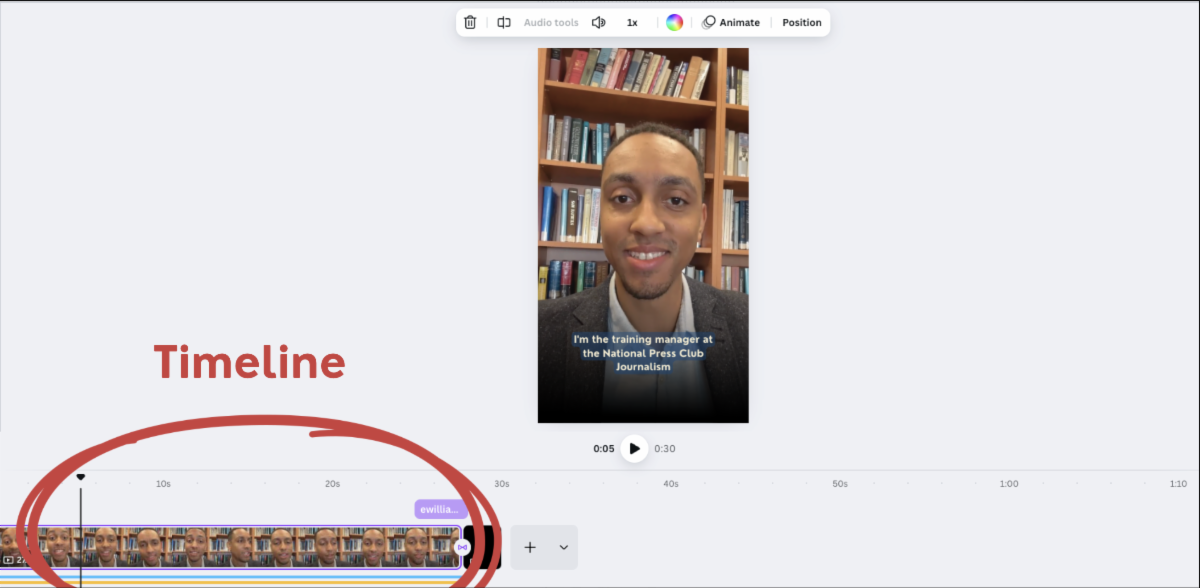
Video editing in Canva starts with a paired-down timeline beneath the video frame. The timeline shows the order of the scenes (also called pages) that make up your video, accompanied by any audio you’ve included.

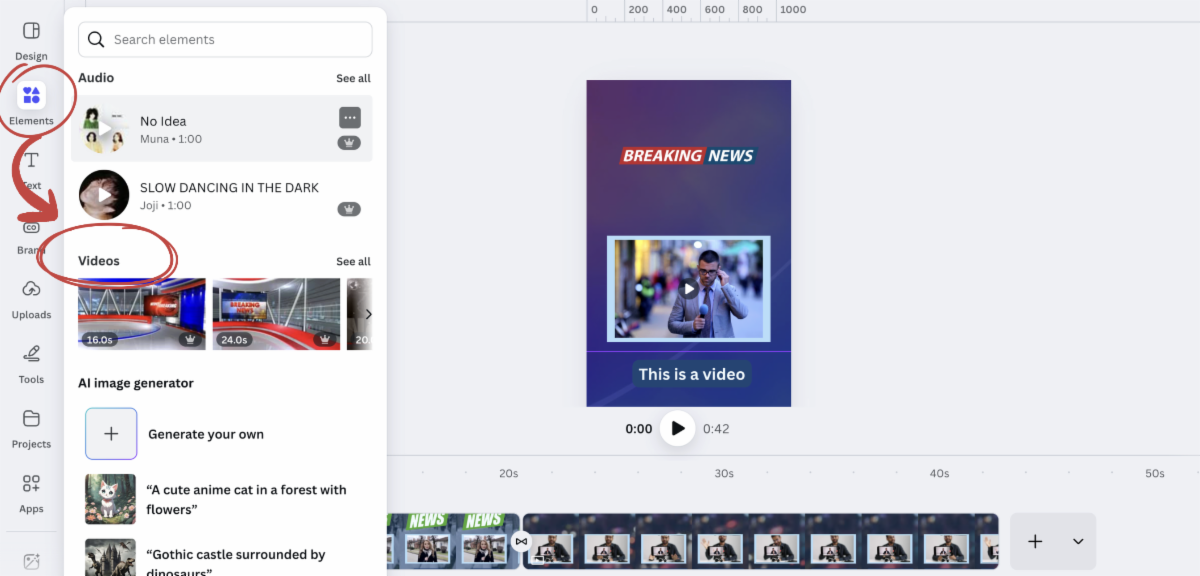
You can customize your video with graphics, text, and other elements by browsing the elements menu on the lefthand side. Along the timeline, you can select transitions to weave pages together.


Learn more about how to interact with the timeline here

Using Canva’s stock footage


To get a sense of how the video editor works, it may be helpful to start with some of the existing videos in Canva’s expansive collection of stock videos. You can find these videos by browsing the elements menu on the lefthand side.


Simply drag and drop your selected footage into the editing frame, or click the video to make it appear in the editor.

Using stock footage can be helpful when you are breaking news and aren’t on the scene or don’t have usable original video. However, you want to be careful about using stock videos that may misrepresent the story at hand.


In general, always confirm you have permission to use the stock footage — even Creative Commons-licensed images and video footage can have stipulations on how you may use them. Review Canva’s content license agreement before publishing any stock videos, and be sure to follow your newsroom’s ethics policies on using video you didn’t record.


We’ll cover tips for collecting video on mobile and uploading it to Canva tomorrow, so stay tuned!

Camp Canva is a partnership between the National Press Club Journalism Institute and Canva to offer 31 days of free training for journalists today and continuing through the month of October. Camp Canva is a self-paced, opt-in e-mail learning series that offers quick tips and tricks for media professionals to supercharge storytelling and audience reach. Learn more about Canva's World Tour.


For any questions about this free program, contact Institute staff.

LinkedIn  YouTube  Web  Email