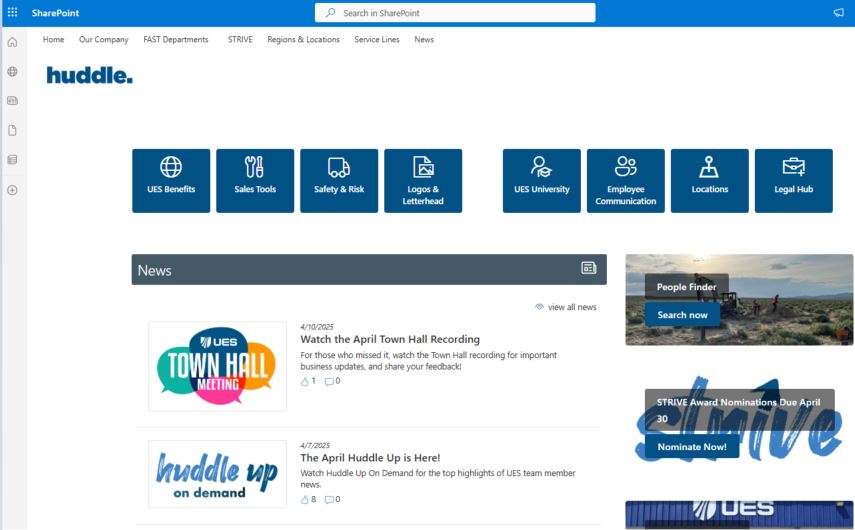
As we continue to come together as one Team UES, we'd love to invite you, our Stevenson, Mosher, and CTI District Services team members, to check out Huddle, our enterprise-wide intranet.
How to Access Huddle: Log in by clicking below and using your TeamUES username and password.
On the homepage, you can keep up with company news, use the People Finder to find contact information of fellow UES team members, and submit a STRIVE Shout Out to a teammate for a job well done!
UES University
In Huddle, you'll see links to UES University, our online learning platform, but you can also access it directly atlms.teamues.com, and log in with your TeamUES username and password.
In UES University, you have access to:
Over 1,500 courses
Safety training
Monthly cybersecurity training
Soft skills training
Certification prep
Leadership training
Technical training (like Microsoft Excel)
Over 60 ASTM courses you can use for exam prep or to obtain professional development hours!
Track completion and manage your learning programs on the go: content is available on desktop, tablet, and mobile device. It’s just one more way UES invests in you! If you have any questions, please contactlearning@teamues.com.
More info, including details on assigned training, will be shared next week.
Everyone in the UES family of companies also has access to ASTM's Compass portal, which contains thousands of ASTM's and AASHTO's published standards.
Log in using your TeamUES username and password. Please note: your log in will only work throughCompass.teamues.com.If you log out of Compass, you cannot log back in directly through ASTM's website.
Once again, if you have any trouble accessing Huddle or Compass, please reach out the UES Service Desk at 877-UES-SDGO (877-837-7346) orServiceDesk@TeamUES.com.