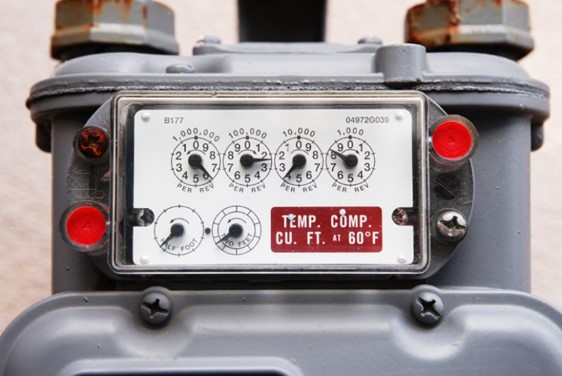
One of the most important (and most commonly skipped) tasks that should be performed during the commissioning of a gas furnace is clocking a gas meter. Clocking the meter is used to check and verify that the appliance is receiving its rated BTU per Hour (BTUH) input. Here is how to do it, step by step:
1 – Turn off all gas appliances (stove, water heater, other furnaces, etc.) other than the one being clocked. Don’t forget to shut off pilot lights, as well, or the reading will be inaccurate.
2 – Place the appliance you are checking into operation and ensure it is running at its maximum firing rate (high fire).
3 – Get a stopwatch (your phone should have one).
4 – Observe the smallest unit dial on the gas meter, it will often be 1/2 cubic ft (York furnace manuals recommend using the 2 cubic ft dial).
5 – Time how long that dial takes to make one full revolution with the stopwatch.
6 – MULTIPLY the dial size by 3600 (the # of seconds in an hr), so if it’s a 1/2 cubic ft dial it, would be 1,800.
7 – DIVIDE that # by the # of seconds it took. So if it took 22 seconds; that would be 1,800 / 22 = 81.82.
8 – MULTIPLY that # by the BTU heat content of 1 cubic ft of gas provided by the gas supplier. If it is 1,000 (which is common for natural gas), the total BTUH input would be 81,820.
The formula to determine the gas input is Cubic Feet per Hour (CFH) = (3600 x Dial Size) / Time (seconds).
The formula to determine the BTUH input is BTUH = CFH x (BTU Heat Content of 1 cubic ft of gas).
Then to get the ACTUAL device output, you would multiply the input BTUH by the AFUE efficiency rating of the appliance (BTUH Output = BTUH Input x AFUE). In this case, if it was an 80% furnace, the input is 81,820 BTUH and the output would be 65,456 BTUH.