Providers: What To Do If Your Event Is Postponed or Cancelled
We're already hearing from providers
whose opportunities have been postponed or cancelled, and we expect those numbers to grow in coming days and weeks. We have a simple process in place to update any afterschool camps, community events, workshops, or other opportunities you've entered in The Connectory.
How to "Unpublish" an Opportunity
- Log back in to The Connectory.
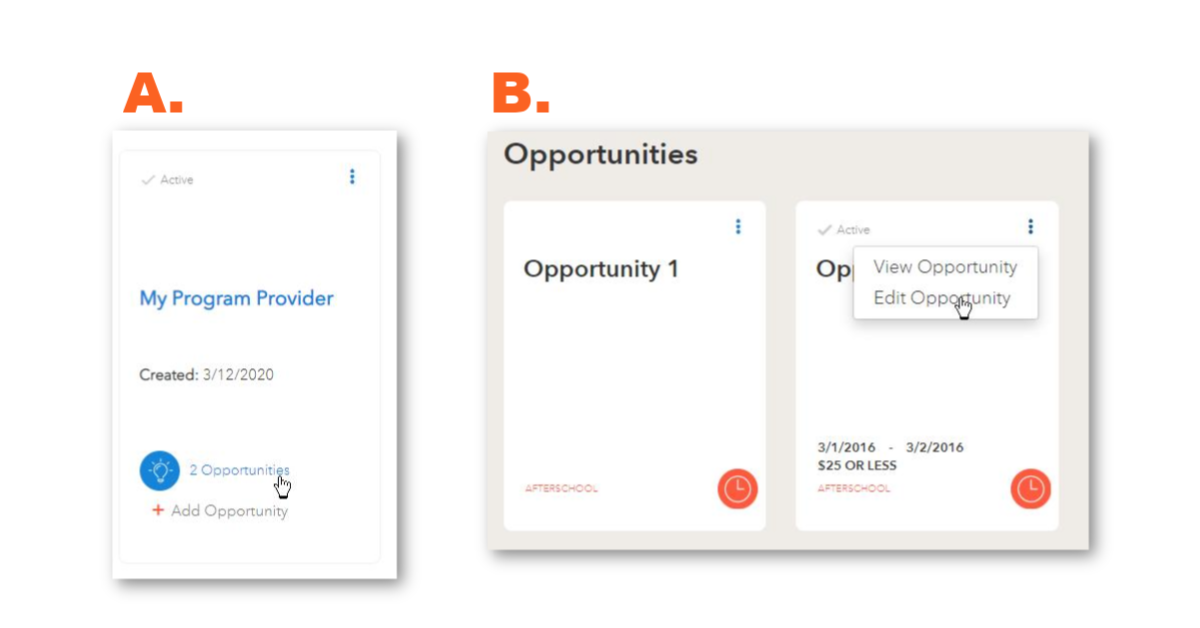
- Go to your Dashboard and A) Click on Opportunities next to the icon and then B) Click the three-dot menu and select Edit Opportunity.
- Add "CANCELLED" or "POSTPONED" to the name of your opportunity. This will instantly change the status to "pending" and prevent it from displaying on The Connectory.
When You're Ready to "Republish" an Opportunity
Use the above steps to go back in and update the Opportunity with new a date, time, location, or any other updates needed. Be sure to remove the "CANCELLED" or "POSTPONED" from the opportunity name so we know it is ready to be reviewed and republished.
|