|
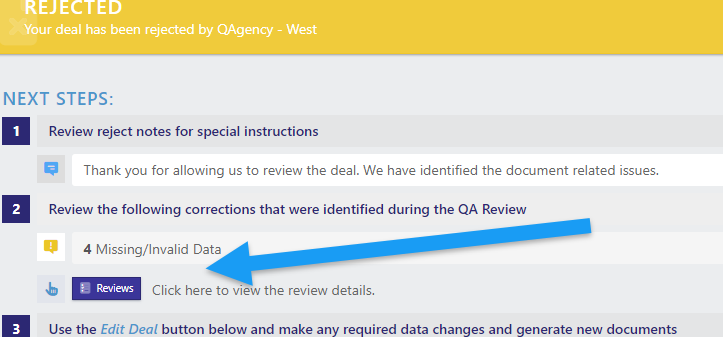
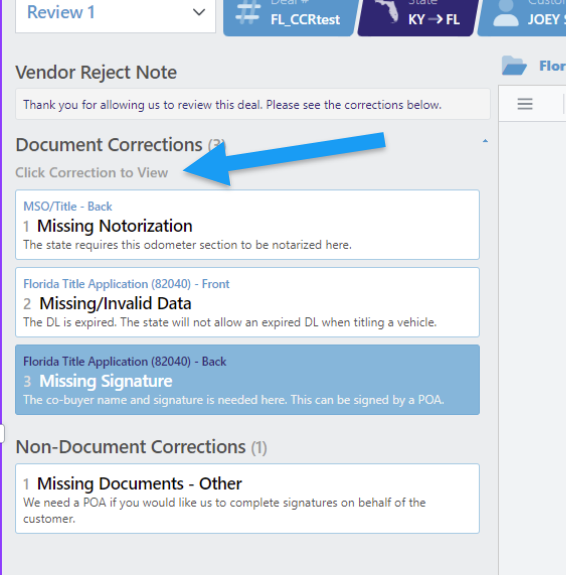
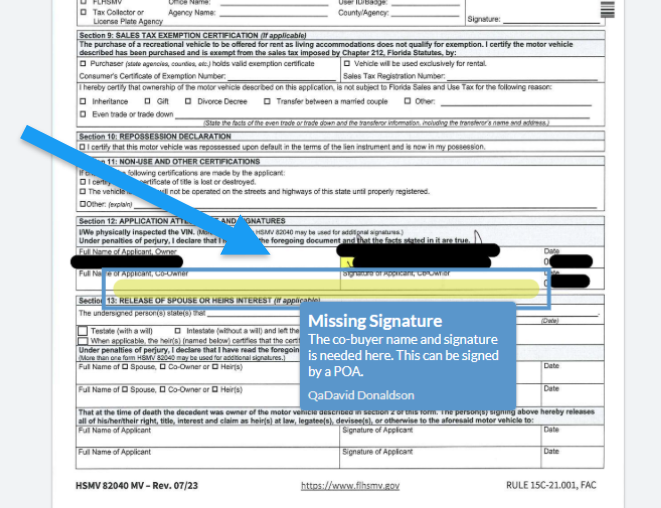
When you are ready to resubmit corrected documents, simply close this window (or move it to an adjacent screen) and visit the “deal documents” tab. Here you may upload your revised documents.
IMPORTANT: You must resubmit ONLY the corrected documents.
-
Do not resubmit all the originals. Only submit corrected docs or docs requested by the vendor during the rejection
-
Do not delete previous documents. The system will clearly differentiate your older documents from those that are newly corrected.
-
Labeling your documents at time of upload will reduce the QA review turnaround time and speed up your overall review.
During your initial QA review submission, please do not upload documents that were not requested on the processing guide checklist. This may lead to delays in your review turn around.
For more details on the enhancement of this latest release, please watch the video for dealers found on the DLR50 home page. Log into DLR50, then click “DLR50” and the video will be available for viewing.
On behalf of the whole team here at DLR50, we sincerely thank you for your continued trust and partnership. Our goal is to provide you with tools that help drive your success. We are committed to supporting you at every step of the way and we look forward to hearing how these updates improve your experience.
Sincerely,
The DLR50 Team
Should you have any questions or need assistance, our team is always here to help!
By Email: 50support@dlrdmv.com
By Phone: (855) 693-5750
|