|
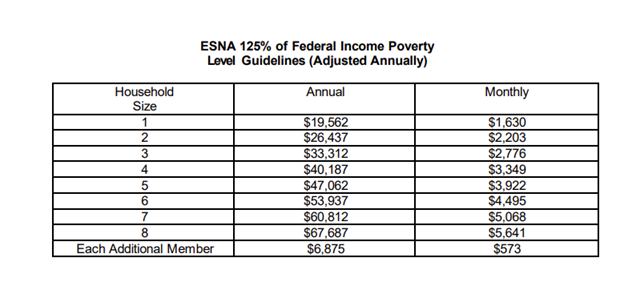
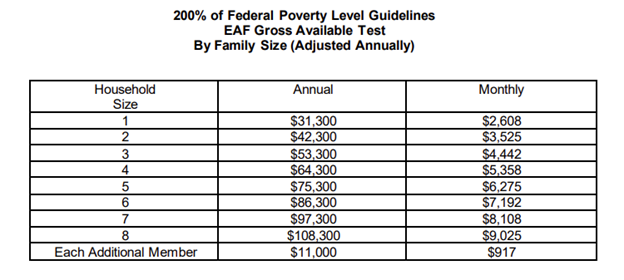
Please note that these Federal Poverty Guidelines do not go into effect for the Supplemental Nutrition Assistance Program (SNAP) or Earned Income Disregard at this time. Those levels are determined at different points in the year and information will be shared with providers when they go into effect.
Food Assistance through the Community Food Connection (CFC)
As a reminder, information regarding emergency food services, including food banks, is available via our Food Assistance webpage. The Community Food Connection (CFC), formerly known as the Emergency Food Assistance Program (EFAP), provides funding citywide to more than 700 community kitchens and food pantries. Community kitchens are available for New Yorkers who need hot meals and food pantries for those in need of groceries to cook at home.
From the Food Assistance homepage, New Yorkers can download a list of NYC Food Pantries and Community Kitchens, or call 311 24 hours a day, 7 days a week to find a food pantry or community kitchen near them. An interactive map to locate nearby food pantries can also be found through Food Help NYC. For organizations interested in working with HRA to provide food assistance, they can learn how to become a Community Food Connection provider here.
Get Case Information & Submit Requests Quickly Using ACCESS HRA
Many clients experience long wait times when they call the DSS OneNumber to get information about or request changes to their case.
A quick and easy way for clients to get information about and manage their case is by using ACCESS HRA. ACCESS HRA is HRA’s online benefits portal and mobile app for New York City residents. Best of all, ACCESS HRA is available 24/7!
Clients who have an ACCESS HRA account that is connected* to their HRA case profile can:
- View information about their HRA case(s), such as their:
- Application or case status
- Notices and upcoming appointments
- Payments made to their landlord or utility company
- Payments made to their SNAP or Cash Assistance cases to buy food or other approved items
- See a list of documents that:
- HRA needs from them
- They uploaded using the ACCESS HRA mobile app in the last 100 days
- They submitted to HRA in the last 60 days that have been added to their case record
- Request a budget letter
- Update their contact information
- Make changes to their case information
*Connecting an ACCESS HRA account to an HRA case profile takes less than 5 minutes!
After a client logs in to their ACCESS HRA account, they should click the “Find My Case” button on the My Benefit Dashboard page and fill in the information on the Complete Account Setup page. They’ll be asked to provide information of the person who was listed as the head of their case, including Social Security Number (SSN), ID Number (CIN), Fair Fares ID Number, and Date of Birth. This information is used to locate their HRA case(s). If the adult on the case doesn’t receive benefits, they will need to enter information for any child on the case.
If a client doesn’t already have an ACCESS HRA account, they can create one and then connect it to their HRA case profile. Follow the steps below to get started.
- Navigate to the ACCESS HRA landing page on the online portal or mobile app.
- Click on “Create Account” and follow the onscreen instructions.
-
Log in to their newly created ACCESS HRA account and follow the steps on the Complete Account Setup page.
Helpful resources related to ACCESS HRA:
Medicaid Renewal Process Webinar
In an effort to support our community partners and their work with our shared clients, the DSS Office of Community Outreach (OCO) is currently offering a virtual Medicaid Renewal Process Webinar to community partner organizations.
This webinar offers a comprehensive overview of the Medicaid program, focusing on the renewal process. Participants will engage in a hands-on simulation of completing a mock renewal on ACCESS HRA and via paper form. The session will provide a clear understanding of the renewal requirements for HRA clients, enabling providers to effectively guide clients through their renewals and prevent case closures due to non-compliance. Please note that this training will specifically address the Medicaid renewal process and will not cover eligibility criteria or the initial application process.
If you’re a community-based organization, municipal agency, or staffer for an Elected official, please click here to register for an upcoming session.
For more information on additional Medicaid training (including eligibility training) please visit the MAP Authorized Resource Center (MARC) website: MAP Authorized Resource Center (nyc.gov)
Resources for Homeowners to Avoid Liens
Thousands of NYC homeowners are at risk of a lien sale due to unpaid property taxes, water and sewer charges, or other property-related fees. Fortunately, there are options available to help New Yorkers protect their homes. Eligible homeowners can apply for property tax exemptions or set up payment plans to manage outstanding balances.
To avoid a lien sale, homeowners must take action by May 19. Homeowners can visit nyc.gov/liensale for more information or call 311 for assistance.
To help spread the word, please post about lien sales and tag @MayorsPEU. You can find sample social media posts, downloadable graphics, flyers, and translated materials in the latest digital media toolkit.
New York State Child Support Online Enrollment for Non-Public Assistance Custodial Parents
The State OTDA recently launched an online child support enrollment form for non-public assistance custodial parents.
It is called the Online Enrollment Wizard; the form makes it much easier for custodial parents to provide the information needed to open a child support case. The entire process is easily handled by mobile phone but can also be completed using a desktop, laptop, or tablet.
The process starts at enroll.childsupport.ny.gov. To log in to the form, custodial parents either need to use an existing NY.gov ID or create one. From there, they can fill in the requested information and then upload supporting documents such as birth certificates or court orders. For more information on the child support program, you can access Wizard through the State’s main website: childsupport.ny.gov/enroll
While the form is short enough to complete in one sitting, users can save their work along the way and return to it as needed—provided they do so within 60 days of starting the enrollment process. A tutorial video of the Online Enrollment Wizard is available here this video.
Resumption of Cash Assistance Conciliation/Reengagement and Sanctions Process
The New York City Department of Social Services/Human Resources Administration (DSS/HRA) will resume the Conciliation/ Reengagement and Sanction processes for Cash Assistance (CA) recipients beginning April 28, 2025.
DSS/HRA is required to re-institute CA sanctions for non-compliance with work-related appointments and assignments. Please note, CA recipients may resolve a sanction at any point in time by demonstrating compliance with work requirements, or by informing DSS/HRA of a reason why they are not subject to work requirements. Also, safeguards are in place to prevent a sanction, if prior to imposition, HRA’s case review finds that supportive services like childcare, transportation and reasonable accommodations were not in place and available at the time of non-compliance.
At a Conciliation/Reengagement appointment, a CA recipient will have an opportunity to:
- Appeal and demonstrate that they complied with the appointment/assignment;
- Explain reason(s) for non-compliance with work requirements, for example, by providing proof of current employment, or a health-related limitation, if that is the cause;
- Request a new work assignment; and/or
- Comply with the work requirements; or
- Request a work-requirement exemption due to health limitations or other barriers to employment.
Clients are urged to communicate timely with HRA to prevent the potential decrease or termination of their CA and SNAP benefits. If the client does not appear for a Conciliation/Reengagement appointment, they will be sanctioned. Examples of sanctions required under Federal and State law are reductions or discontinuances in CA, including certain housing subsidies, and Supplemental Nutrition Assistance Program (SNAP) benefits. Note that while CA sanctions are not durational, Federal regulations do require a minimum sanction period be enforced for SNAP. This means that the sanctioned individual will remain ineligible for SNAP until the end of the sanction period and only become eligible again if they are complying with the work requirements, or if the individual becomes exempt from SNAP work requirements. These returning sanctions do not impact Medicaid.
Note that sanctions are applied at the individual level. If it is a household of one, the entire case will close. If there are other individuals on the case, the individual’s line will be sanctioned, and their grant will be reduced by a prorated amount.
Clients will be notified about the importance of complying with work-related appointments and assignments, their upcoming appointments and activities. Before they are sanctioned, they will also receive a separate notice informing them of their right to request a conference with DSS/HRA and/or a Fair Hearing with NYS OTDA to prevent or remove a CA and SNAP sanction. This notice will inform them that they have 10 days before the sanction goes into effect.
Clients who have questions or concerns about their Cash Assistance or SNAP benefits and/or work requirements, can call DSS OneNumber, at 718-557-1399.
If you have any questions about the return of sanctions in relation to constituent services, please contact DSSOutreach@dss.nyc.gov.
DSS Office of Community Outreach Trainings & Event Requests
Community Partner Trainings and Presentations
The DSS Office of Community Outreach offers specialized training and presentations tailored for staff, advocates, and volunteers working across community-based organizations, elected officials' offices, and municipal agencies. These sessions are held multiple times a month, offering flexible scheduling options. The OCO currently offers the following trainings:
- ACCESS HRA General Overview Webinar
- ACCESS HRA Provider Portal Webinar
- ACCESS HRA Benefit Application Webinar
- CityFHEPS Program Overview and Renewal Application Webinar
- DSS Overview Webinar
- Electronic Benefit Theft and Replacement Claim Process Webinar
- Fair Fares Program Overview and Application Webinar
- Home Energy Assistance Program (HEAP) Webinar
- IDNYC Program Overview and Document Requirement Webinar
- Medicaid and Medicare Savings Program Overview and Application Webinar
- Medicaid Renewal Process Webinar
Click here to view training descriptions and register for an upcoming virtual session.
Organizations interested in requesting any of the trainings listed above specifically for their staff (10 or more) should complete and submit the DSS Training Request Form and someone will be in touch to schedule. Contact CommunityEducation@dss.nyc.gov if you have any questions or encounter issues submitting the form.
Community Partner Event Requests
The DSS Office of Community Outreach (OCO) welcomes requests to participate in events hosted by community partner organizations. Please complete and submit the Community Partner Event Attendance Request Form to request DSS presence at your event and the Outreach Events unit will follow-up on a first come, first serve basis to arrange for DSS representation. Contact OutreachEvents@dss.nyc.gov if you have any questions or encounter issues submitting the form.
Resources/Helpful Links:
ACCESS HRA Client Portal: ACCESS HRA is an online benefits portal and mobile app for New York City residents. With ACCESS HRA, clients can apply or recertify for many HRA benefits, manage their case(s), and much more. Clients can also submit and keep track of documents for their application(s) using the NYC ACCESS HRA mobile app.
ACCESS HRA Help Desk/Online Support: For answers benefit/site-related questions, use the Contact Us form linked or email: accesshrahelpdesk@dss.nyc.gov.
ACCESS HRA Technical Support: For technical issues with ACCESS HRA, email: accesshrasuppapp@dss.nyc.gov. In the message, please include a screenshot of the error, a description of the issue and the ACCESS HRA username.
ACCESS HRA Provider Portal: a provider-facing website that allows clients to grant permission to community-based organizations providing direct social services benefit enrollment assistance and/or ongoing case management to New Yorkers in receipt of HRA-administered benefits. To learn more, visit the Provider Tools section of the DSS/HRA website. If you’d like to request access to the Provider Portal, please begin with submitting an expression of interest via the ‘Interested in Joining the ACCESSHRA Provider Portal?’ form.
Design and Print Ordering System (DPOS): Community Partners interested in ordering outreach materials (in bulk and delivered free of charge) from HRA and are ordering for the first time, should email DPOS Customer Service at DPOSCustomerService@dss.nyc.gov to have their organization/agency registered in the system. Once completed, the requestor will receive an email with a link to create an account, allowing their organization/agency the ability to order from HRA's catalog.
Organizations and agencies with already existing DPOS accounts, should log into their account using the appropriate link below:
DSS Disability Access: HRA can help by providing supports or accommodations to client’s with disabilities to make getting the services they need easier. This type of help is called a reasonable accommodation. Click here to learn more about how to request one.
DSS Office of Community Outreach (OCO) Virtual Training Sign-Up: Intended for community-based organizations, elected officials and their staff, and other municipal agencies. These trainings are conducted multiple times per month and allow for flexible scheduling. Use the DSS Training Request Form if interested in requesting a training session specifically for your organization (for groups of 10 or more).
DSS OneNumber (formerly Infoline): 718-557-1399
DSS/HRA Provider Tools & Supports
DSS - HRA - DHS Webpages
EBT Customer Service Helpline: 1-888-328-6399
ebtEDGE: Cardholder portal and mobile application that allows clients to manage their EBT cards, check their balances/transactions, change their PIN, lock/unlock/replace their cards and more!
Find a Partner Organization: Includes Community-Based Organizations who can help complete applications and screen applicants for eligibility to the various programs. Some locations also assist with submitting documents to DSS electronically. Contact the organizations listed for more information.
NYC 311: Non-emergency municipal services are available online, by texting 311-692, or by calling 3-1-1 from within the City or 212-NEW-YORK outside the five boroughs. TTY service is also available by dialing 212-504-4115.
Office of Temporary and Disability Assistance (OTDA): responsible for supervising programs that provide assistance and support to eligible families and individuals. OTDA’s functions include: Providing temporary cash assistance; providing assistance in paying for food; providing heating assistance; overseeing New York State’s child support enforcement program; determining certain aspects of eligibility for Social Security Disability benefits; supervising homeless housing and services programs; and providing assistance to certain immigrant populations.
Sign up for important updates from DSS/HRA: If you received this newsletter by way of a partner organization or colleague and have yet to sign up on your own, click here to receive relevant resources, agency updates, and opportunities that may interest you and the communities you serve.
Thank you for your ongoing partnership, and for all that you do every day to help New Yorkers in need.
Sincerely,
Office of Community Outreach
NYC Department of Social Services
|