Download Updates


The following companies are now certified to download:

  • Insurance House - AUTOP
  • Monoline, Inc. EDOCS

The following companies have new LOB's certified to download:

  • Glatfelter Insurance Group - eDocs
  • CoverTree – MHOME (re-certify)
  • Allegany Insurance Group – DBCS
  • Poweshiek Mutual Insurance - DBCS
  • RAM Mutual Insurance – CLAIMS
  • Erie Insurance Group - AUTOB
  • Vermont Mutual Insurance Group - PUMBR
  • Central Co-Operative Insurance Company – HOME, DFIRE, MHOME
  • Oswego County Mutual Insurance Co - DB Commission Statements
  • Progressive Insurance Company – eDocs
  • Chautauqua Patrons Insurance Co - eDocs
  • Southern Oak Insurance Company - HOME
  • Western Mutual Insurance Company – HOME, DFIRE
For a complete list of all companies NASA is certified to download click here or visit our website www.nasasoft.com and click the Company Downloads link. To begin receiving any of these new download options, please contact the company and request them.
Commission Statement Transaction Entry
Manually enter Direct Billed transactions for multiple customers quickly and easily all in one screen using the Commission Statement Transactions List. This can be used for Life policies, Health policies, Crop and Multi-peril or any other Direct Billed policies when the transactions are entered based off the commission statements.
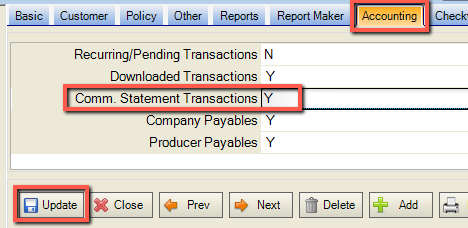
To enable users access, go to Setup - Logon and Security and click the detail button next to the user. Click the Accounting Tab and set 'Comm Statement Transactions' to Y.
Click 'Update' to save the change.
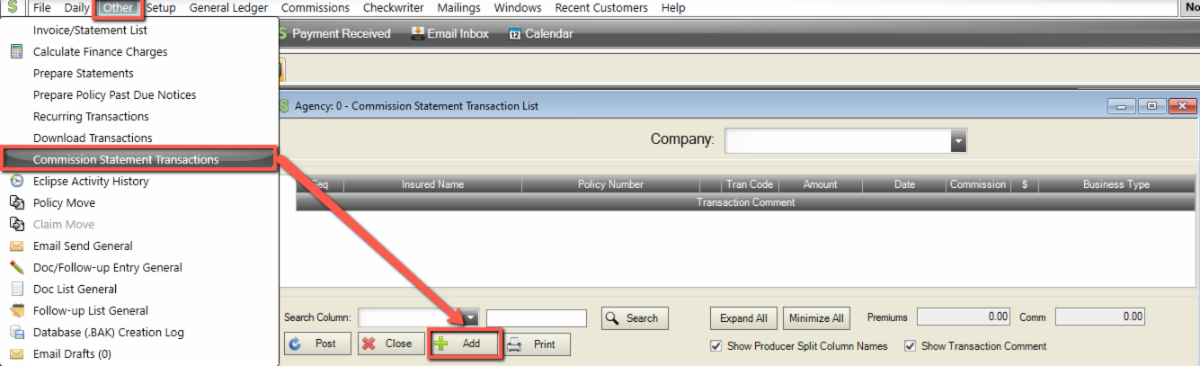
The users with access can then go to Other - Commission Statement Transactions to open the 'Commission Statement Transaction List'.
Click the 'Add' button at the bottom of the window to open the 'Enter Commission Statement Transactions' screen.
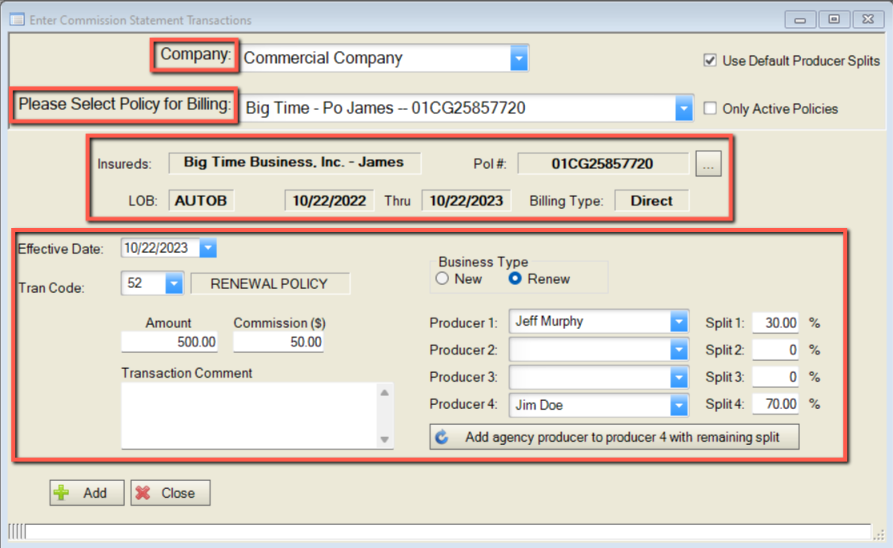
  • Starting at the top of the screen, enter in the 'Company' that the transactions are being entered for.
  • In 'Please Select Policy for Billing' search by Insured Name, Co-Insured Name, or Policy # to select the policy to be billed.
  • Insureds, Policy #, LOB Effective and Expiration Dates and Billing Type will auto fill from the policy screen. Verify the policy information that prefills is accurate.

***This data can not be corrected on this screen and must be changed on the policy screen. Click the detail button to the right of the Pol #: in this section to get to the policy screen to correct the data. The Commission Statement Transaction screen must then be closed to update any changes by reselecting that policy from the list.

  • Enter the Effective Date, Transaction Code, enter Premium and Commission Amounts, a Transaction Comment (if applicable), and verify the producer information is accurate.

***The Producer Splits can be edited from this screen. Any manual changes made on this screen only affect the transaction entered, not the policy as a whole. Only 'Producer Defaults' will change the splits on the transaction and the policy screen.

  • Click 'Add' at the bottom of the screen. After clicking the 'Add' button, the screen will go blank and is ready for the next transaction to be entered. After all transactions have been added, click Close.

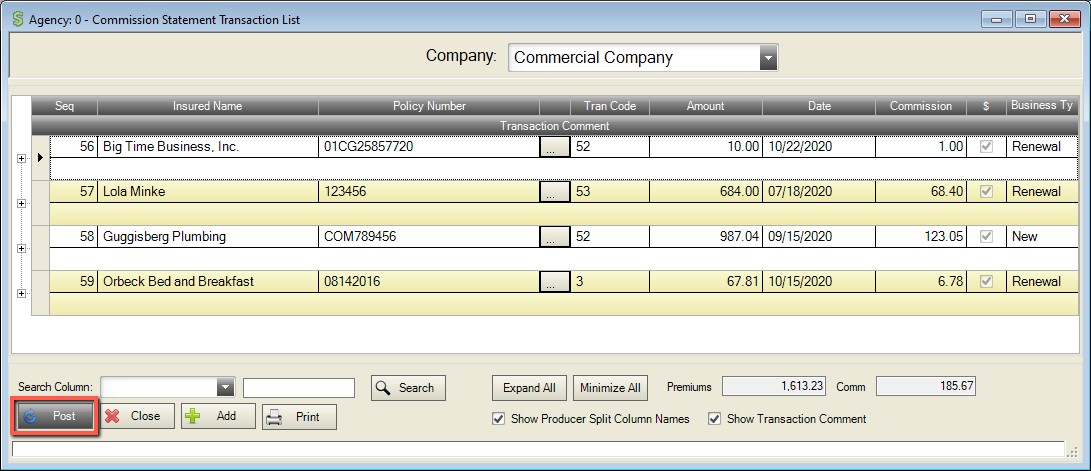
The transactions will accumulate in the 'Commission Statement Transaction List'. The Tran Code, Amount, Date, Commission Amount, Producer and Producer Splits can be edited if necessary before clicking 'Post' at the bottom left corner of the screen.

*** These transactions will not post with 'Daily Posting'. They must be posted by clicking Post at the bottom of the 'Commission Statement Transaction List'.


For more information regarding this new feature, please contact NASA Support at 320-352-1801 or support@nasasoft.com

October Fun Facts


In ancient Rome, October was the eighth month of the year. When the Gregorian calendar was adopted, it became the tenth month of the year but it has retained it's original name.


More United States Presidents have been born in October than any other month.


The owl is the bird of the month of October.


October is National Pizza Month

Facebook  Linkedin