Don't Miss Out!
Click "CLASSES STILL OPEN" Below and These Other Helpful Links
Everything You Need to Know About
↓ the Fall Semester, Plus Registration Tips ↓
REGISTRATION: Open Registration Starts Today! If you are a Current Student (enrolled in a current Summer Class OR were in a Spring 2021 or Fall 2020 Class), you can register anytime.

If you are a New Student or haven't taken a class within a year, click on the Student Application above, then scan and email it the Admissions Office. You can register after you've received a confirmation email from the Admissions Office with your registration information.

WHO NEEDS TO SUBMIT A STUDENT APPLICATION?

  • NEW STUDENT: Has NEVER been enrolled in a Saddleback or Irvine Valley class. A student application IS required.

  • RETURNING STUDENT: Has NOT been enrolled in a class in two long semesters (Spring 2021 or Fall 2020) or more. A student application IS required.

  • CURRENT STUDENT: HAS been enrolled in a class in one of the last two long semesters - Spring 2021 or Fall 2020. A student application is NOT required.

PIN RE-SET: To register via MySite, use your Student ID Number and 4-DIGIT PIN. If your PIN isn't working, RE-SET it. CLICK HERE for instructions.

FALL SEMESTER: AUGUST 23 - DECEMBER 21.

3 DIFFERENT ONLINE CLASS FORMATS: Classes will be offered online in one of three ways - Asynchronous, Synchronous or Online Hybrid. For a description of the three different formats, CLICK HERE. The class format is stated in the first sentence of the course description.

QUICKLY SEARCH FOR A CLASS OR INSTRUCTOR: On the Emeritus Class Schedule page HERE, utilize the Search Box at the very top of the screen. Type in "Emeritus" and a class name or category, such as "Emeritus Aerobics." Search for an instructor's class(es) by typing in his/her name. CLICK HERE for where to find the Search Box.

CONFIRM YOUR ENROLLMENTS: After registering, confirm your class enrollments via MySite. Instructions HERE.

ADD YOURSELF TO A WAITLIST: If a class is FULL, you can add yourself to a class Waitlist in MySite. To learn more, CLICK HERE for the Complete Waitlist Guide.

TIME CONFLICTS: Time conflicts WILL apply for synchronous and hybrid classes since they have required class meetings. There will be NO time conflicts for asynchronous classes since there are no required class meetings. (NOTE: Even if an asynchronous class has optional live meetings, time conflicts will NOT apply.)

CLASS ENROLLMENT CAPS: Even though Fall Classes will be taught online, each course will have a capped number of students who can enroll in it. For this reason, be sure to register EARLY as classes without enough students enrolled will be cancelled. CLICK to learn why online classes have caps.

DON'T GET DROPPED: Students not participating in an online class, CAN be dropped by instructors to make room for waitlisted students trying to get in. Please check with your instructor for participation details.

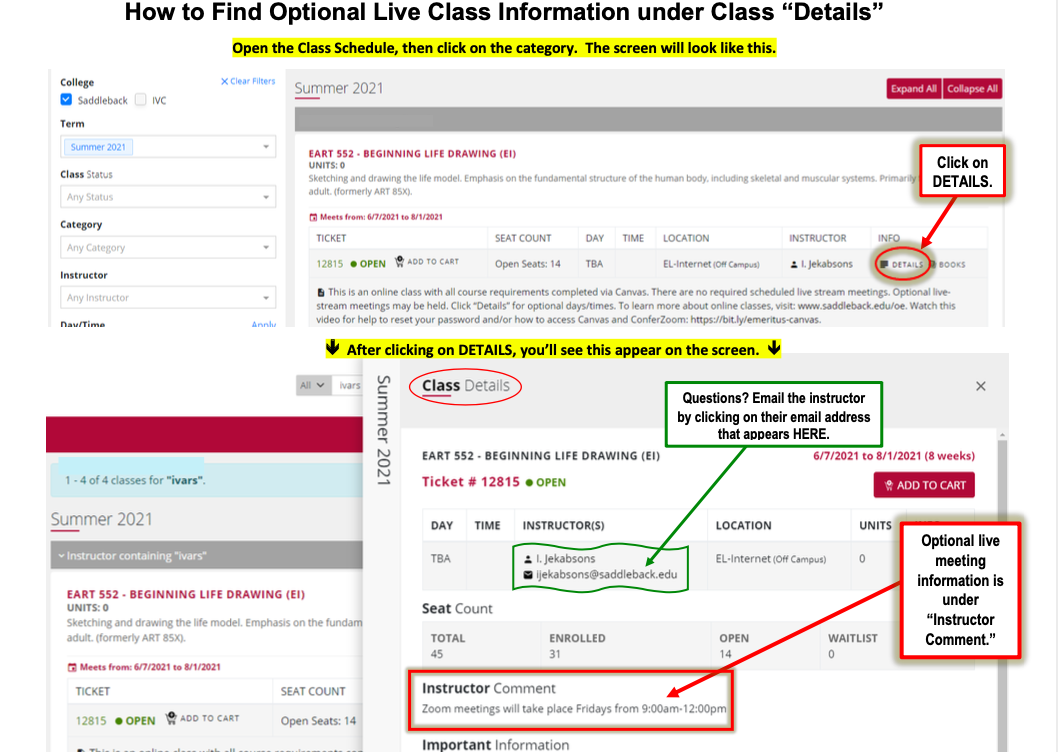
Check for Optional Live Class Meetings by Clicking "Details" in the Class Schedule (click HERE for full size view)
IMPORTANT! Registration Check-out Information
Read the "CHECKOUT - Fees Summary" Page Carefully!
► WATCH FOR OPTIONAL FEES SUCH AS THOSE BELOW! ◄

STUDENT REPRESENTATION FEE - $2 (two dollars) (click the " i " next to the fee for info)
ATTENTION! This fee automatically defaults to "YES." If you DON'T want to pay it, you MUST click "NO", otherwise you will be charged for it. See refund information below.
This is an OPTIONAL "Student Representation Fee" for California Community College Students, per California Educational Code 76060.5.

HEALTH SERVICES - $22 (twenty-two dollars) (click the " i " next to the fee for info)
This fee automatically defaults to "NO" if your classes DON'T meet on the Saddleback College Campus. (The Health Services Fee is REQUIRED for classes that DO meet on Campus.) If your class doesn't meet on Campus, and you accidentally click "YES," you may request a refund. See refund information below.

REFUND INFORMATION: If you inadvertently charge yourself for either of these fees, please immediately contact the Student Payment Office by clicking HERE and fully completing their email form.

REMEMBER TO ALWAYS SCRUTINIZE THE FEE SUMMARY PAGE BEFORE MOVING ON!

Registration Assistance 5 Different Ways!

#1) Use the easy, 12-Step Registration Instructions - CLICK HERE to view or print.
  • Read a step, do it, read a step, do it, through STEP 12.
  • Follow these steps carefully all the way through.
  • Remember, you aren't registered unless you complete STEP 12 and see your class(es) listed on the "Registration Confirmation" screen at the end.

#2) Have a COMPUTER BUDDY register for you.
  • A Computer Buddy can be a friend, neighbor, relative or classmate.
  • CLICK HERE for a handy form to complete & give to a Computer Buddy.
  • You can also BE a Computer Buddy to someone who needs help!

#3) The Emeritus Office can help with a specific registration question or step.

#4) The Admissions Office can help with a specific registration question or step.

#5) Student Technical Support can help with a specific technical question.

Don't wait to register!
Online courses do have class maximums, and they will fill up.
A Special Message From Us to YOU...

We're excited to offer a wide array of online courses for FALL 2021 that are mental-stimulating, academically rigorous, health improving,
socially engaging, tuition-free, zero credit classes.

Know that we are currently busy planning IN-PERSON classes for the
SPRING 2022 Semester. We look forward to "SEEING YOU in '22" !!!

In the meantime, PLEASE continue supporting the Emeritus Institute
by enrolling in our online FALL 2021 classes.