MySite PIN & Re-set Instructions
|
|
If your PIN isn't working,
try your month & day of birth in a 4-digit format
.
- MMDD is Month & Day of Birth in a 4-digit format; the most common PIN.
- Example: A January 5 birthday would be 0105. (Birth year is NOT included.)
- MMDD is the PIN assigned when students submit a PAPER APPLICATION.
- When students apply ONLINE, they choose their own 4-digit PIN.
- If you get a "Contact Administrator" prompt when re-setting your PIN, contact the Admissions Office at (949) 582-4555 or email them at scadmissions@saddleback.edu to clear your account. (Only the Admissions Office can re-set an account.)
- REMEMBER: If your PIN isn't working, RE-SET IT!
|
|
|
- PLEASE NOTE! Emeritus course titles have changed. However, nothing else has changed about the classes.
- The last line of all class descriptions state the former course name.
- For Fitness Classes, the first line of the course description states the type of class it is, as always. Example:
- EHEA 500 - CARDIOVASCULAR HEALTH FOR OLDER ADULTS (EI) The first sentence of the description states "The above class will emphasize AEROBICS."
- Looking for a particular instructor's class? After clicking on the Class Schedule page, type his/her name into the search box, click the down arrow, choose "Instructor," then click the magnifying glass. You can search by any of the criteria listed.
Scroll down and look for the "magnifying glass" icon.
|
|
ATTENTION:
Always Read the Registration
"CHECKOUT - Fees Summary" Page Carefully!
|
|
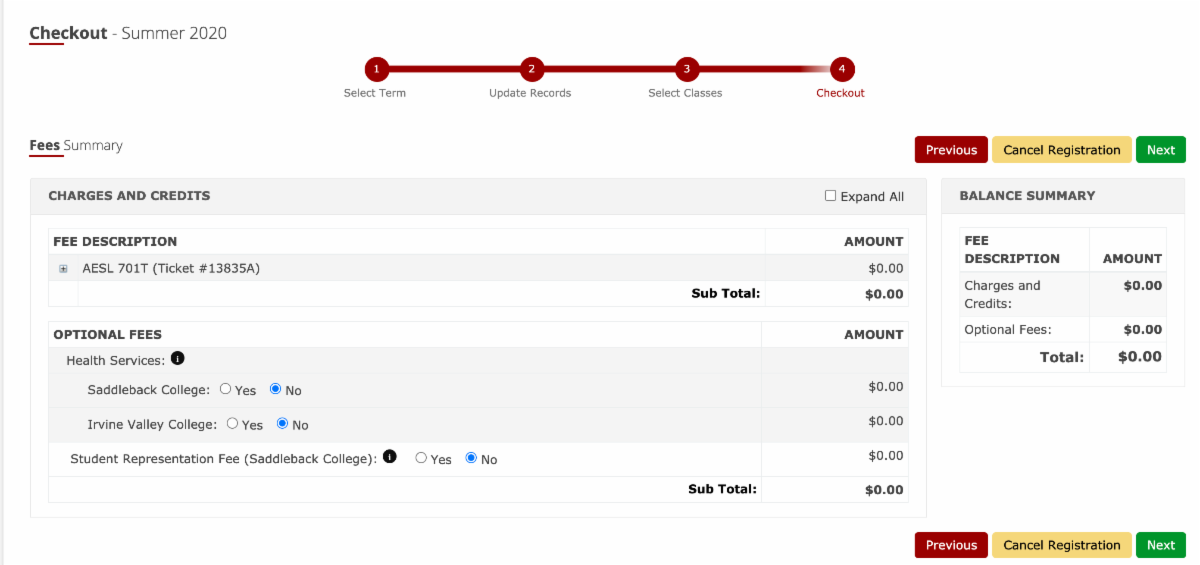
When registering online for classes, always pay special attention to the "CHECKOUT - Fees Summary" page.
For the Fall Semester, there is a
$2 Student Representation Fee that automatically defaults to "YES" that you
want
to pay it.
(In the screenshot below, see the last line under
"Optional Fees" at bottom left.)
If you
DON'T
want to pay this $2 fee, you MUST click "NO", then click "Next" to move forward to complete registration.
When registering, you can also click on the small " i " on the screen for a fee explanation.
|
|
Fall Semester Class Updates
|
|
Word of the Day:
asynchronous
Not sim
ultaneous or concurrent in time.
Asynchronous classes DO NOT require students and instructors to be online at the same time. Instead, classes can be accessed by students at any time convenient for them.
|
|
- REGISTRATION: Fall Semester Registration Dates: June 16 - 22. Check your appointment in MySite HERE. Instructions to Find Your Appointment HERE.
- FALL SEMESTER: August 17 - DECEMBER 16
- ALL ONLINE: All Fall 2020 Emeritus Classes will be ONLINE only.
- NO PRINTED SCHEDULES: Due to the stay-at-home status we're all experiencing, and to conserve precious funding, the Emeritus Fall Class Schedule will NOT be available in print form.
- ASYNCHRONOUS: All Fall Classes will be "ASYNCHRONOUS" meaning THERE IS NO DAY OR TIME LISTED FOR THE COURSE in the class schedule. Students will be able to log into Canvas at any time to participate in class.
- NOTE - Some instructors may choose to offer their course as a "Live" SYNCHRONOUS class at a designated day and time. THIS IS OPTIONAL AND IS THE INSTRUCTOR'S CHOICE. FACULTY ARE NOT REQUIRED TO OFFER OPTIONAL LIVE CLASSES.
- Even if a class is offered live, it will ALSO be recorded for students who want to participate at a different time. If the class will be offered both ways, it will be designated as such in the class schedule. Click on "Details" next to the instructor's name in the class listing. This is where your instructor will provide this information.
- NO TIME CONFLICTS: Since classes are asynchronous, there will be NO TIME CONFLICTS to worry about when students register for classes.
- CLASS ENROLLMENT CAPS: Even though Fall Classes will be online, each course will have a capped number of students who can enroll in it. For this reason, be sure to register EARLY as classes without enough students enrolled will be cancelled. SEE THE "WE GET ASKED" SECTION AT BOTTOM.
- DON'T GET DROPPED: Students who are not participating in an online class, CAN be dropped by instructors to make room for waitlisted students trying to get in. Please check with your instructor for participation details.
- NO MATERIALS FEES: There will be NO Materials Fees for classes since materials cannot be disseminated.
|
|
Registration Assistance Available
4 Different Ways!
|
|
If you are new to registering online or want a refresher...
#1)
Use the
clear, step-by-step directions -
CLICK HERE
to view or print.
- Read a step, do it, read a step, do it, through STEP 12.
- Follow these steps carefully all the way through registration.
- Remember, you aren't registered unless you complete STEP 12 and see your class(es) listed on the "Registration Confirmation" screen at the end.
#3)
Call (949) 582-4555 (MON-THUR 9am-5pm) or do a
LIVE CHAT
with the Admissions Office (MON-THUR 3pm-5pm) for help with a registration step.
NOTE
: The Admissions Office
CANNOT
"walk" students through the registration steps and
CANNOT
register for students.
#4)
Have a "COMPUTER BUDDY" register for you.
- A Computer Buddy can be a friend, neighbor, relative or classmate.
- CLICK HERE for a handy form to complete & give to a Computer Buddy.
- You can also BE a Computer Buddy to someone who needs help!
Don't wait to register!
Online courses
do
have class maximums, and they
will
fill up.
|
|
IMPORTANT - PLEASE NOTE
Due to the current COVID-19 conditions, limited staffing,
and the FERPA Federal Privacy Law,
the following registration assistance will
NOT
be available
:
- In-person registration events
- In-person registration tutorials at the Emeritus Offices
- In-person registration assistance at the Saddleback Admissions Office
- Emeritus Staff, Admissions & Records Staff, and Student Technical Support Staff CANNOT "walk" students through registration over the phone due to very limited staffing.
- Staff are NOT allowed to register for students due to the FERPA Federal Privacy Law.
Thank you for your understanding.
|
|
Accepting an Open Seat for a Waitlisted Class is Easy!
|
What's New?
Students will have the ability to use their mobile device
(cell phone, tablet, laptop)
to be
notified of a
nd accept a newly-opened seat they're waitlisted for. Then students can log into MySite to register for the class using the APC number they've been sent. Notification will be via email, unless you opt-in for text messages and provide your cell phone number.
(See 3rd question under "Notifications" in the link below.)
If a class is already full, what should I do?
Be sure to put yourself on the waitlist, an option that will pop up on your screen when you're prompted that the class is full. Instructors will only add students to classes IF they are on the on the waitlist.
CLICK HERE
to view the excellent video and FAQs that will answer ALL your questions about this new Waitlist notification system.
|
|
Emeritus Student Application
|
|
SCAN & EMAIL IT TO: scadmissions@saddleback.edu
Applications can be mailed via U.S. Mail to the address at the top of the form,
but will take longer to process.
There is also a more lengthy, two-part,
online
college application
HERE.
If using this electronic application, be sure to choose
"EDUCATIONAL DEVELOPMENT"
as your Education Goal!
|
WHO NEEDS TO SUBMIT AN APPLICATION?
RETURNING STUDENT
:
Has NOT been enrolled in a class in either of the last two long semesters - Spring 2020 or Fall 2019.
A new student application IS required
.
NEW STUDENT
:
Has NEVER been enrolled in a Saddleback or Irvine Valley College class.
A student application IS required
.
CURRENT STUDENT
:
HAS been enrolled in a class in one of the last two long semesters - Spring 2020 or Fall 2019. A student application is
NOT
required.
|
|
Google CHROME
is the browser that's most compatible with Saddleback College applications, including REGISTRATION, CANVAS, etc.
|
|
WE GET ASKED...
Why are There Class Caps on Online Courses?
|
|
- First and foremost, online class quality and integrity are closely-monitored by the State of California for the purpose of accreditation standards.
- Online classes are not "static." Students don't just view classes. They email their instructors with questions, requests, clarifications, etc. and the instructors email them back. The more students enrolled in a class, the more email communication time is required of an instructor.
- Instructors' time must be a balance of research, creation of class content, class preparation, teaching the class, maintaining email communications with students, as well as a large number of administrative duties. Thus, class caps are necessary to maintain the quality and integrity of all classes, including online classes.
- Class caps for online classes are essential in providing enrolled students the first-rate learning experience that the Emeritus Institute delivers.
These are just some of the reasons class caps are vital
to the online learning experience!
|
|
From All of Us at the Emeritus Institute to YOU...
We're excited to offer a wide array of online courses that are mental-stimulating, academically rigorous, health improving, socially engaging,
tuition-free, zero credit for the Fall 2020 Semester.
Forward this email and Invite a friend, neighbor or relative to join us!
|
|
HERE'S WHAT'S COMING UP ...
We'll be emailing students the
comprehensive
CANVAS INSTRUCTION GUIDE
again!
With easy to follow steps, videos and helpful tips,
it's a Learning Guide for New Students
and a refresher for Current Students.
DON'T MISS IT!
|
|
|
|
|
|
|