Exciting New Features Now Available in BUURT – Your Resident Portal 

We are excited to share that new features have been added to BUURT to make staying informed and connected easier than ever!


What's New?

Document Library   

You can now conveniently access important community documents directly within the portal. This includes governing documents, rules and regulations, financials, and other helpful resources—all in one centralized location, available anytime.


Community Calendar

Stay up to date with meetings, events, deadlines, and important community happenings through the new Calendar feature. You will be able to quickly see what’s coming up and plan accordingly.


These enhancements are part of our ongoing efforts to improve your portal experience and provide easy access to the information you need.

Start Here: Register for BUURT  

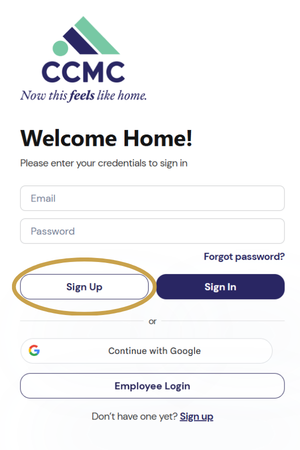
  1.  To register for the portal, go to buurt.ccmcnet.com and click the "Sign Up" button. Please sign up with the email associated with your resident account.  
  2. On the next page, fill out the short form and click “Create account,” or select “Continue with Google,” located below, if your resident account is associated with your Gmail. 


Please note: If you don't have an email on file with the association, include your account number and property address when registering. If you don't know your account number, you can find it listed on your mailed assessment statement or contact CCMC's customer service team at 1-480-921-7500.   

View How-to Guides   

We’re here to help you feel confident with this new portal, and we’ve prepared a variety of resources to guide you every step of the way. Visit the BUURT portal page on CCMC’s website to find step-by-step guides on how to:    

  • Create your account 
  • Pay and view your account balance   
  • Access any current compliance issues 


Training and Support   

CCMC resident experience and customer service departments will be hosting virtual training sessions via Teams to walk you through how to navigate the portal features. If you can’t make the live session, don’t worry; recordings are also available with step-by-step instructions on how to access the most commonly used features online at ccmcnet.com/buurt. 


Additionally, you can always reach out to your management team for assistance.

Meeting ID: 230 055 464 074 13

Passcode: uU3qP39T 

Meeting ID: 212 794 781 965 92

Passcode: Nd7AB7mN

Meeting ID: 231 317 990 954 80

Passcode: cW7GJ3BV

Meeting ID: 292 643 998 469 27

Passcode: Bc9Hd3MS

We're thrilled to bring this improved experience to your fingertips! Please take time to log in to the system and view all that the portal has to offer. If you have any questions, please don’t hesitate to contact the team at ricelandtx@ccmcnet.com or 346-577-5168 or contact CCMC’s customer service team at 1-480-921-7500 or via email at customerservice@ccmcnet.com.