Auto-Pay (ACH) Frequently Asked Questions

What changes?


ICHA monthly auto-pay (ACH) will be replaced by Yardi Payment Processing, effective 1/1/2025 for all January charges. Residents will now have online access to real-time account history.  ICHA Accounting will no longer have access to resident banking information and all requests to make online payments will go through the portal.


What are the benefits?


Payment Processing improves security of resident banking information and allows residents to make electronic payment method elections within the Resident Portal. Yardi partners with Finicity (a wholly-owned subsidiary of Mastercard), which uses security safeguards to verify resident banking information, reducing fraud associated with online payments. When electronic payments are made, they are automatically posted against open charges and visible in the Recent Activity tab of the Portal. Residents receive payment confirmations and receipts to their registered email. 


The new system provides residents far more tools, information, and control over accounts and payments than the current process. These benefits include:


  • View account activity and current outstanding balances.
  • Securely add and verify bank accounts to more precisely control how you pay your invoices.
  • Make electronic payments on your accounts and/or set up recurring auto-pay (ACH).
  • View documents related to your home.
  • Update portal profile information including email, phone, etc. (to update community communications from ICHA and the HRB, email barbara.correa@icha.uci.edu)
  • Additional features will be added to the portal in the coming months, such as submitting home improvement requests.


What are the next steps and timeline?


To avoid disruption to your monthly autopayment (ACH) and to start taking advantage of the benefits of the Resident Portal, please sign up by 12/31/2024. January charges will be paid electronically through this new system.

How do I sign up?

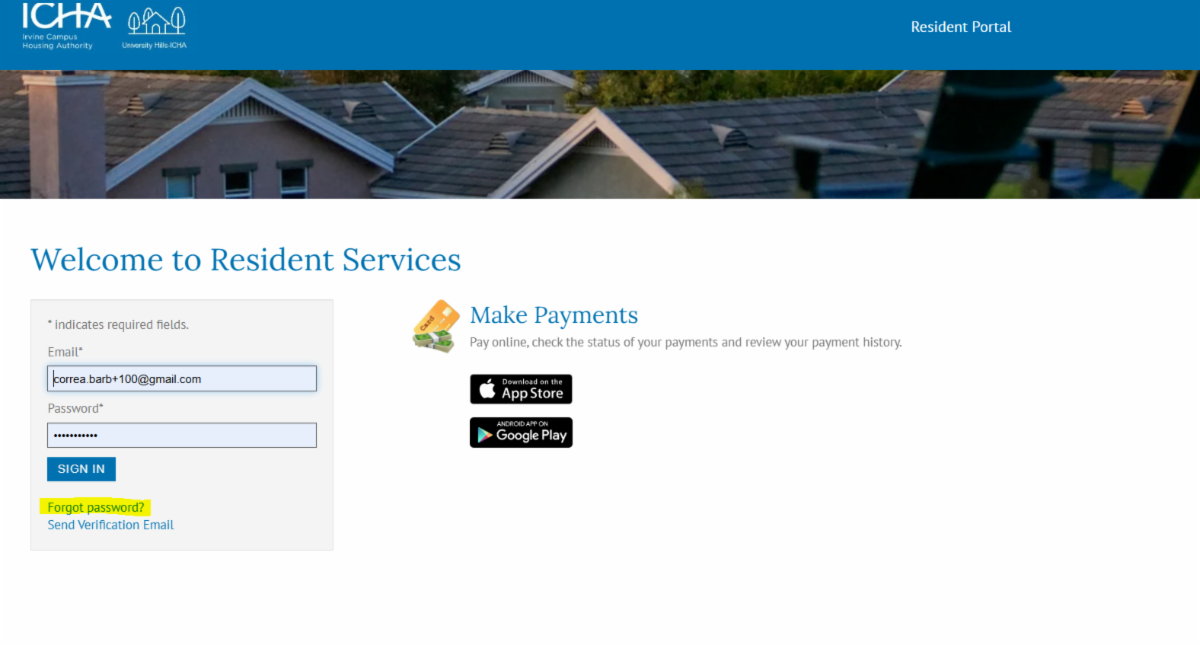
Click on the appropriate link below (condo owners, use University Hills), or go to icha.uci.edu under Quick Links. When you arrive at the Resident Portal log-in page, click Forgot Password. Enter the email address associated with ICHA's billing system (if you are unsure about what email to use, please contact ichaacctg@icha.uci.edu.) you will receive a link to that email to set a password (10 characters, upper, lower, number and special character).


University Hills-ICHA

GroundSublease-ICHA Real Estate

Townhomes-ICHA

2. Once you have registered and logged in to the Resident Portal, set up auto payments (for detailed instructions click on the button below). Residents will be asked to add and verify a bank account then set up recurring auto-payments for Monthly Maintenance Assessments and Ground Rent charges. 

AUTO-PAY SETUP INSTRUCTIONS

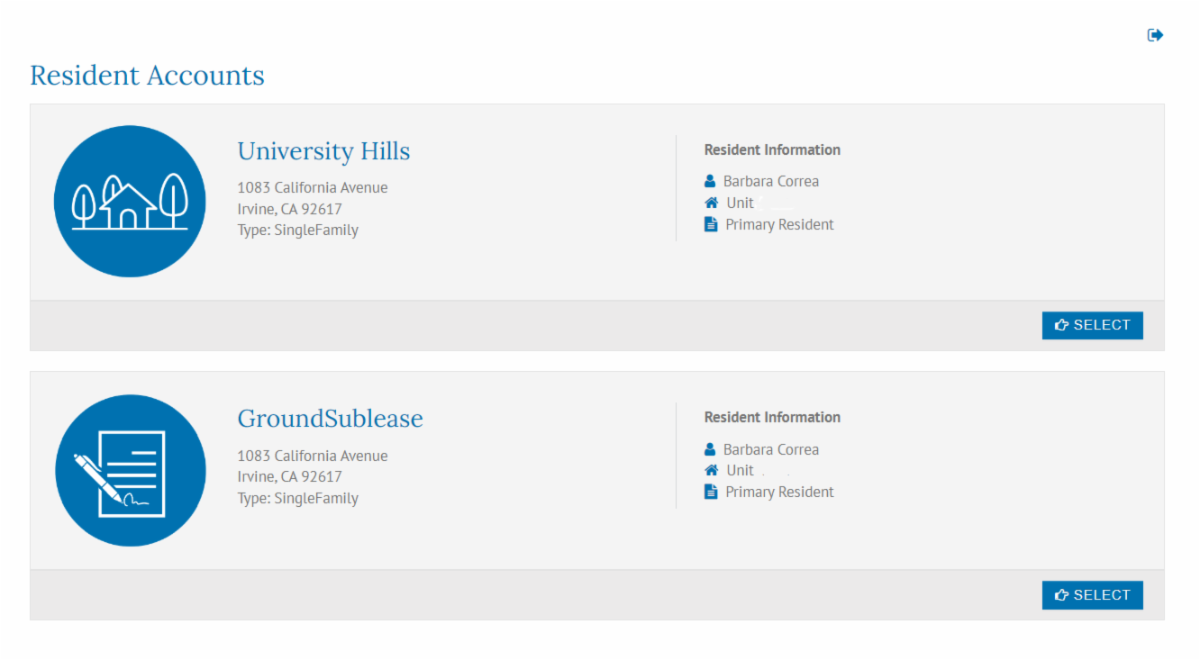
You can use the same login credentials to link all resident accounts and manage payments from a single Resident Portal dashboard. Once logged in to Resident Portal, click on My Accounts to link all resident accounts and manage payments. You will need to add and verify bank account information for each Resident Account you have with ICHA.

Is this legit? I have been told not to click on emailed links.


Yes! We understand the hesitancy to click on links in emails. Instead, you can click directly on the Resident Portal login page (see links above). Or, if you want to access the links from our website, go to https://icha.uci.edu>hover on Quick Links>click on Homeowner Resident Portal.


I was expecting to get a registration code emailed to me, but I did not receive it.


ICHA isn’t using registration codes. Return to a page where there is the option ‘Forgot Password’ and follow the steps to set up a password.


What are my options if I don't want to enroll in the new system?


We encourage all residents to enroll in the Resident Portal, however neither the portal nor enrollment in the electronic payment options are required. If you choose to take advantage of all of these benefits, great! But if you choose not to use electronic payments, please consider still creating a profile in the Resident Portal for account access, document sharing and other future functionality, such as submitting home improvements.


ICHA will continue to accept personal checks or bank-issued checks in lieu of electronic payments. Checks need to be made to the proper payee per your statement. Be sure to allow for enough time for checks to be received by our office, no later than the 10th of the month, to avoid a late fee.

I receive 2 statements from ICHA, how many times do I have to do this?


Each Resident Account requires you to complete the 2-step process, verify a bank and set up the auto pay. Once logged into the Resident Portal, you can see how many Resident Accounts are linked to your address by clicking on My Accounts tab (below). For most homeowners there will be 2—If you are a condo owner, there are 3.

If you choose the recommended Finicity option, this will take approximately 5 minutes to enroll both. If you choose the 2-5 day manual verification method, you will see 2 deposits to your account. Your bank deposit description will not indicate which deposit is for which Resident Account. You will have to guess, but as you’re allowed 3 attempts for two guesses, you will be fine. 


When setting up auto pay, it asks for a "current assessment amount" or "maximum payment amount." What should I enter here?  


We’ve asked the developer to change this to Maximum Payment Amount, however our residents may still seeing this misnomer. This is an optional field and can be left blank, or you can set a ‘not to exceed amount’. If you choose to use this field, give yourself a buffer to accommodate annual increases and variable water and sewer charges. The goal is to ‘set and forget’ so you don’t have to regularly manage your payments. We also recommend leaving the end date blank so your enrollment doesn’t expire. 


Why is Finicity asking for so much of my banking information?


Finicity punches out directly to your own bank’s log in page. You will see everything related to your bank account as if you were logging in independently. Depending on your bank, you will navigate through the steps and have the ability to limit the access to just the bank account you want to use for your monthly payments. Finicity does not have access to or save your log in credentials. 


Why can I add a bank account, but I don’t see the option to set up recurring auto-pay?


Many of our residents have two owners linked to their account. The system limits who can set up the recurring auto-pay feature to the primary qualified employee (at the time of purchase). Please reach out to ICHA to verify this information and recommended options.


I bank with Chase or PNC bank and my account numbers look incorrect in the system.


Chase and PNC Bank use scrambled account numbers when enrolling in these third-party payment processing systems. You may receive a notification from your bank that you’ve linked your account to Yardi and that your account numbers will never be shown. Do not worry, your payment will process correctly as we’ve seen it with our test account and our condo owners.


I have questions about the security of Yardi and Finicity.


Please see additional FAQs posted on the Resident Portal, and the links below:


Yardi security: https://www.yardi.com/services/yardi-cloud-security

Finicity security: https://www.finicity.com/security

What if I still have questions?


Please contact us or make an appointment to get help:


Resident portal log in: barbara.correa@icha.uci.edu

General questions: ichaacctg@icha.uci.edu


If you would like to sign up in person, please email ichaacctg@icha.uci.edu to make an appointment for our office work station. We can help you sign up and answer any questions.

ICHA & UHILLS CONTACTS

ICHA reserves the right to send to an unsubscribed e-mail certain important communications such as construction notifications or emergencies. The unsubscribed status will be respected for all other ICHA or HRB communications.