February Newsletter

Security Permissions Clean-Up


Ensuring your team has the correct access to do their jobs is a critical system issue. Best practice is for each practitioner to be in one practitioner security group. This ensures their permissions are exactly what you want them to be. Every practitioner should be in a group and you should not be using the Standard Practitioner group.

Let's Discuss Security Groups in Workforce Now

DocCloud Extracts & Imports


Whether you have paper files or electronic files living in various systems, I can help you! I can scan current/legacy files or extract/import electronic files into ADP's DocCloud for you. This puts all your employee documents in one place and allows you to have appropriate security permissions around who can view, upload, edit, and/or delete documents.


My team is extremely efficient at DocCloud conversions and can have projects done on your timeline. Free up space in your office and organize your electronic files with my DocCloud services.

I want a DocCloud Quote please!

Wage Garnishment: National Medical Support


These notices require a lot of manual effort and a lot of your time to research. Instead, ADP can now do all the following on your behalf: 


  • Digitalize the paper form. 
  • Pre-populate your data (even required state-specific forms). 
  • Provide you with a virtual form to enter the remaining details and complete it. 
  • Print and mail it out for you once you’ve approved! 
  • Send a notification to the involved employee letting them know a medical order was received and processed.  


Plus, tracking pending notices and due dates is a breeze, making compliance even easier. And there’s no additional cost; it’s the same as what you pay today for new lien processing.


  1. To get started, Click the Help icon in the top right-hand corner of the Workforce Now home screen. 
  2. Click myLearning@ADP from the list of links. 
  3. Look for the course title, “Wage Garnishments: National Medical Support.” 


Year-to-Date Cumulative File


To provide you the opportunity to process 2023 year-end reports, the Year-to-Date (YTD) Cumulative File will not automatically load in ADP Workforce Now. Instead, you’ll need to manually load your first YTD Cumulative file for 2024. For instructions, review YTD Cumulative File Auto Load Suspended at Beginning of New Year.  

Banking Holiday


I would like to remind you Presidents’ Day, on Monday, February 19, 2024, is a bank holiday. The Federal Reserve will be closed.


To ensure timely employee direct deposits, it is recommended you accept and approve your payroll 72 business hours prior to pay date and no later than 2:30 p.m. Eastern Time. Payrolls processed less than 72 hours prior to pay date could experience late funding of employee direct deposits and tax deposits, and a delay in the delivery of your payroll package. 


To prevent a delay in the posting of the direct deposit transactions to your employees' accounts, it is very important you review your payroll processing schedule prior to submitting your payroll.

  • 2024 IRS Mileage Rate


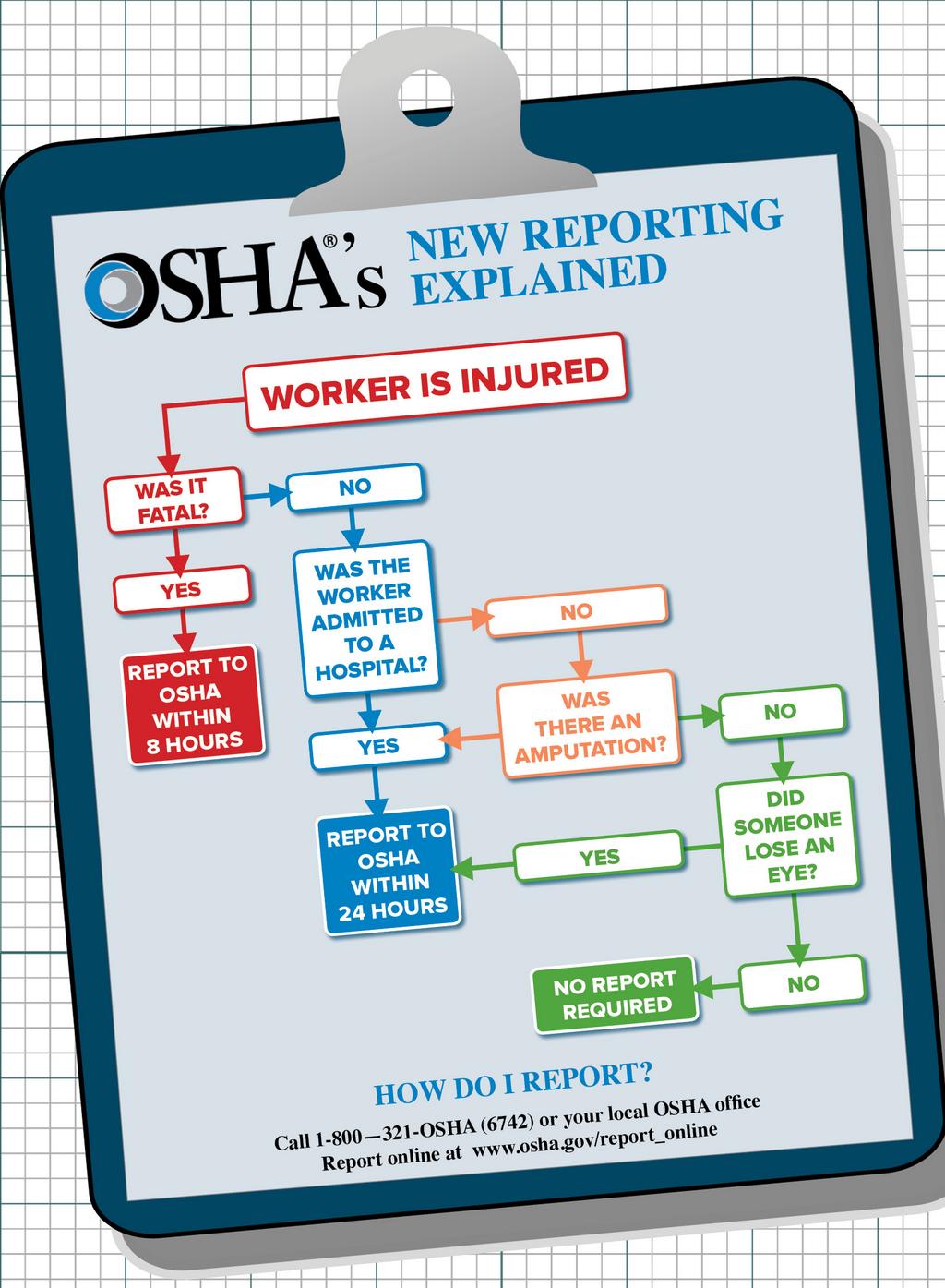
As a reminder, many employers are required to complete the OSHA injury and illness recordkeeping forms on an ongoing basis and electronically submit information from their Form 300A Summary to the Occupational Safety and Health Administration (OSHA).


ADP has developed several Standard Reports in Workforce Now to assist you in these filings each year. It is important to keep in mind:


  • Form 300A must be completed and certified by a company executive as correct and complete at the end of each calendar year, and posted in the workplace where notices to workers are usually posted. It must be posted for three months, from February 1 until April 30 of the year after the calendar year covered by the form.
  • Employers are required to submit to OSHA the information from their completed Form 300A by March 2 of the year after the calendar year covered by the form.


ADP REPORTS & DOCUMENTATION


ADP does not file these reports on your behalf but has provided reports and documentation to help you track and submit this information. To access these reports in Workforce Now, navigate to Reports & Analytics > Reports Dashboard > Statutory Compliance section.


  • OSHA Form 300: This report classifies work-related injuries and illnesses and notes the extent and severity of each case.
  • OSHA Form 300A: This report lists the total number and type of work-related illnesses and injuries that occurred during a specified year.
  • OSHA Form 301: This report lists detailed information about each work-related injury and illness contained on the Log of Work-Related Injuries and Illnesses report, OSHA Form 300.
View Past Newsletters