| |
MONTHLY
NEWSLETTER
February 2026
| | |
Powerful Tool for Agents: Roomvo Goes Live February 16!
SCWMLS is excited to announce that Roomvo goes live on February 16! Roomvo is an interactive visualization platform that allows users to see flooring, paint, and surface options directly in a photo of a space. This is a powerful resource to help clients better envision a property’s potential, support renovation or design conversations, and market listings more effectively—all while making the decision-making process easier and more engaging. Stay tuned for more updates!
| |
Do you know how the CDOM (Cumulative Days on Market) resets on the MLS?
CDOM will reset if a listing has been off the market for at least 31 days. When counting the days, don’t include the list date, and the off-market date, there should be 31 days in between!
| | Did you know the MLS lets you search for condo listings that allow large dogs? | When searching condo listings, check out the icon under Secondary Criteria. | | | When searching condo listings, check out the icon under Secondary Criteria. | | | From there, a bunch of different features pop up. Select the “S - Terms/Misc.” dropdown | | If you choose the “Must Not Have” option next to Dog Size Limit, you can now conduct a search for condo listings that allow large dogs! | | Do you know what is needed for Delayed Listings? | |
Our MLS requires that all delayed listings must have the Multiple Listing Options for Sellers Authorization Form be completed & signed, and either sent to listings@wisre.com or uploaded to the associated docs as a private doc.
Remember! The show date cannot go past 45 days from the list date.
For the MLS listing itself, all that is required is a valid show date, a valid address, and a bona fide list price. Be sure to update all the information before going Active!
Find out more Dos and Don'ts for delayed listings on our website.
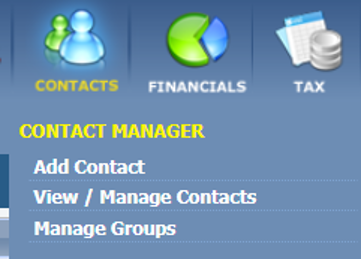
| Did you know you can easily track a listing and receive notifications on changes? | | To do this in our MLS, create a contact for yourself or view/manage contacts. | |
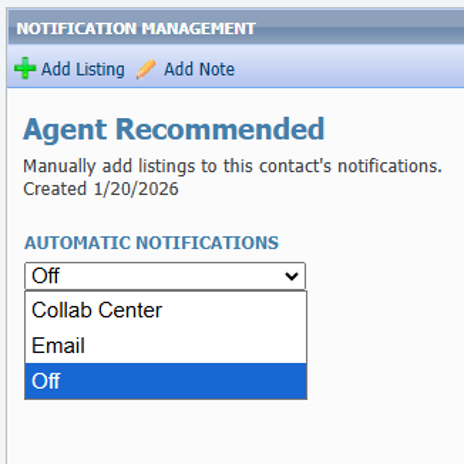
After selecting your contact, go to “Buyer Activity” and select “Agent Recommended”
From here, you can add the MLS# of the listing you desire to get notifications on by clicking
| | |
Then, you can set the notifications
to go straight to your email, or to
the Collab Center.
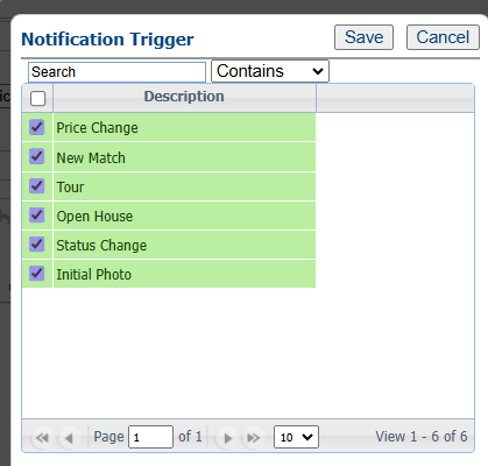
| You can even set it to notify you for all these different changes! | | | | |
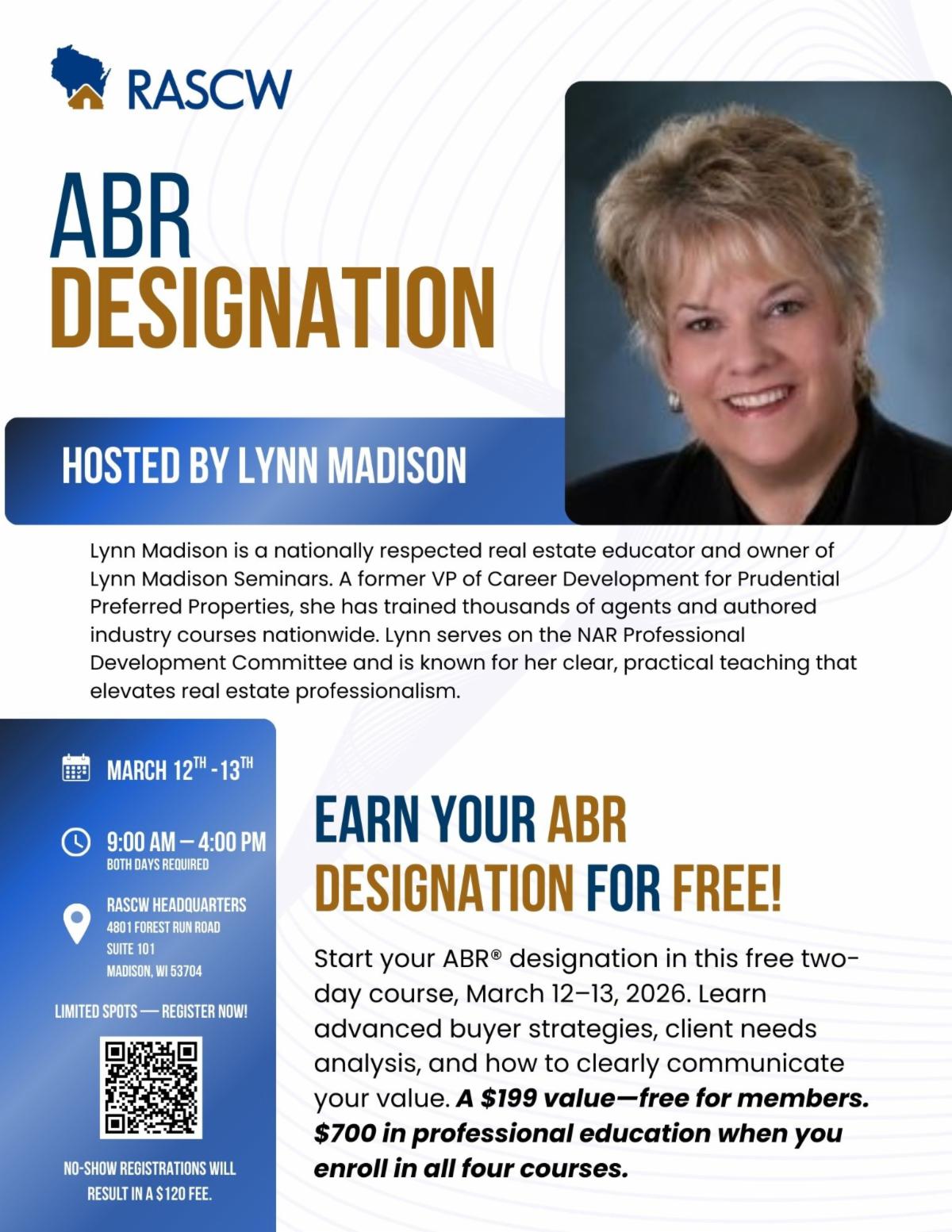
ABR Designation
Start your Accredited Buyer’s Representative (ABR®) Designation. Learn advanced strategies for serving buyers, identifying client needs, and communicating your value. Hosted by renowned instructor Lynn Madison, this course is the first step toward earning your ABR designation. Register today to save over $250!
March 12th - 13th
9:00AM - 4:00 PM
RASCW Headquarters
| | February Paragon Connect Impact Sessions | | | | |
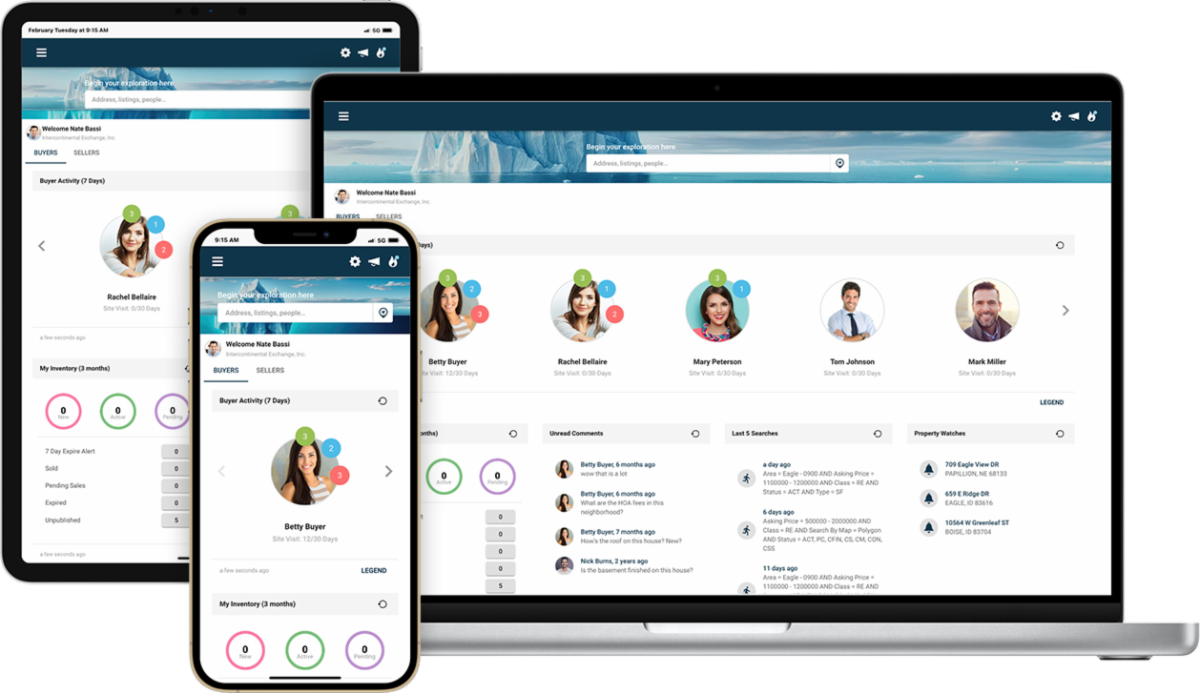
The ICE MLS Solutions training team is offering Paragon Connect Impact Sessions for the month of December. You’ll be able to learn more about Paragon Connect’s best features during these 20-min Impact Session webinars covering a variety of topics.
Paragon Connect topics we will be covering include:
- Dashboard Navigation
- EasyCMA
- Hotsheets
- Collaboration Center
- And more…
| |
How to Text a Listing from Paragon
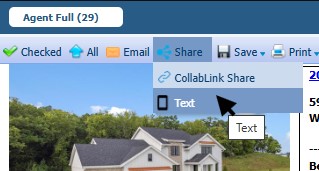
To text a single listing from Paragon, pull up the listing detail, hover over the share button and click Text:
| | |
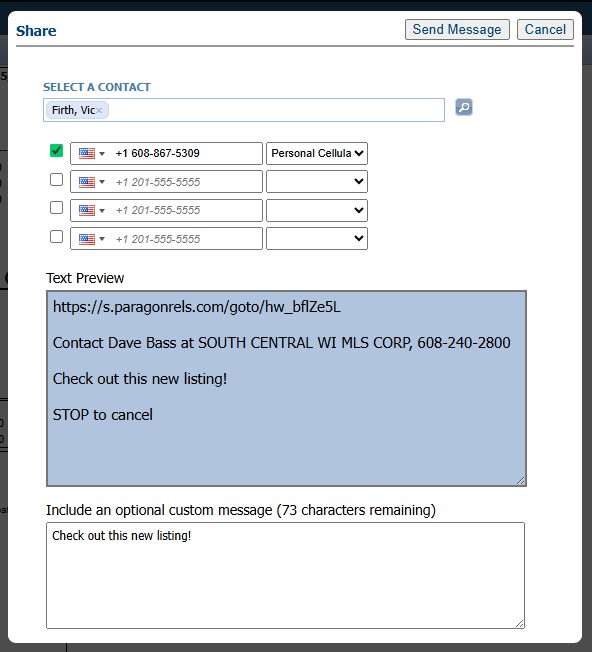
Select a Contact – if you don’t have a phone number saved in it you can type it in. Make sure you check the box next to the number, and select a phone type from the dropdown menu.
If you don’t have the person in your contacts yet, click Add New Contact, put in their First and Last Name, and the number you want to text to.
You can include an optional message if you like, and it will show a preview of what the text will look like.
| | |
Then click Send Message.
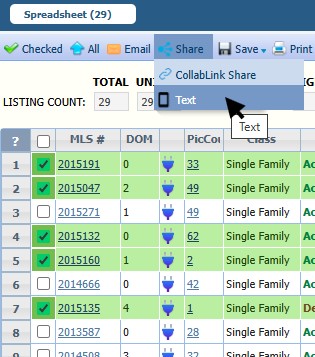
You can also text a link to multiple properties from the spreadsheet view. Just select the listings on the spreadsheet you want to send and click the Text button.
You can select all of the listings by clicking the first box at the top.
| |
Security Alert: Reported Scam Targeting REALTORS®
We want to make members aware of a potential scam that has now been reported by multiple members.
Members have received unsolicited text messages from individuals claiming to be relocating from out of state and requesting a Zoom meeting. When members asked for meeting details, they were sent links that required downloading software or files.
At this time, the exact intent of the scam is unclear. It may involve malware, attempts to access personal or business information, or broader real estate fraud.
In one reported case, a seller has placed a fraud alert on their property with the Register of Deeds as a precaution.
Please remember:
- Do not download files or software from unknown contacts
- Be cautious of unsolicited relocation inquiries
- Create and share your own verified meeting links
- Report suspicious activity to your broker and appropriate authorities
| | 5-Minute Paragon Learning Opportunities | | Check out Dave's quick Paragon training videos that cover common topics such as setting up an auto search, finding sent messages, clearing your cache, and more! | | Clearing Your Browser Cache | | Greenlight Statistics Overview | | December 2025 Statistics Report | | |
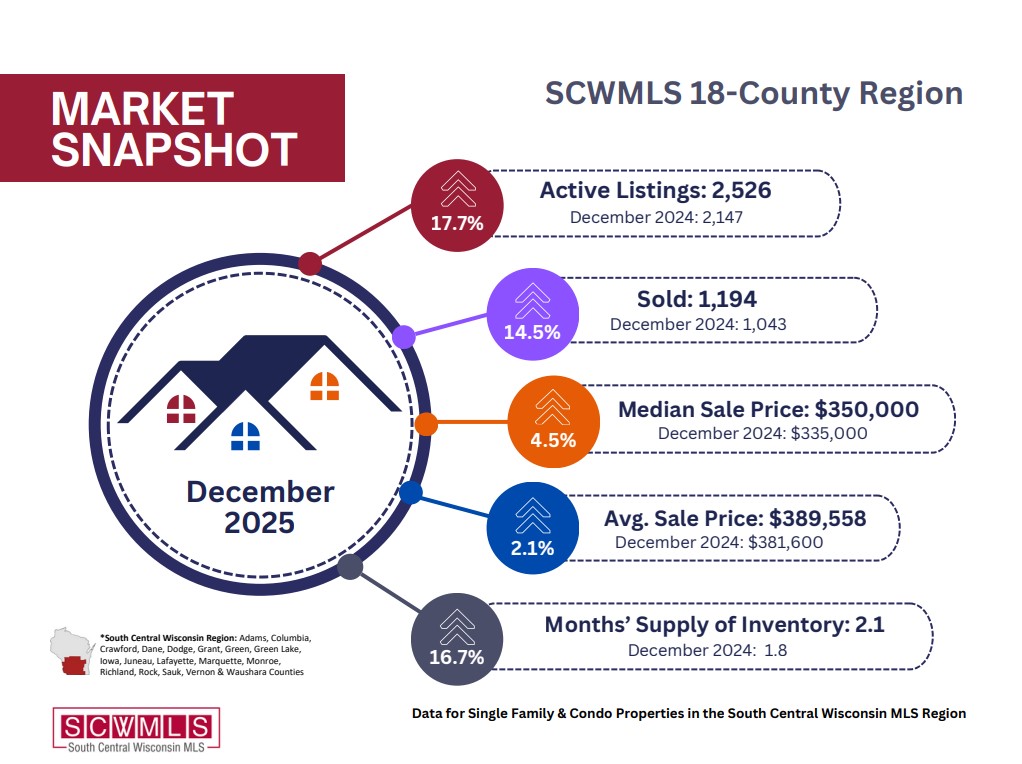
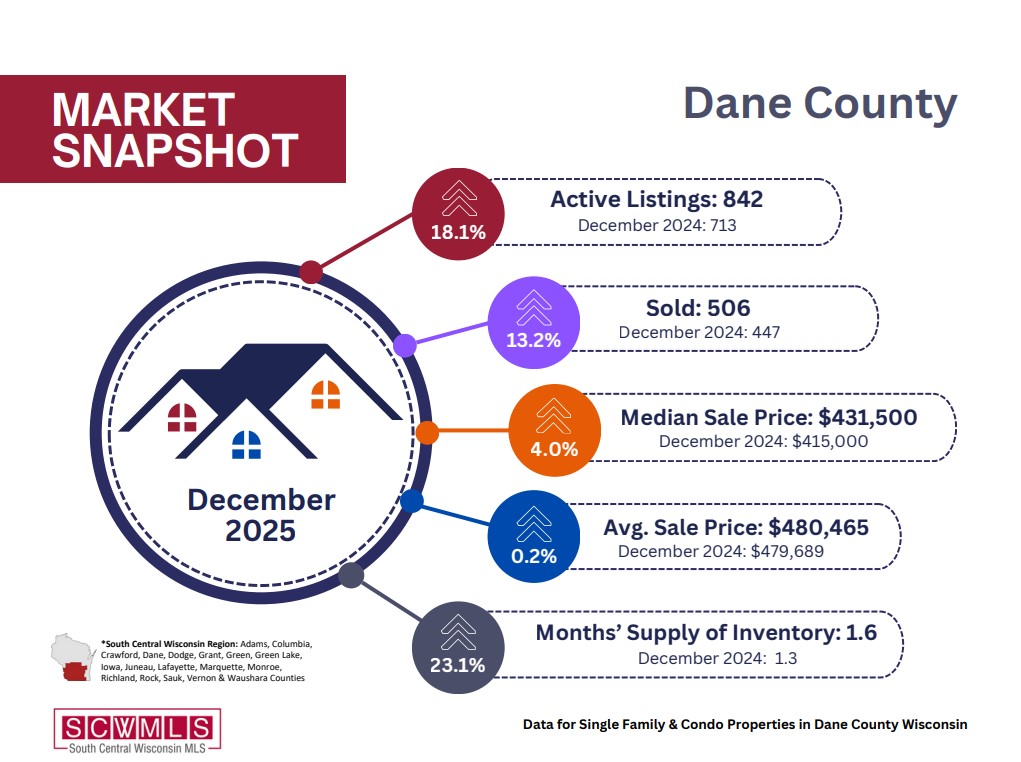
Market Snapshot: What Does This Mean for You?
18-County Region: Across the full 18-county South Central Wisconsin region, sales activity showed signs of stabilization toward the end of the year. December 2025 recorded 1,030 closed sales, an increase from 959 sales in December 2024, representing a 7.4% year-over-year gain.
Dane County: Sales activity in Dane County showed improvement in December, signaling continued demand despite affordability and interest rate pressures. December 2025 recorded 2,526 closed sales, up from 2,147 sales in December 2024, representing a 17.6% year-over-year increase.
| | Upcoming Training Opportunities | | |
Forewarn Training
This training will show real estate professionals how to use FOREWARN for agent safety, identity verification, and smart business insights—plus pro tips and live Q&A to help you get started confidently.
Next Session:
DATE: February 10th, 2026
TIME: 9:00 am
LOCATION: Webinar (Zoom)
| | |
Forewarn Training
This training will show real estate professionals how to use FOREWARN for agent safety, identity verification, and smart business insights—plus pro tips and live Q&A to help you get started confidently.
Next Session:
DATE: February 26th, 2026
TIME: 1:00 pm
LOCATION: Webinar (Zoom)
| | | | |
Domii Webinar: Turning Open Houses Into Lead-Gen Machines
Turn your sphere and past clients into predictable listings. Learn a 4-part referral system, reconnect authentically, and set up touchpoints via calls, emails, and social triggers. Use domii tools to protect yourself while building long-term relationships, increasing referrals, and creating a steady, reliable business pipeline.
DATE: February 19th, 2026
TIME: 12:00 pm
LOCATION: Webinar (Zoom)
| | Most Recent Wisconsin Housing Report: | | | | |