Professional Learning Newsletter

Orion Education & Training can support your educational goals. Whether they are EdTech integration, literacy support, teacher coaching/mentoring, or even principal/superintendent mentoring at Orion we can help. Contact us to see how our service center can fill in the gaps.


Please forward this email to another educator.

Summer Series Recordings and Resources

Better AI That Is Actually Helpful (NotebookLM) 

Click Here for the recording.

View the presentation slides: Click Here. 
If you participated, please
submit for your certificate.


Simplifying Classroom Workflows with Smart Browser Hacks

Click Here for the recording.

View the presentation slides: Click Here. 
If you participated, please
submit for your certificate.


Maximizing Formative Assessment with Existing Google Tools

Click Here for the recording.

View the presentation slides: Click Here. 
If you participated, please
submit for your certificate.


Transforming Slide Decks into Active Learning

Click Here for the recording.

View the presentation slides: Click Here. 
If you participated, please
submit for your certificate.


Getting Started with Gemini for Everyday Classroom Tasks

Click Here for the recording.

View the presentation slides: Click Here. 

If you participated, please submit for your certificate.


➡️ Navigating Gemini Integration in Google Classroom

Click Here for the recording.

View the presentation slides: Click Here. 

If you participated, please submit for your certificate.


Join live Tuesday 7/14 at 12pm Central.

Link will be sent out 1 hour before the workshop.

Unable to participate? We will send out the recording 
and resources after the presentation.


Make sure you are signed up for updates.


Digital Literacy


In the age of AI, digital literacy is the ability to critically navigate, evaluate, and construct information while understanding how artificial intelligence influences digital spaces. It moves beyond basic tech proficiency to empower students to use AI tools deliberately to enhance their creativity, critical thinking, and collaborative problem solving. Ultimately, this literacy ensures learners can ethically and safely harness modern technology to amplify their own voice and take authentic ownership of their learning.

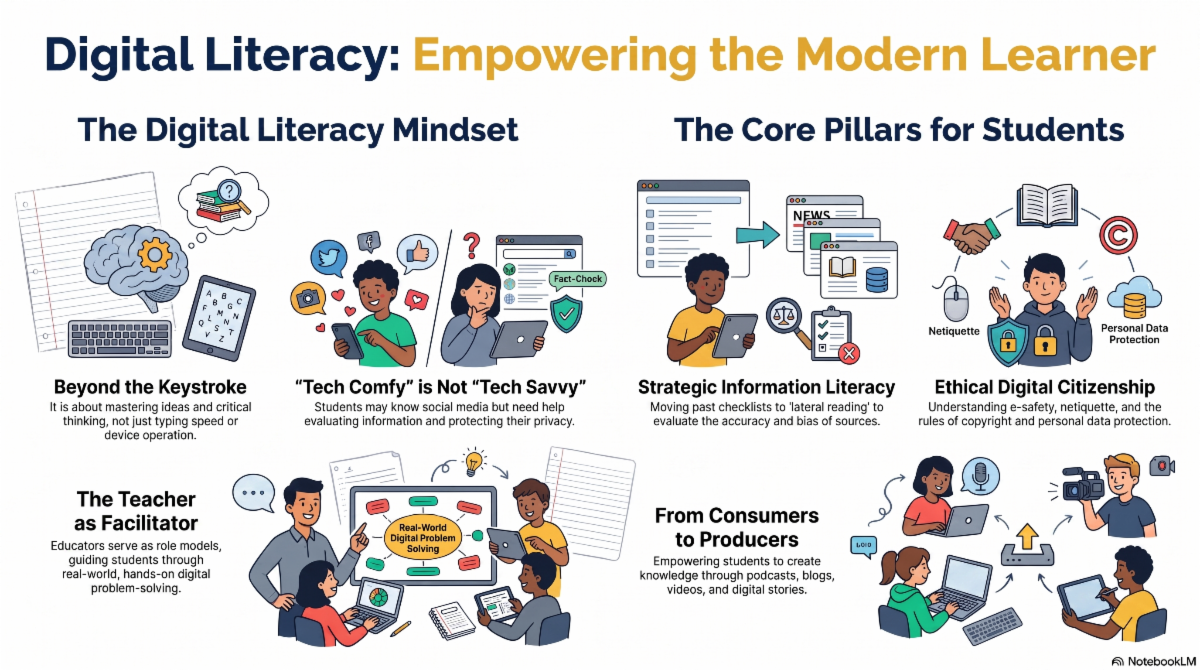
The infographic titled Digital_Literacy_for_Modern_Learners.png outlines key concepts for educating students in the digital age under the heading Digital Literacy: Empowering the Modern Learner. It uses colorful cartoon illustrations to break down four main areas of focus. First, The Digital Literacy Mindset explains that true literacy goes beyond typing skills to include critical thinking and that merely using social media does not equate to being tech-savvy. Second, The Core Pillars for Students emphasizes the need for strategic information literacy to evaluate sources for bias and ethical digital citizenship which covers safety, copyright, and data protection. Third, The Teacher as Facilitator shows an educator guiding a group of students collaboratively solving real-world digital problems. Finally, From Consumers to Producers depicts students actively creating their own media such as podcasts, blogs, and videos to share knowledge.
 

Tech Comfy is Not Tech Savvy


Today's K-12 students grew up with technology. People often call them digital natives. We mistakenly assume they understand how to navigate the web safely.


However, being "tech-comfy" does not mean a student is "tech-savvy" in a learning environment.


True digital literacy focuses on mastering ideas, critical thinking, and ethical behavior.


Fact-Checking 2.0


Old methods of evaluating websites fail today. Long checklists like the CRAAP (this is real!) test are outdated.


Ask students to include their fact checking methods as part of their work submissions. Demonstrating learning is not just the end product. Documenting how they approached the project, decided on sources, rejected sources, and the different revisions before the final version.


Investigate the Author

Students must know who created the content they consume. Did they look for the intent or bias of the publisher?


Cross Reference Claims

Did students verify information by checking multiple sources? Encourage your class to find at least two additional sources that confirm or challenge the original claim. This builds a necessary habit of healthy skepticism.


Question the Logic

Help students test new information against their existing knowledge. Teach them a simple recurring classroom tool. Ask them what else would have to be true if the current claim is entirely accurate.


Spot Artificial Intelligence Errors

Generative artificial intelligence frequently invents fake citations (hallucinations.) Remind students to verify machine generated content using credible sources authored by real humans. Make this verification process a daily expectation.


Ten Ways to Model AI


How do we teach student to use AI? One method is to model using it ourselves.


1. Brainstorming Partner

Show students how to use artificial intelligence to generate initial ideas. You can project a chatbot on the board and ask it for ten project topics. Evaluate those ideas together as a class.


2. Drafting Outlines

Demonstrate using artificial intelligence to structure a paper or presentation. Ask the students to add the real substance and unique voice.


3. Keyword Generator

Use artificial intelligence to find better search terms. You can ask a tool to identify keywords for a specific research topic. This helps students test better search phrases in traditional academic databases.


4. Feedback Mechanism

Model how to paste a draft into a tool to get grammar or structural suggestions. Show students how to critically accept or reject this feedback.


5. Fact Checking Assistant

Integrate artificial intelligence tools into your lessons to check facts. You can show students how to examine the reliability of claims using these specific programs.


6. Bias Detective

Generate a response from a chatbot and analyze it for bias together. You can guide students to question the sources of the generated content and explore how biased data creates biased outcomes.


7. Simplifying Complex Text

Show students how to ask an artificial intelligence tool to summarize a difficult historical document or scientific article. Emphasize that this helps with initial comprehension but does not replace reading the original text.


8. Debate Opponent

Instruct a chatbot to argue a specific side of an issue. Students can practice their own critical thinking by countering the arguments the machine produces.


9. Logic Guide

Use artificial intelligence to troubleshoot errors. You can model asking the tool to explain why a specific formula failed instead of just asking for the final answer.


10. Routine Task Automator

Share with your students how you use artificial intelligence to handle mundane administrative tasks. Explain that this frees up your time to focus on personal connections and mentoring.


Teaching Digital Citizenship

Fact Checking


The Lateral Reading Challenge

Traditional website evaluation checklists fail today. Professional designers easily fool these outdated rubrics with sleek layouts and official sounding domain names. We must teach students to read laterally. They need to leave the site to find the truth.


The Setup

Tell your students they are researching the minimum wage. Direct them to the Employment Policies Institute at epionline.org.


The Trap

Ask students to spend two minutes looking only at the site itself. Have them read the About Us page. The site looks highly credible. It features polished research reports, academic language, and a .org web address. Students will almost always conclude it is a reliable and nonpartisan think tank.


The Activity

Now instruct students to practice lateral reading. They must open a new browser window. Ask them to search the exact phrase Employment Policies Institute funding or Who funds epionline.org.


The Reveal

Students will quickly discover articles from other sources exposing the truth. The Employment Policies Institute is actually run by a public relations firm. This firm lobbies for the restaurant and hotel industries.


The Goal

The goal is for students to realize that evaluating a website by its own About page is exactly like asking a salesperson if their product is good. They learn that they must rely on the broader web to verify a source's true intent.


Teacher Resource

You can easily find more ready to teach examples like this. Check out the Digital Inquiry Group, formerly known as the Stanford History Education Group. They offer free and prepackaged lessons with specific cloaked websites for you to use in the classroom.


For the summer, Alice Keeler is creating our PL Newsletter. As an Educational Technology and Math expert the summer newsletter will skew towards her expertise. Coming this fall we will feature segments from all of the Professional Learning Consultants at Orion. Stay tuned!

More Topics and Templates to Come!!


Summer 2026

Join Orion for Professional Learning

In Person, Virtual, Asynchronous, and Credit Earning


Ready to learn more? This summer we have a lot of options for you. Please reach out to akeeler@orioneducation.org for more details.

INSTRUCTOR: 

Alice Keeler

DATE: 
All Summer

TIME: 

Varies, see website


LOCATION:

Online or Asynchronous


IN PERSON:

ORION SERVICE CENTER

13939 Diagonal Rd, Clearwater, KS 67026


More to Come! Please share this newsletter with other educators and let us know what you'd like us to cover in the future.

For more information, contact Alice Keeler at akeeler@orioneducation.org.

Orion Education & Training offers a variety of onsite and online professional learning opportunities with new workshops available monthly.

To learn more, visit us at orioneducation.org and click WORKSHOPS,

or give us a call at 620-584-3300.