|
Epic Advisor Top Stories
Attn: Managers and Leaders! These key items must be addressed in your Daily Huddles:
Ambulatory and Inpatient Huddle Topics:
- Planned Interface Downtime/Epic "Pause" coming Sunday, 2/11 at 2:00 AM
-
Coming Soon: Epic Hyperdrive
Inpatient Huddle Topics:
Ambulatory Huddle Topics
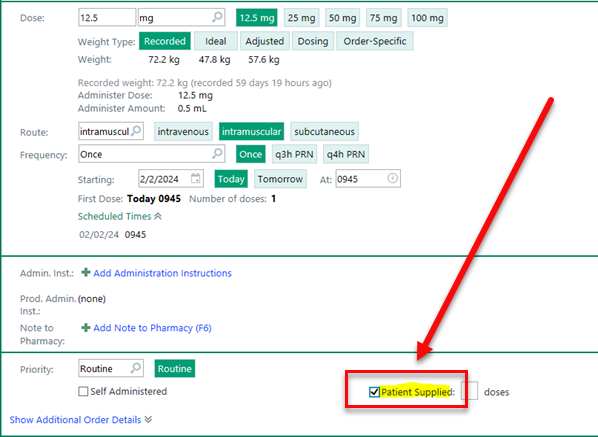
- Document patient supplied medications
| |
Planned Interface Downtime/Epic "Pause," Sunday, February 11, 2:00 AM
- The Rhapsody Interface Engines will encounter a planned downtime on Sunday, February 11 starting at 2:00 AM.
- Rhapsody planned downtime is estimated from 2:00 - 4:00 AM.
- Epic, Children's Specialized (Meditech), Trinitas (SCM), CVIT, Lab, Rad, and other clinical systems will be up and running.
- However, no registration messages/orders/results or charge information will pass to/from all ancillary systems during this downtime.
- Order/Result messages will be placed in a hold status.
- Once the interface engines are back up, the held messages will be released and then pass to bring all systems current.
-
Please follow all documented downtime procedures for non-Epic systems (including STAT order downtime procedures) during the planned downtime.
Epic's Downtime Resources are available below:
| |
IMPORTANT NOTE: Epic Systems will encounter a corresponding 2-3 minute "Pause" during this same time (Sunday, February 11 at 2:00 AM)!
-
Epic users should anticipate this very short system pause - No change in user workflow is anticipated due to the short duration.
Since this pause is only 2-3 minutes in duration, you likely will not need the downtime resources!
| |
Epic Hyperdrive Is Coming Soon
Hyperdrive is Epic’s new way to access/open the Epic application.
After the transition to Hyperdrive, you may notice changes to the aesthetics (look) and performance (feel) of your Epic experience, including a 30-40% quicker response time, increased security, enhanced performance, and added efficiency for future innovation!
Epic Hyperdrive Roll-Out Strategy:
Epic Hyperdrive will be rolled out in phases to allow the Epic Together team time to gather feedback and refine the user experience.
-
Phase O (March 10 - 16): A small group of early adopters consisting of physicians, nurses, and patient access/revenue cycle staff have been selected to transition to Epic Hyperdrive beginning 3/10/24.
-
Phase 1 (March 17 - April 26): The next group, Newark Beth Israel, RWJUH Somerset, and the Central Medical Group Practices, have been identified as our Phase 1 Pilot Sites and will transition to Epic Hyperdrive on 3/17/24.
-
Phase 2 (April 27): All remaining RWJBH sites live on Epic will transition to Epic Hyperdrive on April 27, 2024.
Click here to review additional information about RWJBH's transition to Epic Hyperdrive.
| |
PLEASE NOTE: No additional training is needed for the transition to Epic Hyperdrive.
- Tip sheets will be published to the "What's New" section of your Learning Home Dashboards (LHDs) beginning February 24.
-
Press F1 for easy access to more information about Hyperdrive!
| |
Coming Soon: Exciting Epic Enhancements | |
|
Preview Next Week's Epic Enhancements!
-
The following Epic Enhancements will be in Production on Tuesday, February 13!
| |
- Thank you to the Epic Together Project Team for these amazing enhancements!
| |
Inpatient Nursing and Allied Health Focus | |
|
Reminder: Proper Use of Secure Chat
Nurses - Do not use Secure Chat for personal healthcare inquiries. Call providers, including residents, for critical values and changes of status:
- Secure chat is a business tool intended for clinical communication amongst the patient care team.
-
Please do NOT use Secure Chat for personal purposes to communicate with your healthcare providers about your health status or that of family-members -- This violates RWJBH's privacy policy.
- Urgent patient safety items must be communicated via telephone call to ensure timely receipt of the message.
-
Please do NOT send urgent patient safety messages using Secure Chat.
- Contact the provider directly for clarification of orders within your scope.
- Please reinforce with all users to use Secure Chat appropriately!
- Avoid the use of Secure Chat with providers during night hours for non-sensitive communications.
- Access QGenda to validate the on-call provider in real-time.
Click here to review the Secure Chat SBAR!
Click here to review the Secure Chat vs. Phone Call flyer.
Check Provider's Status on Secure Chat before Messaging (Especially After Hours)
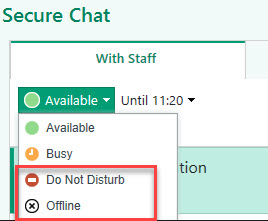
- Clinicians can mark themselves as Busy, Do Not Disturb, or Offline in Secure Chat.
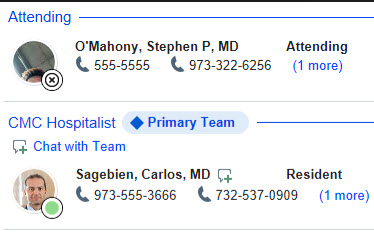
- A black circle with an X icon indicates the recipient is Offline and they will not receive any Secure Chat message (Please see below for images).
- If a clinician is set as Busy or Do Not Disturb, the message will be sent; however, no corresponding push notification will be received on a mobile device.
| |
|
You are not alone: Clinical Informatics is available for support 24 hours a day, 7 days a week!
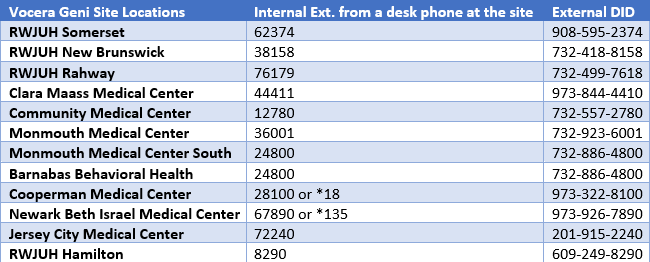
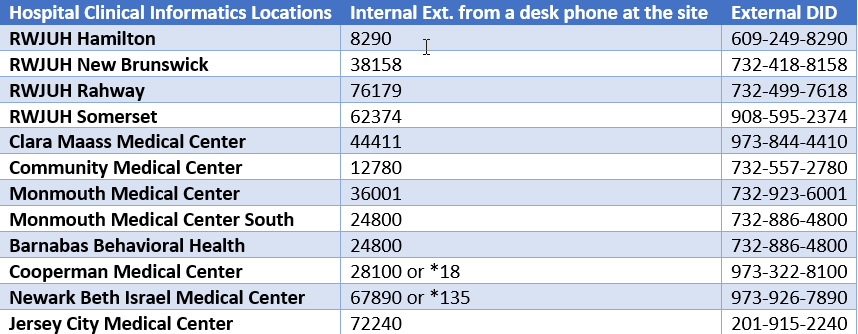
For 24/7 inpatient assistance, please call informatics extensions from within the hospital on a hospital phone - Ask for "Clinical Informatics" to be transferred to 24/7 help.
Click here to access the Nursing Pocket Guide for additional help.
| |
Ambulatory Nursing and Allied Health Focus | |
|
Document Patient Supplied Medications
Check the box to avoid duplicate charges when a patient pays separately for a medication to be administered in the clinic!
-
Sometimes your clinic/office administers a previously paid for medication that the patient or an outside pharmacy provides.
-
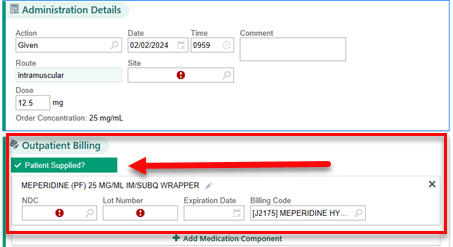
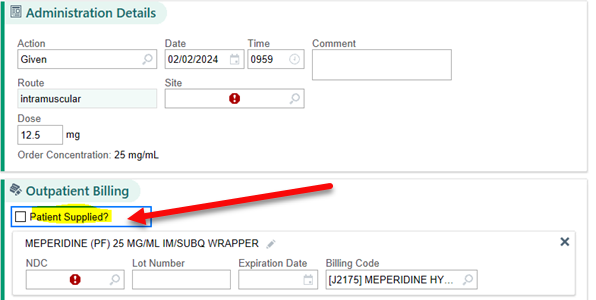
To avoid duplicate charges or claim denials, it is imperative that the “Patient Supplied” checkbox be selected.
- This checkbox is available both when ordering and also during the medication administration workflow.
To place a medication order as patient supplied, follow the steps below:
-
Search and select the medication from the Clinic-Administered Medications (CAM) preference list.
| |
- If the order details don't open automatically, open them by clicking on the medication.
-
Enter the order details and select the "Patient Supplied" checkbox.
|
- Associate the diagnosis to the order and sign it.
To record medication administration, follow the steps below:
-
Navigate to the Medication Administration Record (MAR) activity.
- Select the medication and click on the medication due date line to access administration details.
| -
Verify that the medication is marked as "Patient Supplied."
| |
-
If the "Patient Supplied" check box was missed when the order was placed, mark it from the MAR Outpatient Billing section by selecting the "Patient Supplied?" box.
- Record the administration details by selecting the site, NDC, lot number, exp date, and verifying the billing code which auto-populates.
| |
Access and Revenue Cycle Readiness (ARCR) Corner | |
|
Send Scanned Documents for Correction
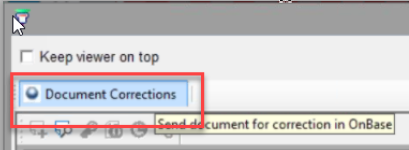
If you find a scanned document that needs correction of any type it can be sent for Document Corrections.
- Access the document requiring correction.
-
Click Document Corrections.
|
-
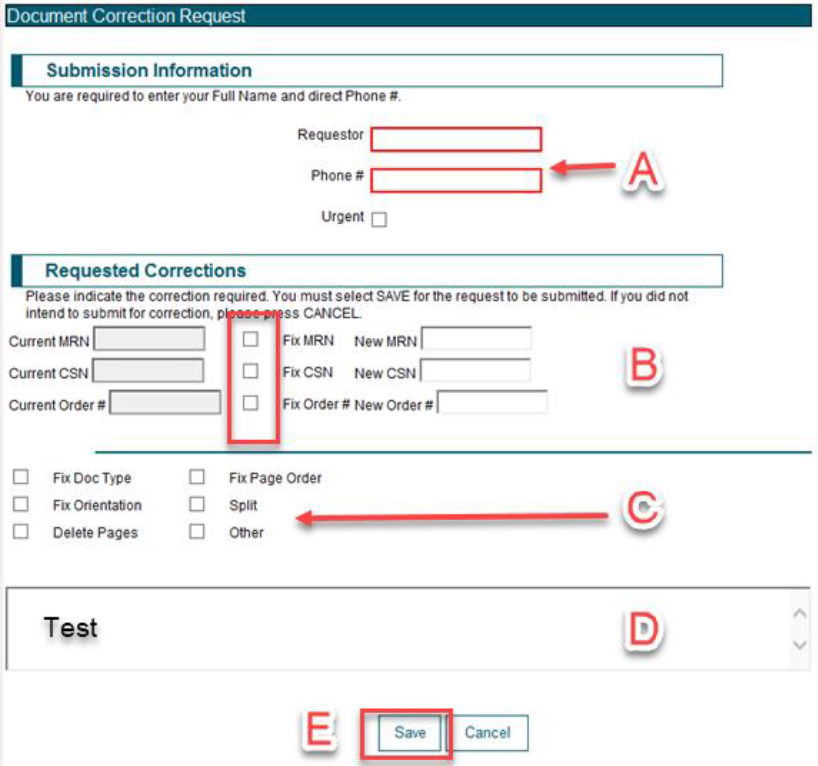
Clicking Document Corrections will launch an e-form to be completed, detailing the reasons the document requires correction.
-
Requestor name and Requestor Phone # are required fields.
- You can mark the request as Urgent if priority corrections are needed.
-
Requested Corrections (Select the appropriate box):
- MRN
- CSN
- Order #
- Select the appropriate boxes to identify fixes for the document image or document type.
- Use the free-text box to provide any additional information that will help with document correction.
-
Click Save to send your request to HIM for correction.
Click here to review the Sending Scanned Documents to Document Corrections tip sheet, also available on your Learning Home Dashboard.
| |
All Work and No Play Makes for a Dull Day! | |
|
Welcome February!
February is the shortest and coldest month of the year! It is also Black History Month. Valentine's Day and Leap Year make it extra special this year!
We have compiled a carefully curated list of February fun for you, your friends, and your family. ENJOY!
| |
|
Celebrate Black History Month!
February is a month to celebrate the achievements and triumphs of African Americans and recognize their invaluable role in U.S. history. Since Gerald Ford in 1976, every U.S. president has officially designated the month of February as Black History Month. The Black History Month theme for 2024 is African American art.
Click the links below for some special Black History Month events throughout New Jersey:
|  | |
How to "Get Help" With Epic | |
For 24/7 inpatient assistance, please call informatics extensions from within the hospital on a hospital phone - Ask for "Clinical Informatics." | |
|
For immediate help with Epic issues/build-fix requests, call the Enterprise Service Desk at 855-453-1950.
We have developed a handy "Epic: How to Get Help" flyer that will provide instructions on opening Help Desk Tickets and enhancement requests in Epic.
| |
Heartfelt thanks to Dr. Frank Sonnenberg for this week's Good Humor submission! | |
Print-Edition of Today's Epic Advisor! | | | | |