Add/Update your availability for Wintersession and Spring Term 2022, so students can easily schedule an appointment with you from Navigate Student App! Clickhere for the How-To Video.
You can copy one of your previous availability blocks to make tweaks for your Wintersession and Spring term appointment and drop-in availability.
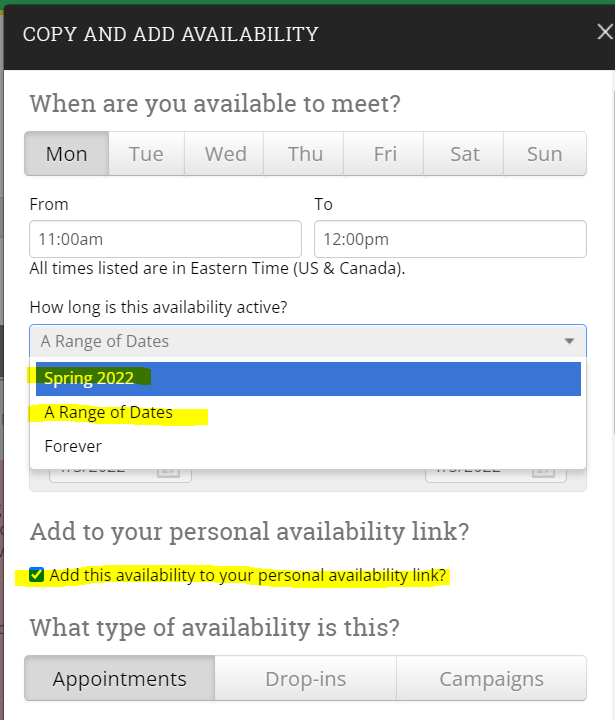
You can make your availability active for “A Range of Dates” or “Spring 2022.” Note: If you select “Spring 2022,” the start date of your availability is 01/24/2022 with an end date of 05/19/2022.
Add the Wintersession and Spring availability blocks to your Personal Availability Link (PAL) bychecking, “Add this availability to your personal availability link?”
Confirm that your scheduled work time/tasks/etc. are marked as “Free” on your HCC Google calendar you synced with Navigate to ensure your meetings with students take place during available blocks you set up in the Navigate Staff Live site. Click here for instructions.
Example email signature staff and advisors started incorporating in Gmail (you can add the entire text below to your email signature):
Schedule an appointment with me using the steps below:
If you are using a computer: first log intoNavigate before scheduling an appointment with me.
If you are using a smartphone: First download the "Navigate Student" App in App Store/Google Play and log in using your HCC email username and password.
After you log into Navigate, click this link (copy and hyperlink your unique PAL from your Availability Tab)and open the Navigate App to schedule an appointment with me.
If you still have questions, follow the step-by-step guide to schedule an appointment with me using my link.
CAPS Tutors
On January 20, during your all-staff training, Yarida will have time for tutors to update availability together with your Spring Term schedule. If you have any questions about your staff training reach out to Yarida at ycruz@hcc.edu.