Please click Trust Sender if prompted by your email application. This will help ensure you receive important HMIS updates and see all available materials provided in our messages.


HMIS TX-500 Newsletter

April 2026

Updated Data Quality Thresholds

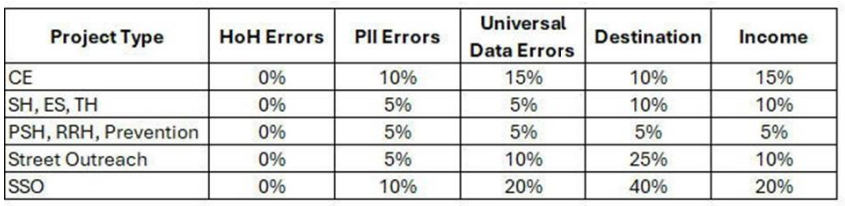
The Data Quality send outs will use the updated threshold percentages that went into effect March 1st. These figures can always be found in the Data Quality Monitoring Plan on our website.

Community Performance Monitoring Tool: Now Live in HMIS

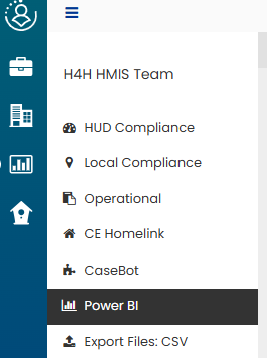
The Community Performance Monitoring Tool (PMT) is now live in HMIS! End users can view their agency's data within the dashboard in the Reports sections of their HMIS account. The data will be refreshed daily which means when viewing the Community PMT, the information should be reflective of data entered up to yesterday.

Click Path: Reports > PowerBI

Copy Assessment Fix

The Copy Assessment issue has been resolved.


The issue presented when users enrolled a family and attempted to copy over assessments while completing a workflow. Only the Head of Household data copied over and rest were not. This has been fixed and now all members copy over successfully.

New URL

On April 20th the HMIS application will have a new URL.

There will be redirects in place, so end users will not experience any disruption. Your current bookmarks and saved links will continue to work.


Updating your URL in bookmarks and any other places referenced is recommended.


The new URL will be updated on the website and will be communicated out by the HMIS team as soon as it's available.

Updates to Coordinated Entry Prioritization Postponed. New launch date:

April 15


In collaboration with researchers from Notre Dame to improve coordinated entry prioritization for individuals seeking services and to create a more person- and community-centered prioritization tool, the Alliance has been working on implementing updates to the Resource Placement Index, consisting of a new single-scoring for Homelink prioritization. The new prioritization score will be updated to a hybrid score based on the skilled assessor score and the data drive score already captured in Homelink Assessments. This update to prioritization will not change the workflow, but will be a backend calculation, that creates and prioritizes based on a single score for all individuals seeking services in our community.


There is no need to update existing clients, unless the client's data has changed since the last assessment. All individuals on the Priority Pool list on the go live date will remain unchanged and the Priority Pool list will be refreshed weekly based on the new scoring tool.


While these changes were scheduled to go live on April 1st, 2026, due to ongoing quality assurance efforts, the launch of the new scoring system has been postponed and is now anticipated for mid-April launch. This additional time will ensure the system meets performance standards prior to implementation.


We will continue to provide regular updates on progress and any revised timelines. In the meantime, training materials for the new scoring system are available at any time through the Alliance Training Portal to support preparation and onboarding.

AI & Personally Identifiable Information (PII)

Never input real HMIS client data into AI systems. Entering HMIS client data into AI tools can unintentionally expose it to third-party systems, where you may lose control over how it’s stored, processed, or used.


Instead, adopt these safer practices:

  • Use anonymized or fictional data when testing AI capabilities
  • Remove or mask any identifying details before inputting information
  • When in doubt, treat AI like a public space - if you wouldn’t say it out loud, don’t type it in


HMIS Mobile Portal

Updates & News

  • New Buttons: The buttons across the mobile portal have been updated for a more unified look across the portal.
  • Feature Highlight - Documents: End users are able to upload documents directly to HMIS by using a phone camera without the need to save the document to a personal device. Please refer to the HMIS Policies & Procedures for guidance on using personal and mobile devices.

  • Mobile Portal Access: If you are a Street Outreach employee from any HMIS agency and would like access to the portal please have your supervisor submit a training request on your behalf to request the 'Mobile Portal' training.

Known Issues

  • Physical Needs Assessment: We are currently experiencing an issue where required questions for adult clients are not appearing in the assessment during the workflow. As a result, users may be unable to move forward and complete a workflow.


Status- Reported to Vendor. Vendor is currently investigating and working on a resolution.


  • HUD Program Assessment: There is a issue that occurs intermittently in which the HUD Program Assessment questions do not populate correctly which prevents end users from moving forward in a workflow. 


Status- Reported to Vendor. Vendor is currently investigating and working on a resolution.

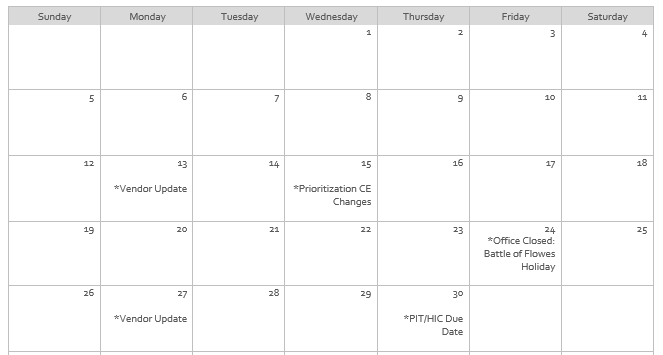
April 2026 Calendar

Hints, Memos, Inklings, & Shortcuts!

Case Notes: Corrections

Reminder - A case note can be edited for up to two days after it's created (created date). After the two day window it will become read-only and will no longer be able to be directly edited. If a correction is needed at this point, end users:


  • May create a new case note and delete the old one.


  • May add an addendum to the case note. This will add a record to the case note wile leaving the original case note unchanged. To add one:
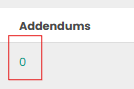
  • Find the case note you want to add an addendum to > click on the blue number in the column labeled 'Addendums' > Click 'Add New Addendum' > Save


SolarWinds

End users can use SolarWinds as an alternative to email when they have an open ticket. SolarWinds is the ticket management system used by the HMIS team to create, track, and update support requests.


Through SolarWinds, you can easily communicate with the HMIS team directly for open tickets, as well as view your full ticket history in one place.


Accounts are automatically created when end users submit their first ticket, there’s no need to sign up separately.


Click the link below for step-by-step login instructions.

Reminders & Resources

  • Google Chrome is the recommended browser for using HMIS.
  • Make sure your pop-up blocker is set to allow pop-ups from HMIS.
  • Contact the HMIS Team within 24 hours of employee termination/departure for account deactivations.
  • Project Managers: Please inform the HMIS Team if projects are no longer being used so we can deactivate them.
  • Vendor updates occur every two weeks. Notifications are sent day of.

Why am I receiving this email?

If you are receiving this email, it is because you either have an active San Antonio/Bexar County HMIS account, or you are designated as an important point-of-contact for HMIS-related updates. As an HMIS User, it is important for you to stay up-to-date on all major updates regarding the database.


We ask that you do not Unsubscribe from these alerts as long as you use HMIS.


If you believe this description no longer applies to you, please submit a ticket to HMIS.Support@Havenforhope.org to request your account be deactivated.


(Our Contact lists are uploaded on a monthly basis, so please allow time to account for this.)