Please click Trust Sender if prompted by your email application. This will help ensure you receive important HMIS updates and see all available materials provided in our messages. | | |
We are excited to welcome Cristian Gomez to our HMIS team as our new HMIS Application Support Specialist! Cristian brings experience in technical support, systems operations, and customer service, with a strong passion for helping users solve problems and succeed. His background supporting enterprise technology environments, troubleshooting software issues, and training end users makes him a great addition to our team, and will help us serve our diverse HMIS community.
As you submit Help Desk requests, participate in trainings, or have questions about HMIS, you'll likely have the opportunity to work with Cristian. We are confident his friendly, solutions-focused approach and commitment to excellent customer service will be a valuable resource to our Continuum of Care partners and HMIS users. Please join us in giving Cristian a warm welcome!
| Updated CHO Agreement Forms | |
The CHO Agreement forms have been updated and are now available on the HMIS website. The HMIS team will notify your organization when a new agreement is due. To ensure you are using the most current version, always download the form directly from the HMIS website.
Click Path:
HMIS Website > Resources > Local Policies section
| |
Users should be aware that profiles should only be viewed as-needed. This means a client's information should only be accessed if your job duties require you to do so.
Appropriate client access includes:
- Verifying eligibility for a program
- Adding enrollments, services, case notes, or any other valuable data for the client
- Checking contact information to relay a message
- Gathering information necessary for data quality, audits, or reporting
Inappropriate client access includes:
- Viewing the profiles of acquaintances or loved ones that are not being served by your organization
- Viewing your own profile, if applicable
- Practicing data entry (all practice should be done in the Training Organization on imaginary clients)
- Collecting information with the intent to share with parties the client did not consent to
As a reminder, actions in HMIS are automatically recorded by the system. Inappropriate use of HMIS can lead to permanent loss of access, fines, and in some cases criminal sentences.
| |  | No Data Standards Updates Expected for FY 2027 | HUD has informed Continuums of Care (CoCs) and HMIS Leads that no HMIS Data Standards updates are anticipated for Fiscal Year 2027. If no new Data Standards are released as expected there will be no significant changes to federal reporting requirements or federal data entry processes. | Quarterly Self Audits Due | The Quarterly Self-Audits distributed earlier this month were due by July 31st. If your organization would like to request an extension, please contact HMIS Security & Compliance Specialist, Lauren Khaug (lauren.khaug@havenforhope.org), as soon as possible. | Vendor Infrastructure Upgrade | |
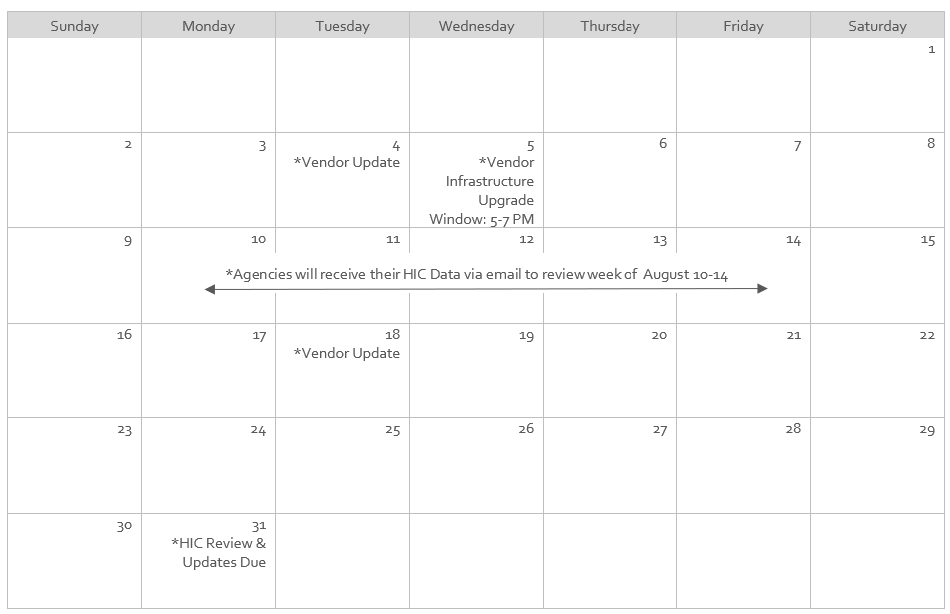
CaseWorthy, our HMIS vendor, will be performing a system infrastructure upgrade to improve overall performance. This maintenance is separate from our regularly scheduled vendor updates. During the upgrade, the production environment is expected to experience less than one minute of total downtime. This will not impact the user interface.
Scheduled Maintenance Window:
Wednesday, August 5, 6:00–8:00 PM
If you experience an outage lasting more than a few minutes during or after the maintenance window, please submit an HMIS support ticket so the HMIS team can investigate the issue.
| Housing Inventory Count (HIC) Semi-Annual Bed & Unit Inventory Review | |
The HMIS Data Analyst team is conducting our semi-annual review of the Bed & Unit Inventory in HMIS. We conduct this review to better prepare for the upcoming PIT/HIC count in January 2027.
Mark your calendars! During the week of August 10th-14th, each agency will be sent an email with their HIC data, that will include all projects that have bed & unit inventory.
You’ll have until Monday, August 31st to complete your review and submit any bed & unit updates, if applicable.
|
|
We are excited to welcome the following organizations to the TX-500 HMIS community:
- Northwest Vista College
- God's Messenger of Victorious People
- Street Medicine San Antonio
We look forward to these agencies joining our partnership to support coordinated data collection and improve services for our community.
| | | |
-
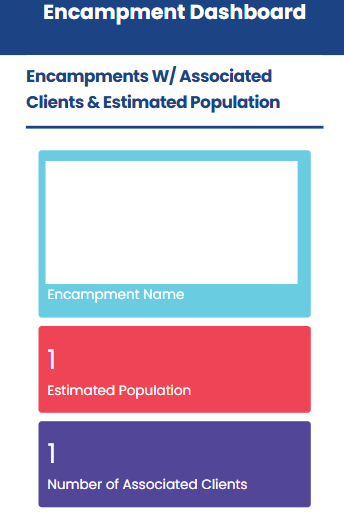
Feature Highlight - Encampments: Unhoused Client Encampments are defined by our community as "the presence of one or more individuals who have established a semi-fixed or permanent space within an area, marked by belongings, structures, or materials that remain in place while the individual is out in the community. This differs from a client who carries all personal belongings with them and has no designated or recurring nighttime space."
| |
Staff are able to create encampment records in the Mobile Portal. Once an encampment has been created in the portal, other users can add clients to it as needed, making it easier to document and manage encampment locations.
Encampment records can store the following:
- Location
- Primary Contact
- List of Active Clients
- Encampment Notes
Click Path: Menu > Encampment Summary > Select an encampment > Add Client To Encampment
|
| | |
-
Selecting Project when adding a Case Note: When an end user fills out a Case Note the 'Program Enrollment' data element allows the user the option to select a project. The dropdown does not display any projects even when the client has an active enrollment.
Status- Fixed! This issue has been resolved and confirmed.
-
Selecting a Project when adding a Referral: When an end user fills out a Referral the form allows the user to add a Project enrollment to the record. The dropdown does not display any projects even when the client has an active enrollment.
Status- Fixed! This issue has been resolved and confirmed.
-
Case Note: When adding a referral, there is an option to add a case note simultaneously. The case note button is not working as expected, an error message now appears when the user attempts to add a record.
Status- Reported to Vendor. Vendor is currently investigating and working on a resolution.
-
Digital ROI: Some users are experiencing an issue where the ROI form is not auto-populating the client information onto the form as expected and is instead rendering blank name and date of birth fields.
Status- Reported to Vendor. Vendor is currently investigating and working on a resolution.
| | Hints, Memos, Inklings, & Shortcuts! | | |
Important Reminder: Do not include PII in HMIS Support Tickets.
Protecting client privacy is a shared responsibility. Please remember that Personally Identifiable Information (PII) must not be included in HMIS support tickets.
PII, sometimes referred to as Personal Health Information (PHI), includes any information that could potentially be used to identify a client. Sensitive information should always be stored securely within HMIS and should never be entered into the ticketing system.
When referencing a client in a support ticket, always use the client’s HMIS ID number. Before submitting a ticket, carefully review all screenshots and attachments to ensure no PII is visible.
If a PII violation occurs within a ticket, the HMIS Security & Compliance Specialist will review, document, and address the incident with the end user to help maintain system security and protect client information.
Common examples of PII include:
- Name
- Social Security Number (full or partial)
- Date of Birth
- Address
- Full-face photos
| | |
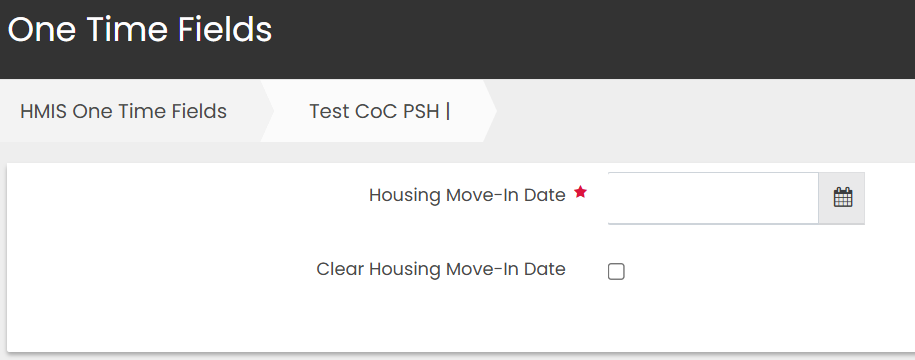
The Housing Move-In Date is a required data element for clients enrolled in the following project types:
- PSH (Permanent Supportive Housing)
- PH (Permanent Housing)
- RRH (Rapid Re-Housing)
- Services Only (VA: GPD CM/HR only)
HUD Definition
According to HUD, the Housing Move-in Date is:
"The date the client moved into permanent housing. [It] must be entered if/when a household moves into any type of permanent housing, regardless of funding source or whether the project is providing the rental assistance, to differentiate between clients who are housed and those who are experiencing homelessness at different points during their enrollment."1
Key HUD Guidance
Keep the following in mind when recording a Housing Move-in Date:
- The Housing Move-in Date date may or may not align with the lease date.
-
"'Move-in' means a lease arrangement has been made, the client has a key or entry ability to the unit, and that the client has physically slept in the unit."1
- An active subsidy from the project is not necessary to document Housing Move-in Date.
-
"A 'Housing Move-In Date’ must be recorded at the point the household moves into a permanent living situation, whether subsidized by the currently enrolled project, a different PH project or subsidy, or without any subsidy at all."1
Where to find the Housing Move-in Date in HMIS
In HMIS, the Housing Move-In Date is located on the client's Enrollments page.
Important: This field appears only on the Head of Household's enrollment. Only one Housing Move-In Date is recorded per enrollment.
Click Path:
Case Management (Workspace) > Case Management > Enrollments > One-Time Fields (for your enrollment)
| |
1FY 2026 HMIS Data Standards Manual Standard Reporting Terminology Glossary, Page 71-72
| |
- Google Chrome is the recommended browser for using HMIS.
- Make sure your pop-up blocker is set to allow pop-ups from HMIS.
- Contact the HMIS Team within 24 hours of employee termination/departure for account deactivations.
- Project Managers: Please inform the HMIS Team if projects are no longer being used so we can deactivate them.
- Vendor updates occur every two weeks.
- Client Merges occur nightly for clients with the same first name, last name, SSN & DOB.
| | |
Why am I receiving this email?
If you are receiving this email, it is because you either have an active San Antonio/Bexar County HMIS account, or you are designated as an important point-of-contact for HMIS-related updates. As an HMIS User, it is important for you to stay up-to-date on all major updates regarding the database.
We ask that you do not Unsubscribe from these alerts as long as you use HMIS.
If you believe this description no longer applies to you, please submit a ticket to HMIS.Support@Havenforhope.org to request your account be deactivated.
(Our Contact lists are uploaded on a monthly basis, so please allow time to account for this.)
| | | | |