Please click Trust Sender if prompted by your email application. This will help ensure you receive important HMIS updates and see all available materials provided in our messages.


HMIS TX-500 Newsletter

July 2026 (Corrected)

Scorecard Dashboard

The HMIS and CTH teams have partnered to transform the Scorecard Report into a new Scorecard Dashboard! This enhanced dashboard will serve as a centralized location for scorecard definitions and other helpful resources, while offering an improved design and a more user-friendly experience. A partial release for beta testing is scheduled for June 29, with the full dashboard launching on July 6. The scorecard report will be retired from user roles on July 6th.


*Correction post send out: The new Scorecard Dashboard is in its final stages and will be available for agencies to complete beta testing soon! 


Please be on the look out for additional updates from the CTH and HMIS teams regarding the updated timeline for the Scorecard Dashboard beta testing and launch date.


Current Report Location:

Reports > Local Compliance > CoC Performance Scorecard


New Location:

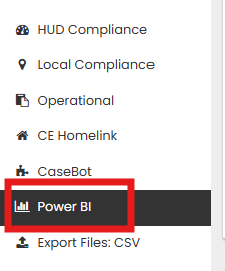
Reports > PowerBI > CoC Performance Scorecard

Welcome, Lauren!

Please join us in welcoming Lauren Khaug to the team as our new Security & Compliance Specialist!


With over 20 years of experience in fraud prevention, compliance, and data analysis across banking, fintech, and regulatory environments internationally, Lauren Khaug is a welcome addition to the Haven for Hope HMIS team. At Haven for Hope, Lauren focuses on HMIS security, privacy, and compliance monitoring, helping ensure strong data practices across the Continuum of Care. She is excited to contribute to the Haven for Hope mission and work alongside the dedicated teams serving clients every day.

FY 26 Q4: Quarterly Self-Audits

The HMIS Security & Compliance Specialist will be contacting Agency Security Officers at the beginning of July to complete quarterly self-audits.


The email will contain information for an optional training session.

HMIS Access Reminder

If you no longer need your HMIS license, or if an HMIS user has left your agency, please notify the HMIS team within 24 hours.


Promptly updating user access helps keep our records current and ensures the continued security and integrity of the HMIS system. Thank you for helping us maintain a secure environment!

Client Merges

The HMIS System performs automatic client profile merges each night when two profiles contain matching information for all of the following fields:


  • First Name
  • Last Name
  • Date of Birth
  • Social Security Number


The full Date of Birth and full Social Security Numbers must be entered. Partial or approximate answers cannot be automatically merged. If client has no Social Security number, the profile cannot be merged.


Please note that if multiple family compositions are involved, additional assistance from the HMIS team may be required.


Client Merge Log Report


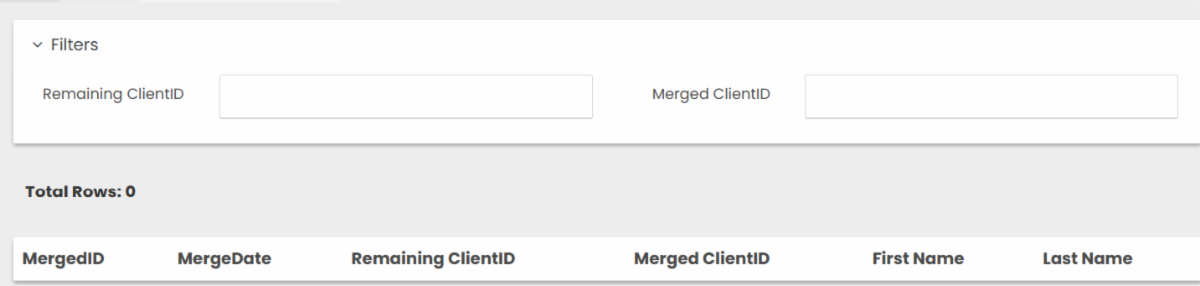
The Client Merge Log provides a record of all automatic merges completed by the system. Users can search using either the client’s old ID or new ID to review merge activity, including the date the merge occurred. Please note this report began recording on 3/25/25. Merges that occurred before that date will not appear on the log.


Navigation:

Reports > Operational > Client Merge Log

HMIS Mobile Portal

Updates & News


  • Services Training Available - Location Permission Required: Some users may encounter an error when adding services in the mobile portal if location access has been denied or turned off. To successfully add services, the portal must have permission to access your device's location.
  • If you receive this error, the user will need to enable location access for the portal. The video below provides step-by-step instructions on how to grant location permission or turn it back on if it has already been disabled.

Known & Resolved Issues


  • Selecting Project when adding a Case Note: When an end user fills out a Case Note the 'Program Enrollment' data element allows the user the option to select a project. The dropdown does not display any projects even when the client has an active enrollment.


Status- HMIS team is working with Vendor on confirming solution.


  • Selecting a Project when adding a Referral: When an end user fills out a Referral the form allows the user to add a Project enrollment to the record. The dropdown does not display any projects even when the client has an active enrollment.


Status- HMIS team is working with Vendor on confirming solution.


No other known issues currently in progress, if you encounter one please inform the HMIS team.


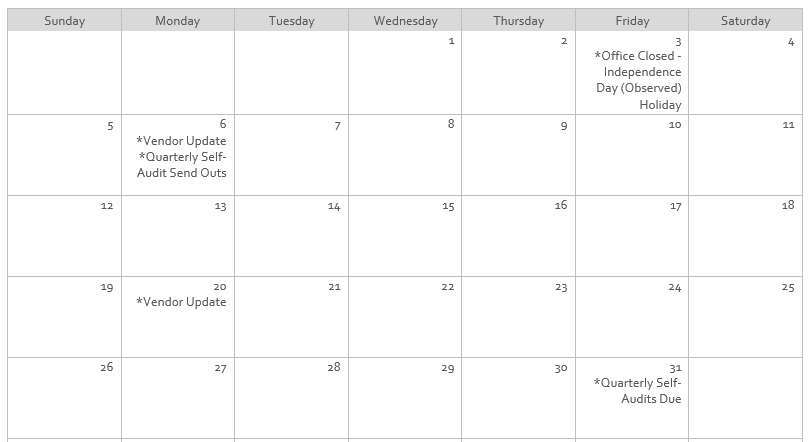
July 2026 Calendar

Hints, Memos, Inklings, & Shortcuts!

Practice in the HMIS Training Organization

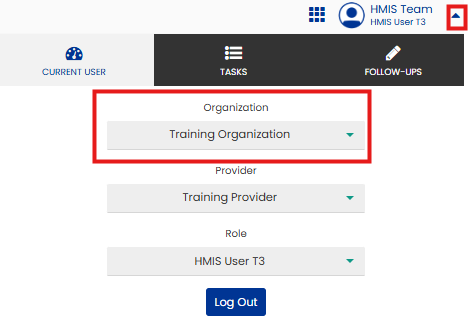
All users have access to the Training Organization through their account. This environment allows you to practice common HMIS task such as completing entry and exit workflows, updating addresses, and modifying contact information, without creating or changing records in production (real data).


To access the Training Organization:

  1. Click the drop-down menu next to your name in the upper-right corner of the application.
  2. Select Training Organization from the Organization menu.


When you're finished practicing, simply follow the same steps to switch your organization back to your agency's organization. This will bring you back to production.


For the best training experience, we also encourage users to use the test client:

  • Client Name: HMIS Test
  • Client ID: 303354

Social Security Number Issues

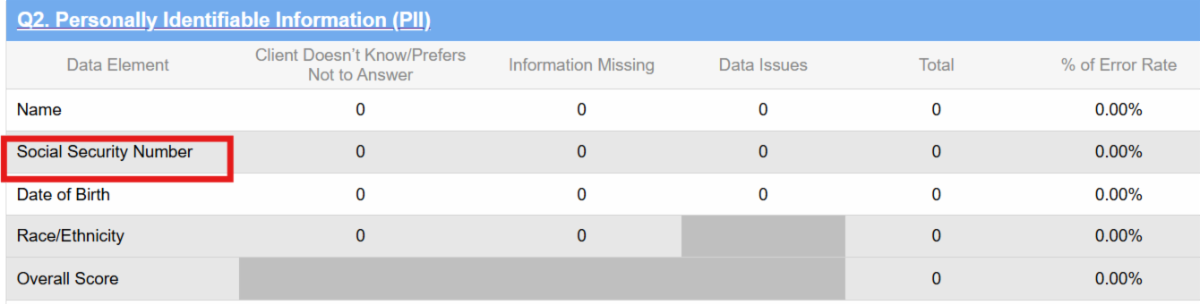
Accurate Social Security Number (SSN) data is essential for several reasons. The SSN serves as a unique client identifier and is a key factor in the client merge process. It is also included as a data quality measure Q2 of the HUD Data Quality Report.

Records may appear on the report when an SSN is missing, when a client responds "Don't Know" or "Client Prefers Not to Answer," or when data quality issues are identified. The following are considered data quality issues:


  • For all SSNs 
  • Cannot contain a non-numeric character (excludes any vendor-designated placeholder characters).
  • The third group / last four digits must be present and cannot be “0000”. 
  • When the first three digits are present 
  • First three digits cannot be “000,” “666,” or in the 900 series 
  • When the fourth and fifth digits are present
  • The second group / 4th and 5th digits cannot be “00”.
  • When all nine digits are present
  • There cannot be repetitive (e.g., “333333333”) or sequential (e.g., “345678901” “987654321”) numbers for all 9 digits.


FY 2026 HMIS Standard Reporting Terminology Glossary, Page 37

Reminders & Resources

  • Google Chrome is the recommended browser for using HMIS.
  • Make sure your pop-up blocker is set to allow pop-ups from HMIS.
  • Contact the HMIS Team within 24 hours of employee termination/departure for account deactivations.
  • Project Managers: Please inform the HMIS Team if projects are no longer being used so we can deactivate them.
  • Vendor updates occur every two weeks.

Why am I receiving this email?

If you are receiving this email, it is because you either have an active San Antonio/Bexar County HMIS account, or you are designated as an important point-of-contact for HMIS-related updates. As an HMIS User, it is important for you to stay up-to-date on all major updates regarding the database.


We ask that you do not Unsubscribe from these alerts as long as you use HMIS.


If you believe this description no longer applies to you, please submit a ticket to HMIS.Support@Havenforhope.org to request your account be deactivated.


(Our Contact lists are uploaded on a monthly basis, so please allow time to account for this.)