Wednesday, August 9, 2023 | |
|
Advisor Top Stories
Attn: Managers and Leaders! These key items must be addressed in your Daily Huddles:
Ambulatory and Inpatient Huddle Topics:
- Telemedicine Visits require eCheck-In for Consent Collection!
-
Epic Upgrade is coming September 13!! Get ready!
-
Reminder: CAMs are required for all new hires, rehires, and transfers.
Inpatient Huddle Topics:
- Inpatient Nurses: Review and Document COVID Vaccination History (If Needed)!
| |
Exciting Epic Enhancements | |
|
Exciting Epic Enhancements!
|
- Thank you to the Epic Together Project Team for these amazing enhancements!
- We value you, Epic Together Team!
| |
Planned Interface Downtime/Epic "Pause," Sunday, August 13, 2:00 AM
- The Rhapsody and Openlink Interface Engines and the EMPI SmartIX will encounter a planned downtime on Sunday, August 13 starting at 2:00 AM.
-
Rhapsody planned downtime is estimated from 2:00 - 4:00 AM.
-
Openlink and EMPI SmartIX planned downtime is estimated from 2:00 AM - 3:00 AM.
- Epic, CVIT, Lab, Rad and other clinical systems will be up and running.
-
However, no registration messages/orders/results or charge information will pass to/from all ancillary systems during this downtime.
-
Please Note: Brand new registration information on patients who arrive during the downtime will not have a Medical Record #, therefore downstream systems will not receive these patients during the downtime period.
- MR#s will automatically process and reconcile when downtime concludes, therefore no actions are required by system users.
- Order/Result messages will be placed in a hold status.
- Once the interface engines are back up, the held messages will be released and then pass to bring all systems current.
- Please follow all documented downtime procedures (including STAT order downtime procedures) during the planned downtime.
IMPORTANT NOTE: Epic Systems will encounter a corresponding 2-3 minute "Pause" during this same time (Sunday, August 13, 2:00 AM)!
-
Epic users should anticipate this very short system pause - No change in user workflow is anticipated due to the short duration.
Epic's Downtime Resources are available below; however, since this pause is only 2-3 minutes in duration, you won't need these resources!
|  | |
|
Reminder! Telemedicine Visits Require eCheck-in for Consent Collection!
Although it has always been a requirement to obtain a consent for telemedicine, the expiration of federal and state regulatory waivers associated with Covid-19 has reinforced the need to follow proper protocols for how patients join their visit.
Patients will receive reminders containing links to prepare for the visit:
- 3 days in advance
- 24-hours in advance
- 15 minutes in advance
*** If the patient has completed their eCheck-in and signed their consent, they will not receive additional reminder emails. Fifteen minutes prior to their visit, the patient will be sent a video visit notification with a link to join the visit directly.
| |
|
Automatic reminders already contain all necessary information; therefore, it is not necessary to send a direct video link to patients. Direct video links send a copy of the previous reminders that are sent, but will not bring patients directly into the video unless they have already completed eCheck-in.
| |
|
Reminder: Please submit CAM requests for all new hires, re-hires, and transfers
A CAM is required for all new hires, re-hires, and transfers.
You will also need to request Epic Training for new hires, re-hires, and transfers.
| |
Inpatient Nursing and Allied Health Focus | |
|
Review and Document COVID Vaccination History (if necessary)
- Last week, the COVID Vaccination History section and rule were removed from the Admission Navigator and Admission Required Documentation, respectively, to align with the CDC's end of the federal COVID 19 Public Health Emergency (PHE) declaration.
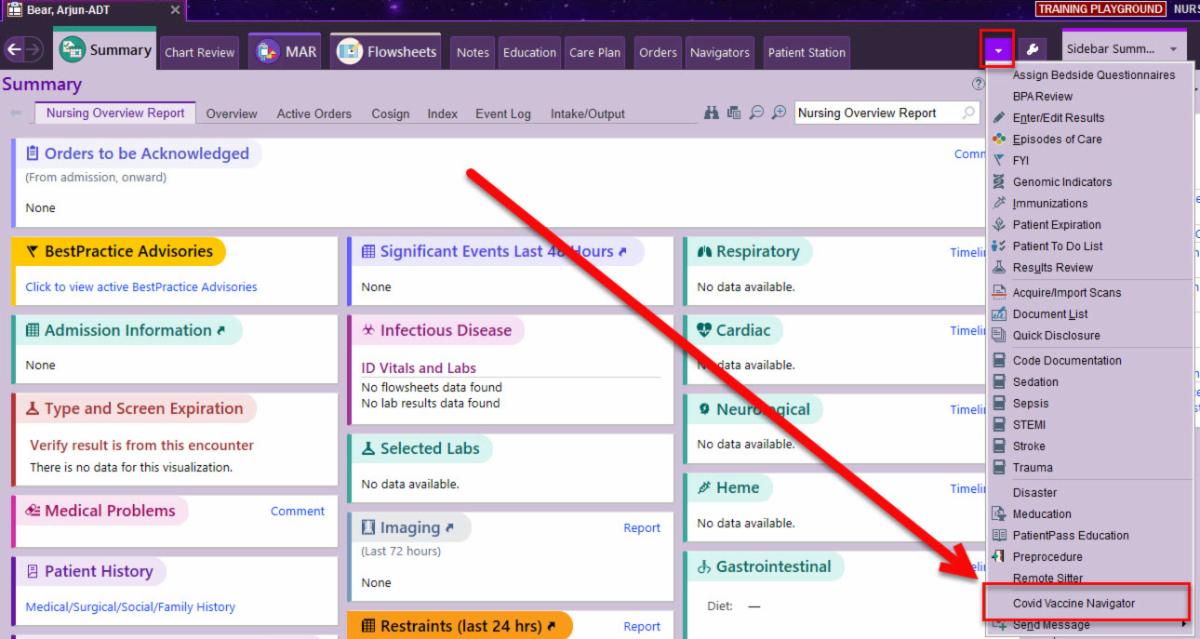
- Going forward, if you need to access these same sections to update past vaccine information or determine eligibility to administer a COVID vaccine, you can access the COVID Vaccine Navigator under the More Activities menu (Please see screenshot below for additional guidance):
| |
|
Reminder: Proper Use of Secure Chat
Nurses - Do not use Secure Chat for personal healthcare inquiries. Call providers, including residents, for critical values and changes of status:
- Secure chat is a business tool intended for clinical communication amongst the patient care team.
- Secure Chat should not be leveraged for personal healthcare communications by RWJBH employees to communicate with their healthcare providers about their health status nor that of family members.
- Urgent patient safety items must be communicated via telephone call to ensure timely receipt of the message.
-
Please do NOT send urgent patient safety messages using Secure Chat.
-
Please do NOT use Secure Chat for personal purposes to communicate with your healthcare providers about your health status or that of family-members -- This violates RWJBH's privacy policy.
- Contact the provider directly for clarification of orders within your scope.
- Please reinforce with all users to use Secure Chat appropriately!
- Avoid the use of Secure Chat during night hours for non-sensitive communications.
- Access QGenda to validate the on-call provider in real-time.
| |
|
Check Provider's Status on Secure Chat before Messaging (Especially After Hours)
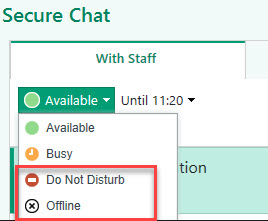
- Clinicians can mark themselves as Busy, Do Not Disturb, or Offline in Secure Chat.
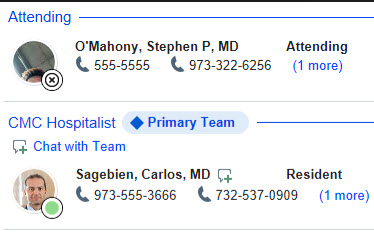
- A black circle with an X icon indicates the recipient is Offline and they will not receive any Secure Chat message (Please see below for images).
- If a clinician is set as Busy or Do Not Disturb, the message will be sent; ho no corresponding push notification will be received on a mobile device.
| |
|
Refreshes on Recent Articles
We have highlighted some important communications in recent weeks. If you missed something, click the links below to catch up on some important Epic Updates you don't want to miss!
| |
Ambulatory Nursing and Allied Health Focus | |
|
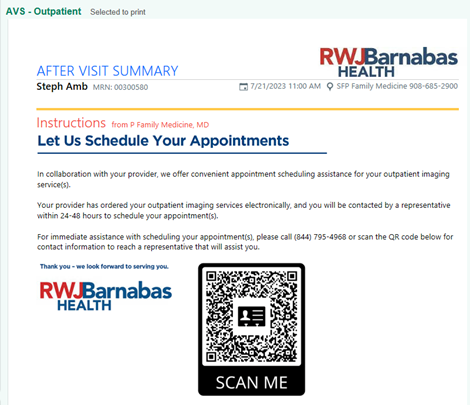
New After Visit Summary (AVS) Patient Instruction SmartText Streamlines Imaging Scheduling!
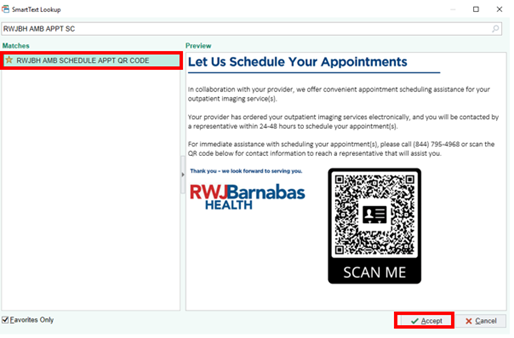
A new AVS patient instruction SmartText is now available in Epic, offering our patients a more convenient way to schedule outpatient imaging service(s). This new SmartText includes a QR code, which launches contact information for RWJBH's Central Access scheduling team, as well as instructions that can be printed with the patient’s After Visit Summary (AVS).
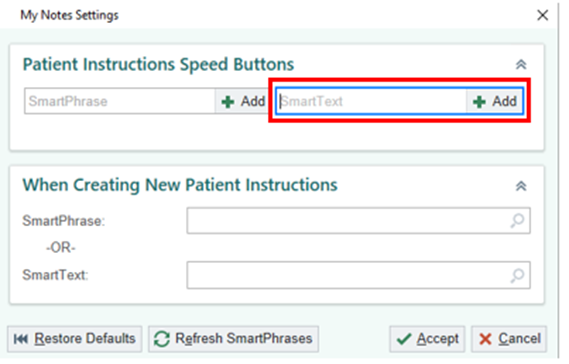
Follow the steps below to create a speed button for patient instructions:
- Within a Visit Encounter:
-
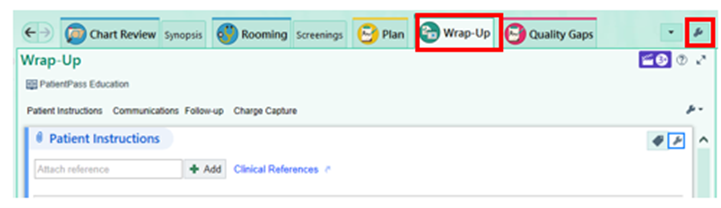
Navigate to the Wrap-Up activity.
-
Click the Wrench located to the right of the Patient Instructions section.
| |
-
In the SmartText field type “RWJBH AMB SCHEDULE APPT QR CODE.”
| |
- Select the RWJBH AMB SCHEDULE APPT QR Code SmartText.
-
Click Accept.
|
-
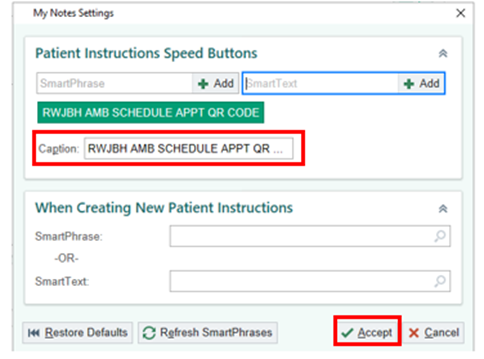
Edit the Caption.
-
Click Accept.
| |
|
To include and print the After Visit Summary instruction:
-
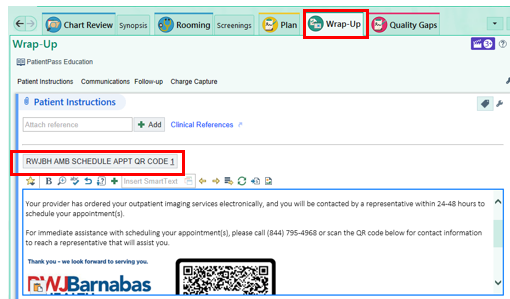
Navigate to the Wrap-Up Activity.
-
Click on the Instruction Speed Button.
| |
-
Print the patient's After Visit Summary (AVS).
| |
Access and Revenue Cycle Readiness (ARCR) Corner | |
|
Front Desk & Patient Service Representatives - Remember to Use Palm Scanners
- Are you using the Palm Scanner to check-in every patient?
- If you answered no, what barriers are keeping you from using this cool tool?
-
Please open a Help Desk Ticket if you need assistance!
- Palm Scanners are intended to:
- Protect our patient's identity
- Accurately access the correct patient's medical record
-
Streamline the check-in process for the patient and for YOU
-
IMPORTANT: Click here to review the new, updated Palm Scanning guide.
| |
-
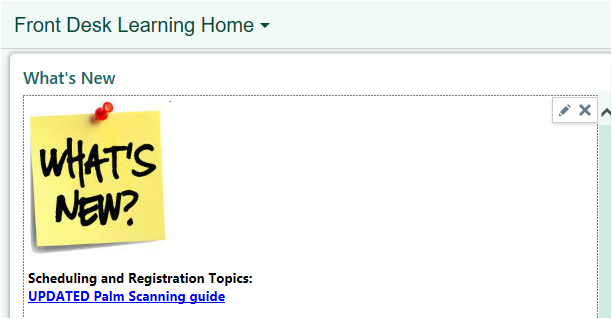
Remember, All Tip Sheets can be accessed by pressing F1 and accessing your Learning Home Dashboard!
- You'll find this tip sheet in the "What's New" section (Please see image below for details)!
| |
All Work No Play Makes for a Dull Day | |
|
Outdoor Family Fun in Beautiful New Jersey
Make the most of these last glorious days of summer with our carefully curated list of fun outdoor activities in New Jersey:
| | |
|
|
Plan an August Road Trip!
| |
How to "Get Help" With Epic | |
|
For 24/7 inpatient assistance, please call informatics extensions from within the hospital on a hospital phone:
-
Community Medical Center: 12780
-
Jersey City Medical Center: 36001
-
Monmouth Medical Center: 24800
-
Monmouth Medical Center Southern Campus: 24800
-
RWJHB Behavioral Health Center: 72240
-
Hamilton: 8290
-
New Brunswick: 33284
-
Rahway: 77618
-
Somerset: 62374
For immediate help with Epic issues/build-fix requests, call the Enterprise Service Desk at 855-453-1950.
We have developed this handy "Epic: How to Get Help" flyer that will provide instructions on opening Help Desk Tickets and enhancement requests in Epic.
| |
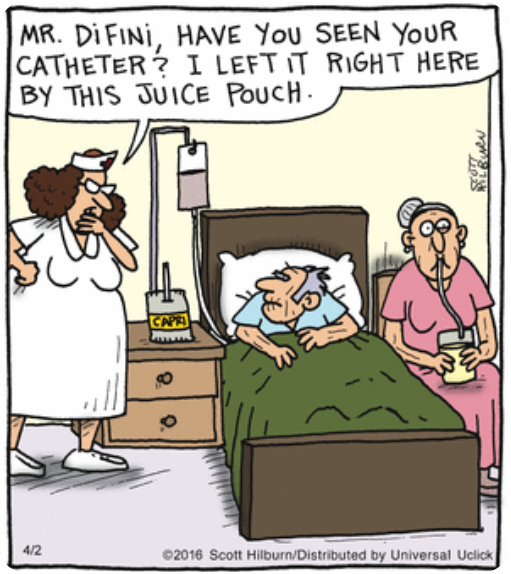
If you have a joke to include in a future Epic Advisor newsletter, please email Epic Communications. | |
Print-Edition of Today's Epic Advisor! | | | | |