An Operational Update from the
Executive Director
| | |
Listen to the latest operational update from Executive Director Brian Collins about improvements IMRF is making to better serve our members, retirees, and employers.
Learn more about the resources Brian highlights by visiting IMRF's Member Access Learning Center.
The Learning Center, launched at the same time as the new Member Access website, provides “how to” guides, answers to frequently asked questions, and other important updates.
If one of your employees has a question about applying for an IMRF benefit, please direct them to the Member Access Learning Center.
| | Find Important Documents in Employer Access | | |
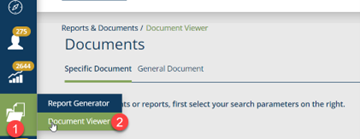
Many important documents that employers need can be found conveniently in Employer Access. Once you log into your account, go to "Reports and Documents" in the vertical toolbar on the left-hand side of the screen and choose "Report Generator" or "Document Viewer."
Instructions are below to help find important documents your employer's chief financial officer needs.
| | |
Your 2025 Governmental Accounting Standards Board (GASB) 50 & 68, and IMRF’s SOC-1 Type 2 reports are available in Employer Access.
To find these documents, log into your Employer Access account and look for “Document Viewer” under "Reports and Documents" in the vertical toolbar on the left-hand side of the page.
Watch the video above for more details.
| | |
Additionally, your 2024 Employer Retirement Reserve Statements are available in Employer Access.
This statement can be found in Employer Access within "Reports and Documents" in the vertical tool bar on the left-hand side. Choose “Report Generator” option to create your report.
Watch the video for more information.
| | |
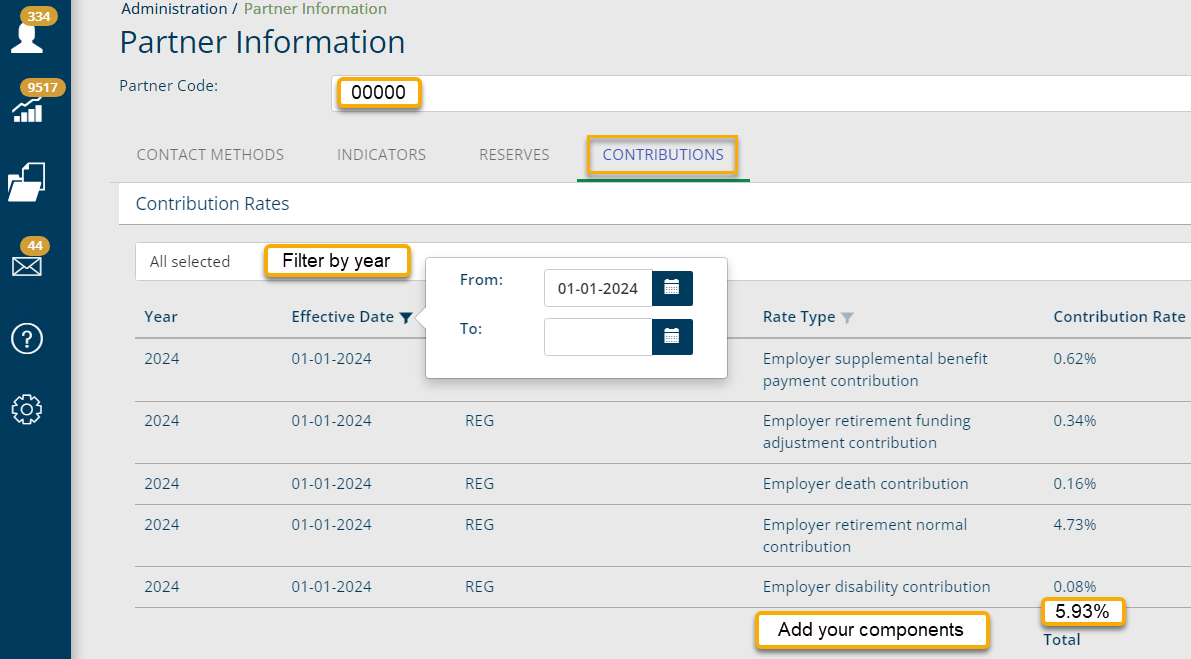
Your employer's Estimated 2026 Annual Contribution Rate for its IMRF plans is also available in Employer Access. This is needed for financial planning, accounting, and reporting purposes.
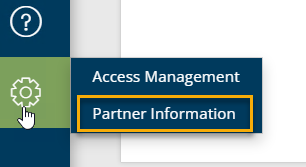
To view this information in Employer Access, click on the gear icon on the vertical toolbar on the left side of the Employer Access homepage, and then click Partner Information.
Enter your partner code and click on the Contributions tab. To filter by year, enter the appropriate dates (January 1, 2026, to December 31, 2026), then filter by plan to see the rate components calculated below.
You can also learn more by visiting the Employer Access Learning Center or watching this video.
| | |
You can also create a print copy of the 2026 Preliminary Rate Notice, by selecting the 2026 Preliminary Rate Notice Generator link located in our Employer Access Learning Center. Once you open the spreadsheet click on the first tab to enter your employer number, click on the second tab to view generated Preliminary Rate Notice.
Please note: Census data for active and inactive IMRF members will be located in GASB 68- Census Data - Active. Census data for retirees will be located in GASB 68- Census Data - Inactive.
Please provide these important documents to your employer's chief financial officer.
| |
|
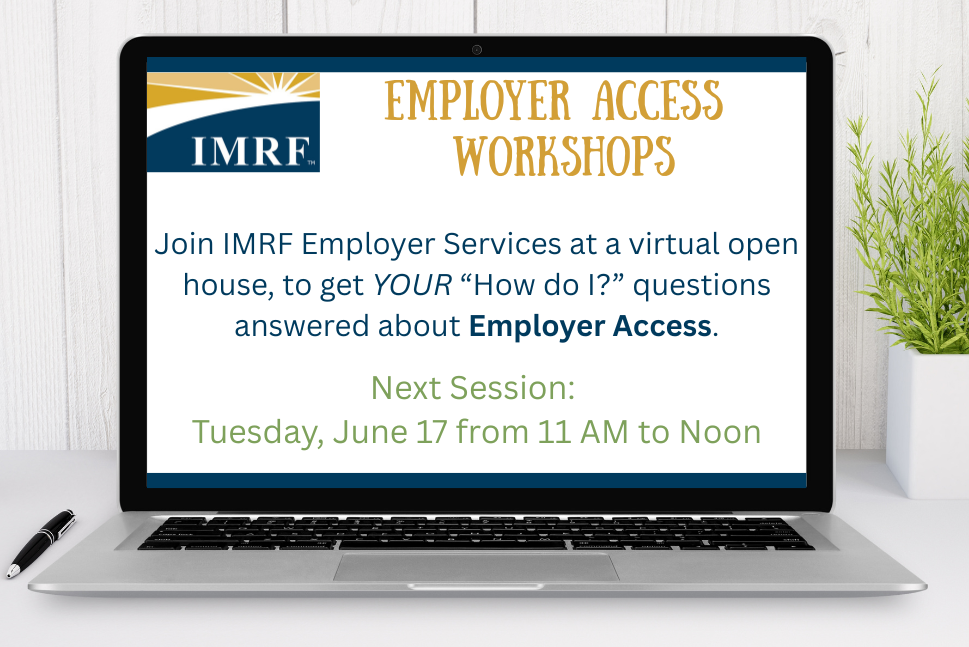
Employer Access Workshops Coming Soon!
Do you have questions about how to update an employee’s contact information? Or where you can find Accelerated Payment invoices? Or how to file return-to-work disability data?
Join IMRF Employer Services for a virtual open house where you can get answers to these questions and much more!
Register to get a link for one of the upcoming virtual open houses:
| | | |
Last Chance to Register for
2025 Rate Meetings!
The Rate Meetings will review year-end financial results and actuarial data for IMRF, and the data's estimated impact on employers. IMRF Executive Director Brian Collins and Chief Financial Officer Mark Nannini will conduct the meetings.
Please register for one of the following dates:
Wednesday, May 14
In-person:
Western Suburbs – Wheaton
Presentation: 10-11 AM
Arrowhead Golf Club (26W151 Butterfield Rd., Wheaton, IL 60189)
In-person:
Northern Suburbs – Northbrook
Presentation: 2 pm -3 pm
Hilton Chicago/Northbrook (2855 Milwaukee Ave., Northbrook, IL 60062)
Thursday, May 15
Online Webinar
Presentation: 10-11 AM
In-person:
South Suburbs – Tinley Park
Presentation: 2-3 PM
Hilton Garden Inn Chicago/Tinley Park (18335 LaGrange Rd.,
Tinley Park, IL 60487)
Friday, May 16
In-person:
Central Illinois – Springfield
Presentation 10-11 AM
Express Personnel Building - Lower Conference Room
(3000 Professional Dr., Springfield, IL 62703)
| | | |
Securing your Employer Access Account
Whether your employer has one or many Employer Access users, it is important to remove team members who should no longer have access to view or change data within your Employer Access account. It is the responsibility of the Authorized Agent of each employer to add or remove authorized users as needed and in a timely manner.
This helps protect your employer’s and your employees’ personal data.
To reduce risk, Authorized Agents should immediately remove the access of any user who is no longer authorized to use Employer Access on your employer’s behalf or who, upon review, doesn’t need or use their account.
For this same reason, IMRF will remove the access of user accounts who have NOT signed into Employer Access in over 180 days.
If you have any questions about how to remove someone from Employer Access you can learn more via our Employer Access Learning Center, here, or by watching this video.
| |  | |
Retirement Planning Webinars Available!
If your employees have any questions about how their IMRF pension works as they are planning for their retirement, IMRF has two webinars available on our website.
| | |
|
How to Fix Common Wage Reporting Issues
There are two errors that can often happen on wage reports. This article will break them down and explain how you can fix them.
Wage Reporting: New Member
In the first month an employer reports a newly enrolled member, it is common for the wage report to have an error.
| |
Typically, this is because the wage report is for the reporting period (a month), while the employee hasn’t been participating that entire time.
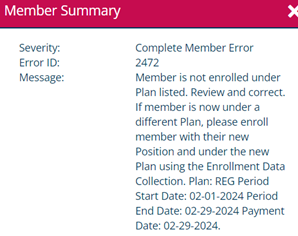
The wage report validates the wages and period being reported against the member’s participation dates, for this reason, employers commonly receive this business validation error when reporting a member for the first time.
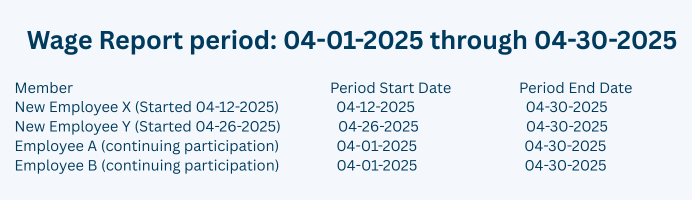
To prevent the error, or correct it, the employer will need to use the Wage Report Period Start Date equal to the new member’s participation date.
Assuming an employer produces wage reports for a month as the reporting period, the start dates for new employees should be noted clearly. Below is an example of what a report may look like.
| |
Wage Reporting: MID error
With the most recent system update, the wage report now validates the member identification (MID) field in the wage report.
If using this field in the wage report, either through a file upload or by manual entry, this field must either be blank (empty) or contain the 11-digit IMRF MID that can be found on the Member Profile within Employer Access.
Helpful hint: This 11-digit MID is the 7-digit member identification number assigned to the member at enrollment with 4 preceding zeros.
Please make sure your system has the correct MID for each member before uploading and validating your Wage Report file to prevent errors on your report, or remove the data from this field, leaving it blank.
| | | | Authorized Agent Webinars in May and June | |
We offer these online webinars for Authorized Agents to learn more about IMRF procedures and how to administer IMRF. Register today!
IMPORTANT NOTE: By law, all new Authorized Agents must attend Authorized Agent training within three months of appointment.
There are two modules to completed:
- Module 1: Introduction, Enrollment, Wage Reporting, and Termination
- Module 2: IMRF Benefits, Employer Rates, and Legislation
May
-
Module 1: Tuesday, May 13
-
Module 2: Tuesday, May 27
June
-
Module 1: Wednesday, June 11
-
Module 2: Wednesday, June 25
July
-
Module 1: Wednesday, July 9
-
Module 2: Wednesday, July 23
August
-
Module 1: Wednesday, August 13
-
Module 2: Wednesday, August 27
All sessions run 9:30 AM to 11:00 AM.
Webinar Structure
This 2-part webinar series prepares IMRF Authorized Agents to perform common IMRF tasks. Note: To receive a completion certificate, you must attend the online session live. Watching a recording at a later date will not result in a certificate of completion.
Together, these two 90-minute webinars cover the topics included in the former one-day workshop. Each webinar stands alone, and you can attend them in either order. Canceling your registration from just one module is not permitted.
| | |
Employer Access Learning Center
Visit IMRF's Employer Access Learning Center for training materials to help you complete your daily tasks. Instructions are available as PDFs, PowerPoint presentations, and MP4 videos.
| | Stay Connected with IMRF! | | |
2211 York Rd., Ste. 500
Oak Brook, IL 60523-2337 (Main Office)
3000 Professional Dr., Ste. 101, Springfield, IL 62703
Member-only Phone: 1-800-ASK-IMRF (275-4673)
Employer-Only Phone Number: 1-800-728-7971
| | You are receiving this email because you have been identified as an Employer Contact of IMRF. As such, you cannot opt out of receiving this email. To update your Employer Contact information, log in to your Employer Access account. | | | | | |