We are exited to announce our NEW website for all matters related to Continuing Legal Education is now live! This website will be your new resource for tracking your CLE progress, checking your compliance status, looking for CLEs and answering frequently asked questions. To check out the new website please visit: www.MECLE.org and register your new account. Our current website will remain your primary resource for all non-CLE related Board matters. You will continue to use MyBoardAccess for annual registration, updating contact info, printing your bar card and attorney access to the bar directory.
 
You will need to register to create an account to access your CLE record. Your MyBoardAccess credentials will not work for your new MyCLEAccess. Registering is very easy following these simple steps:
 
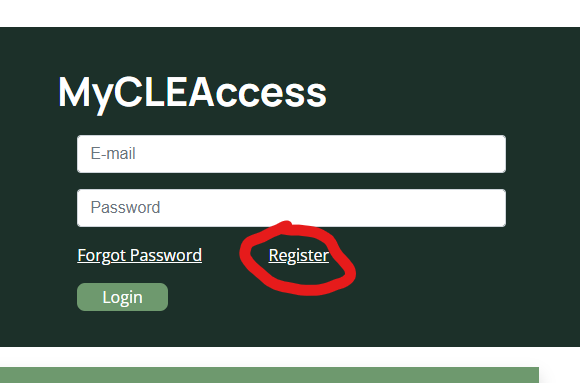
           1.) From the homepage, click “Register” at the MyCLEAccess portal.

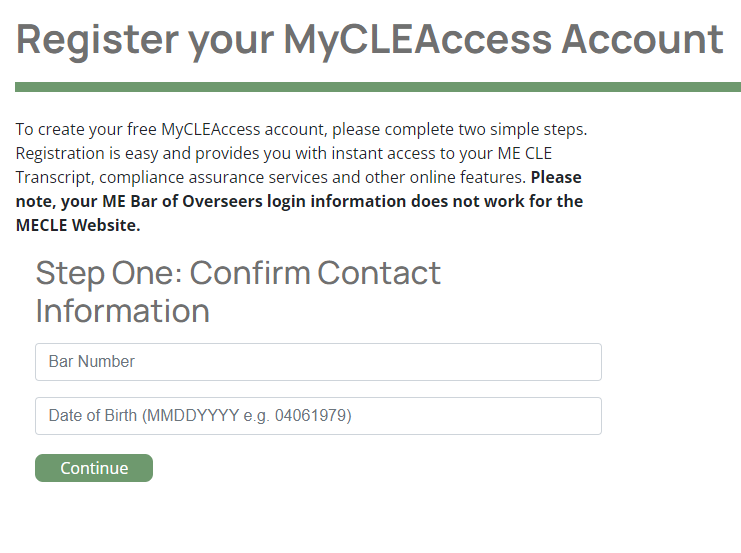
      2.) On the next screen you will enter your bar number and date of birth. Do not add any leading zeros to your bar number. Enter your date of birth with no slashes or dashes in the following format: MMDDYYYY
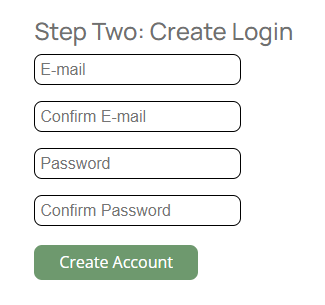
      3.) This will lead you to the final set up screen where you will create your login and password.
That’s it! You should now have access to your CLE transcript and be able to see your courses posted for 2022 so far. If you read that you are currently non-compliant for 2022, don’t worry! You have the entire calendar year to achieve compliance for 2022. You will see on your account summary page how many credits you may need before the end of the year or how many carry over credits you have already earned for next year. To see a detailed list of courses on your record simply click “Full Transcript.” Any credits you complete may take up to 45 days to appear on your record depending on when your credits are reported to the Board.
 
Please contact CLE Director David Morse at dmorse@mebaroverseers.org with any questions.