COMMUNITY UPDATE

Dear Residents,


We're thrilled to introduce you to BUURT, CCMC’s brand-new resident portal. This new and improved experience will serve as a one-stop shop for all your association needs. BUURT is designed to simplify your experience: from viewing and paying your association account balance to accessing important information you need as a resident!  


Why “BUURT”?  

BUURT stands for Building Unified User and Resident Tools and is also a play on the Dutch word Buurt, which means neighborhood.  


How Does BUURT Benefit You?    

We understand how overwhelming it can be to juggle multiple systems for association details. That’s why we’ve created this streamlined experience to:   


  • Reduce the number of platforms you need to log into    
  • Simplify the way you pay and view your account balance    
  • Streamline access to your resident account information 


What You Can Expect in BUURT  

The new portal is a centralized technology platform that will optimize how you currently:  


  • Pay and view your account balance  
  • View any current or previous compliance issues  
  • Access documents   
  • Update your contact information  

Start Here: Register for BUURT 

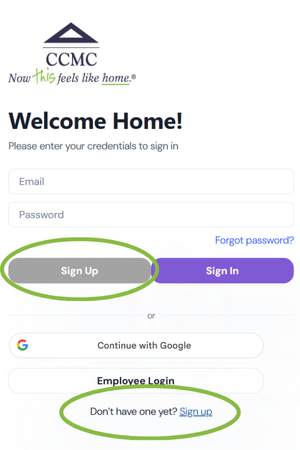
  1. To register for the portal, go to buurt.ccmcnet.com and click the gray "Sign Up" button, or click “Don’t have one yet? Sign Up,” located below the login options. Please sign up with the email associated with your resident account. 
  2. On the next page, fill out the short form and click “Create account,” or select “Continue with Google,” located below, if your resident account is associated with your Gmail. 

Please note: If you don't have an email on file with the association, include your account number and property address when registering. If you don't know your account number, you can find it listed on your mailed assessment statement. 

View How-to Guides  

We’re here to help you feel confident with this new portal, and we’ve prepared a variety of resources to guide you every step of the way. Visit the Resident Portal page on the Inspiration community website to find step-by-step guides on how to navigate the system:   


  • Pay and view your account balance  
  • Access compliance history  
  • View community documents 

Training and Support  

We will be hosting two virtual training sessions to walk you through how to navigate the portal, one on January 15 at 6 pm and one on January 20 at 6 pm. If you can’t make a live session, don’t worry, recordings will also be available with step-by-step instructions on how to access the most commonly used features. 


We're thrilled to bring this improved experience to your fingertips! Please take time to log in to the system and view all that the new portal has to offer. If you have any questions, please don’t hesitate to contact the team at InspirationTX@ccmcnet.com or 469-522-2120.

Meeting ID: 236 891 950 945 99

Passcode: ag3Ca7YN

Meeting ID: 266 915 805 010 77

Passcode: ct7uj9Ua

Sincerely,
Heather Bordner-Ayyob
Community Manager I hayyob@ccmcnet.com
Club Inspiration
1715 Inspiration Blvd.


Office Hours 8 am - 5 pm
Monday - Friday
Office Hours: 10 am - 2 pm
Saturday
Inspiration Residential HOA is proudly and professionally managed by
469-522-2120
After Hours HOA Emergency Number
1-800-274-3165