It's about time newsletter banner.

Timekeeping Replacement Project

Thursday, March 5, 2026

Dear Colleagues, 


I am pleased to welcome you to the inaugural issue of our monthly Timekeeping Replacement Project newsletter as we transition to new timekeeping systems to better serve our entire campus community. This project is a vital investment in our people, ensuring every hour worked is accurately recorded, approved, and reported to UCPath for accurate pay. By automating complex pay rules and providing a cost-effective solution for the university, we are not only enhancing payroll accuracy but also reducing the administrative burden on our departments. I fully support this journey toward a more efficient workplace and look forward to the clarity and ease these new systems will provide for us all.


Warm regards,

Kelly Sparks

Vice Chancellor of Finance and Chief Financial Officer

Testimonial from a Change Champion

Headshot of Jeff Gill.

Jeff Gill, Facilities Services, CalKronos Change Champion


Tell us about your timekeeping experience at Berkeley.

I have worked in a timekeeping capacity for almost my entire career on campus since starting at UC Berkeley in 2009, ranging from payroll processing to being a payroll lead to being a system admin on the Caltime team during its 2014 rollout. 


How will you be impacted by the new timekeeping systems?

These changes will impact how I go about timesheet review and processing since there will now be multiple systems to address instead of just one.


What excites you most about the upcoming changes?

What excites me about the upcoming changes is getting a new system that sounds a bit easier to train on, which is a continuous focal point both with our current staff and our incoming staff, and some of the new features that sound like they will make some of our tasks easier. 

Time is a'Changing

In this section, we will address the important question: Why are we changing, and what’s in it for me?


We heard from UC Berkeley employees in a November 2024 survey that navigation in CalTime, especially for supervisors, was a big frustration. Adding hours for students with multiple jobs is confusing, leading to errors that need to be corrected by supervisors or the timekeepers. Sometimes just accessing the CalTime system is the problem. 


Read on in our One Minute Tip section to see how we made this a top priority for the new timekeeping systems with new features like a Home page and using modern navigation through tiles in CalKronos.

One Minute Tip

Introducing the CalKronos Home Page

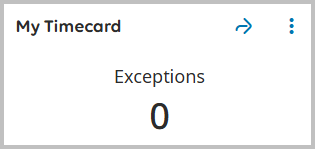
On the home page, tiles display a snapshot view of key information and links to access more detail and functionality. Some tiles, such as My Timecard and My Accruals, are present for everyone, while the Manage Timecards tile is only available for managers. Clicking the arrow in the upper-right corner of the tile allows you to access its functionality.

My Timecard tile.

In addition to tiles, the home page has several icons at the top: 

  • Main Menu and Home icons on the left
  • Employee Search (managers only), Help and Notification icons on the right
CalKronos home page banner with simple icons of the navigation options.

While the home page presentation is different from our current CalTime system, the Timecard retains the same look and feel. The Approve icon and the drop-down to change the time period are in the same place as in CalTime. Entering pay codes to record leave works the same way.


Check out a general demonstration video Timecard Overview for Employees to see these features in action. Note that our configuration will differ slightly.

Your Questions Answered

Why is UC Berkeley replacing its current timekeeping system, CalTime?

The vendor for CalTime, UKG, is ending technical support for the platform in March 2027. This means no further updates, bug fixes, or support will be provided after that date, making it necessary for UC Berkeley to find a replacement solution.

Will the way employees record their time in CalKronos be different from how we do it now?

The requirements for how you enter time will remain the same in the new systems. For examples:

  • If you use a time clock currently, you will also use a time clock with the new systems.
  • If you enter the exact times you start and end work in the Timesheet, often called ‘real time’, you will do the same in the new systems. 

For more answers to your questions, please visit the Resources page on our website. If you have additional questions regarding the timekeeping systems and their implementation, feel free to email us at caltimetransition@berkeley.edu.

Project Timeline

We are set to launch CalKronos in July.


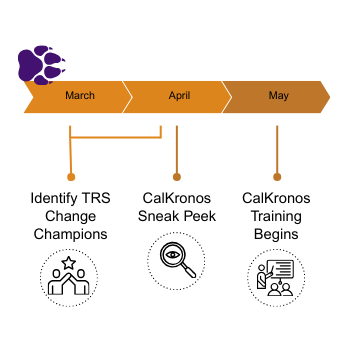
Follow the bear tracks to stay updated on upcoming milestones:


  • March/April - Identify TRS Change Champions
  • April - CalKronos Sneak Peeks
  • May - CalKronos Training Begins
March, April, and May milestones with a bear paw right before March.

Let us help

Please visit the Timekeeping Replacement Project website for more information or email us at caltimetransition@berkeley.edu with questions. 

If you are having difficulty accessing the information in this message, please contact caltimetransition@berkeley.edu for assistance.