 |
 |
 |
 |
 |
 |
 |
 |
 |
 |
| |
Program Control Quarterly Newsletter
June 2020
|
|
|
 |
 |
 |
 |
 |
 |
 |
 |
 |
 |
 |
 |
 |
 |
 |
 |
 |
 |
In this Issue
What is Program Control?
New Team Members
Training/Learning Opportunities
PMIS Recent Implementation/Enhancement Activities
Shayna's Tech Tips
Coronavirus
|
|
Program Control assists in managing scope, project status, budgets, schedules, estimates, document control, change control, risk management and reporting. Program Control serves as the central point of coordination across departments to ensure projects are delivered within cost, schedule, and risk expectations. Program Control support is also provided for activities including program reporting, enterprise standards and tool development, project management training and process improvements. Staff support is provided for the environmental planning and preliminary engineering, final design engineering and construction, and maintenance and operations phases.
|
|
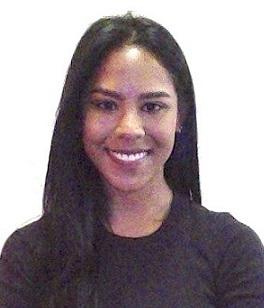
My name is Jana Motie and I will be assisting the Program Control group with cost/schedule analysis for the Crenshaw/LAX Transit Corridor Project. I graduated from Carnegie Mellon University with a degree in Economics and Statistics and have been working in the rail industry for about three years in project management and controls. Prior to making the move to Los Angeles three months ago from the east coast, I worked on major public projects in the Boston Metropolitan area, namely the Greenline Extension, and MBTA PTC (Positive Train Control) projects. I am looking forward to getting to know everybody and expanding my skill set here at Metro
.
|
Training/Learning Opportunities
|
- Unifier/CM Training Videos: With the recent implementation of Oracle Unifier, Metro has updated its training video series and uploaded it here on the MetroPMIS Vimeo page, which houses both a Unifier and CM14 series. The videos go through various aspects and functions of Unifier such as logging in, navigating, printing reports and many more. It's recommended users reference these videos to better understand the new system and how to navigate its features. Going forward, trainings will be provided to users on an as needed basis. For all questions, issues and requests, please contact MetroPMIS@metro.net.
- Metro/AACE International Webinars: AACE International (formerly known as the Association for the Advancement of Cost Engineering) provides resources in a variety of subjects that relate to the fields of engineering and construction management. The PMIS team has been hosting a series of AACE webinars for those of you wishing to expand your knowledge of project management/controls. We require a minimum of 10 people to set up a webinar for a particular topic, so let us know if you have coworkers that are also interested. Contact MetroPMIS@metro.net to express your interest. Be sure to include your name and the topic you are interested in. For those of you interested, you can find the complete list of available webinars by going to SharePoint > CMExternalDocLib > Programwide Documents > PMIS Desk Instructions > AACE International Webinar List or clicking on the link: AACE International Webinar List.
|
PMIS Recent Implementation/Enhancement Activities
|
-
W
e've posted our
Dashboard Publication Calendar for 2020
and it can be accessed in SharePoint at any time. Just use your PMIS login info at the link
here
.
-
SharePoint
: There are two new folders in SharePoint in the Programwide Documents folder:
Cert Training Materials and RPs. Both folders contain content from AACE International. To get access to SharePoint, please contact MetroPMIS@metro.net.
- P6: Every time a project is imported, global P6 data - including risk categories, resources, calendars - gets unknowingly imported into the system. This can cause P6 to slow down or crash. As a result, minor changes were made to everyone's P6 profile to prevent this data from being uploaded with every project import. These changes went into effect Thursday, May 21. This will not affect anyone's ability to update their projects; however, it does affect the ability to create new calendars and user defined fields. For any issues with P6, please contact vakharias@metro.net and bootorabibi@metro.net.
-
Unifier/P6: Work at home requirements have placed many burdens on project teams that are continuing to progress their projects. However, Unifier's electronic review and approvals have helped everyone continue with little interruption. Email, the mobile application and having records accessible from anywhere means that everyone can continue to work with minimal disruption. The newest version of Unifier has been deployed, and one of the benefits is having more descriptive information in the automated emails. In addition, a patch was applied to speed up navigation through the application. The cost engineers have migrated their work from a development copy to the full production site, paving the way for some of the enhancements planned, including integration with P6 (Schedules) for cash flow review, integration to Change Control documentation to simplify the cost engineer's reporting of potential changes. Also, the "Issues" business process is currently being reviewed and tested and plans are to put it into production before fiscal year end. For Contractors, a method to deliver back to the contractor large files through the CMI application that cannot be emailed has been put into production. Previously, this involved copying files to SharePoint, but now the large files can be delivered back to the contractor directly from Unifier via CMI. As part of the integration between Unifier and P6, the P6 application has been updated to the most recent version.
Also, relember that for ANY support questions, just email MetroPMIS@metro.net for a quick response. Training videos are available here.
|
- Zoom Fatigue: Since the pandemic started, more people are working from home. This is a big adjustment for many people, especially for workers who have never telecommuted before. Meetings are now conducted via video conferencing programs, from Skype to Teams to Zoom.
More and more people feel mentally exhausted as a result of increased video conferencing. This phenomenon has been dubbed "Zoom fatigue" (although not particular to this specific video conferencing application). It is also likely that feelings of isolation during the quarantine contributes to this fatigue, but this phenomenon is centered around the increased use of video conferencing.
There are many factors that contribute to this fatigue:
-
Technical issues - There are numerous potential technical issues that make video conferencing frustrating, from a faulty webcam to echoing audio to bad reception. Not only can all of these be tiring to deal with, but tend to be distraction and make the meeting longer
-
Being constantly attentive - In a video conference, there is a constant focus on the face. Callers feel more pressure to be constantly alert because they are always on screen even if they are not the focus of the conversation. Everyone can always see everyone.
-
Looking in a mirror - Not only can everyone see the caller, but the caller can see themselves. It is easy for one to become self-conscious when they constantly see their own image. In addition, they can become distracted by their own appearance, especially if they are self-conscious, instead of being part of the meeting.
-
Distracting backgrounds - Many telecommuters are stuck at home with family. While this is unavoidable for many, a meeting can easily be derailed by, for instance, an unusual picture on the wall or a family member crashing the meeting. While this can be endearing
when it happens on a talk show, it is inappropriate for a work conference.
There are ways to mitigate or prevent becoming fatigued during teleconferences:
-
Keep multitasking to a minimum - Because teleconferencing requires focus, refrain from doing other activities (even if they are work-related) during the conference.
-
Take breaks - This is effective in long video conferences. Allow callers time to shut off or step away from the screen.
-
Switch to "Audio Only" conferencing - Employees who are uncomfortable seeing themselves on conference calls may prefer this option. Relying on phone calls is a similar option.
-
Work in a private room with few distractions - It is preferable to use a plain background with few distracting features. If a meeting is scheduled in advance, set up a private meeting space in the house and inform the other residents that this is a work conference.
For more information, see below:
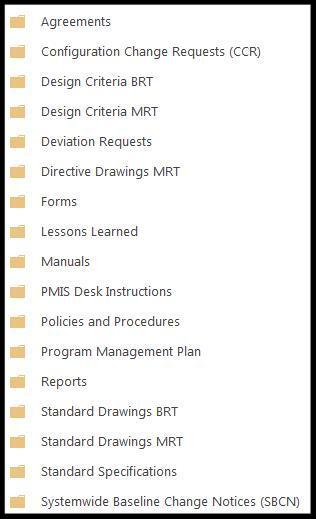
- Accessing Sharepoint Programwide Documents: It's come to the attention of the PMIS team that some users are unfamiliar with Metro's programwide documents. These documents, shown in the screen shot below, include Design Criteria Bus Rapid Transit (BRT)/Metro Rail Transit (MRT), Standard Drawings BRT/MRT, Standard Speculations, etc. To access these files, click this link Programwide Documents and use your PMIS SharePoint login info. If you don't have access to SharePoint, please contact MetroPMIS@metro.net and we will verify/resend your login info or help get you set up. In order to keep everyone up to date on the latest designer criteria, standard drawings, etc., we have also set up an alert for these documents to notify you when there has been a change.
- If you have a suggestion you'd like to see in the next newsletter or any question regarding these or previous tech tips, feel free to contact MetroPMIS@metro.net.
-
For those of you having issues using CM14, especially with Java, we recommend you use Java 6.43 & 8.101. If you don't know which version of Java you have you can check in your "Control Panel" and then check in "Programs and Features", look for the program with "Java" and note the version. If you have a different Java please contact Metro ITS at x24357 and request them to install the correct version. If you are still having issues please refer to the guide in the SharePoint folder to show you how to configure Firefox: Firefox 41.0 CM14 Configuration Instructions (Updated)
|
The Coronavirus pandemic is on everyone's minds right now, and since there is a lot of misinformation circulating online, here are some general tips for staying safe:
- Wear a mask when you leave your house. The purpose of the mask is to protect the people around you from getting infected
- Wash your hands with soap for 20 seconds (the time it takes to sing "Happy Birthday" twice
- Avoid touching your face as much as possible
- Check that health information comes from reliable health organizations
- Try to avoid crowds of more than 10 people
- When in public, stay at least 6 feet apart from other people
- If you develop severe symptoms (fever, trouble breathing, etc), call your health care provider BEFORE visiting a facility so they direct you to the best place to go
For up-to-date information about the Coronavirus, check out the links below.
More articles:
|
Have an idea or a question?
|
|
|
|
 |
|
 |
|
 |
 |
 |
 |
 |
 |
 |
 |
 |
|
|
|