|
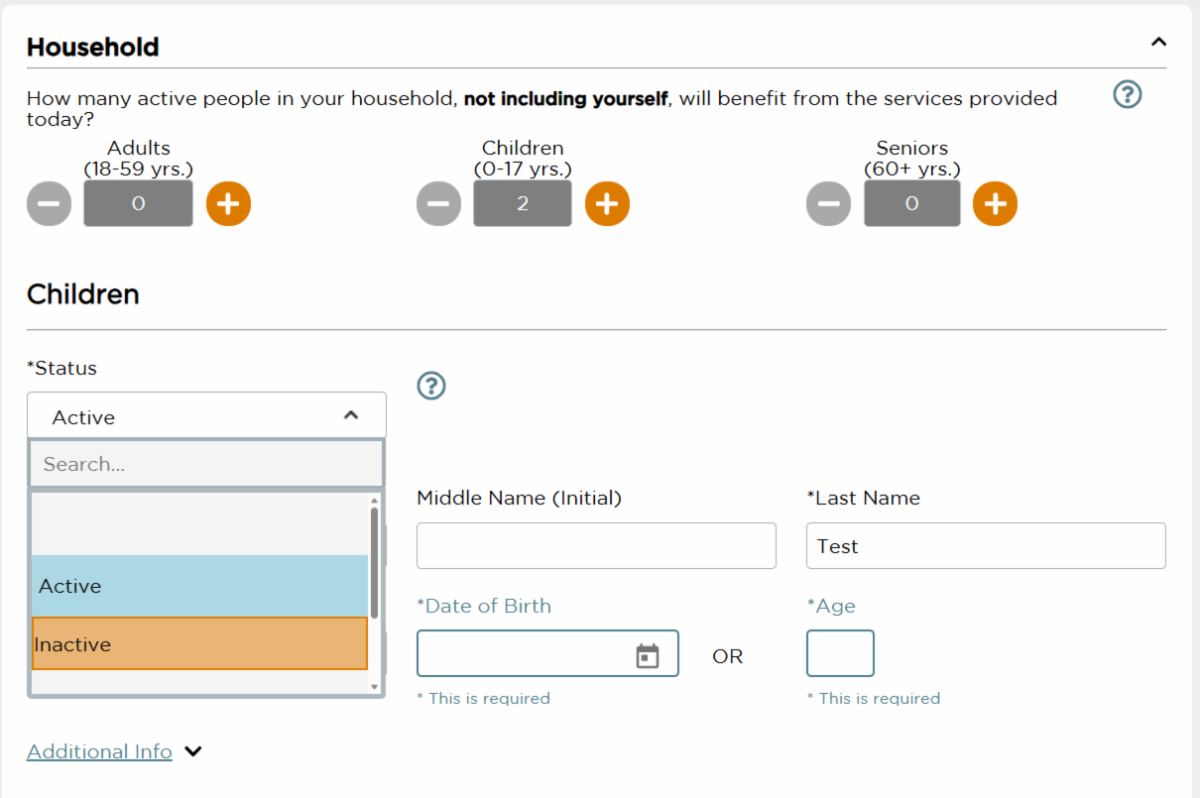
The MCI team has recently had an influx in questions regarding the "Status" option when editing Neighbor Household information.
Status can be found within the household section of intake. This segment is closer to the bottom of page 1 of 2 (or page 3 for TEFAP forms). The Status section is a clickable drop-down menu that will provide four statuses to choose from.
The four statuses to choose from are: Active, Inactive, Permanently Inactive, and Deceased.
When To Edit Neighbor Status
Active: This will be the default option when inputting neighbors into MCI for the first time. This means that this individual is searchable and "live" within the database.
Inactive: When a neighbor is manually set to inactive, they are no longer able to appear within a household. This is important because it can help provide more accurate numbers and statistics.
Some examples of when Neighbors should be set to "inactive" are:
- Temporarily leaving for a summer
- Moving out of household
Permanently Inactive/Deceased: These last two options can be a little more complicated. An example of permanently inactive could be a neighbor moving out of state and unable to attend food distribution events.
Please note! Updating neighbors into permanently inactive status would mean they would have to create a new neighbor profile if they return to a distribution!
Lastly, "Deceased" is an option for neighbor status.
MCI Agency Resources
We know that being unable to find a recurring neighbor can be frustrating, so we hope that these solutions can help! As always, we will link our agency resource page down below. Please reach out to our team if you have any more questions.
The MCI resource page contains important information ranging from downloading a neighbor roster to duplicate management. We encourage all agencies to save the URL for quick access. Click the link here to view: MANNA FoodBank - Agency Resources
|