COMMUNITY UPDATE

We hope you’ve had a chance to review the invitation email we sent earlier today with details about your new resident portal, and you've signed up for an account. If you haven’t already, you can find instructions here. The portal was designed to simplify your experience: from viewing and paying your association account balance to accessing important information you need as a resident.

How to View and Pay Your Assessment

  1. Sign in to your portal account at buurt.ccmcnet.com.  
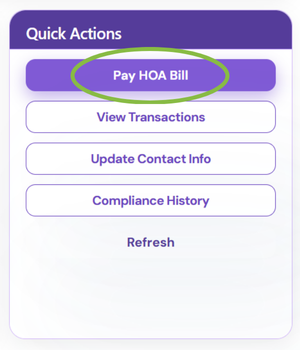
  2. After logging in, you’ll land on your Dashboard screen. Under Quick Actions, select Pay HOA Bill. 
  3. Clicking Pay HOA Bill will take you directly to the Online Payment Portal, powered by Western Alliance Bank (formerly known as Alliance Association Bank or AAB). 
  4. If you already have an account with Western Alliance Bank (AAB), you may be asked to enter your password once to activate single sign-on (SSO). If prompted, enter the password you created for your account. If you’re unsure of your password, click Forgot Password and follow the steps to reset it. Once this step is complete, your SSO will be activated, and you shouldn't need to enter your password again for future logins. 

We’re Here to Help! 

If you’re not able to reset your Western Alliance Bank (AAB) password, please contact our customer service team at 1-480-921-7500.


CCMC and Western Alliance Bank (AAB) are not related companies. To comply with privacy laws, we do not share personal information, nor does CCMC have access to your recurring payment profile.

Club Inspiration
1715 Inspiration Blvd.


Office Hours 8 am - 5 pm
Monday - Friday
Office Hours: 10 am - 2 pm
Saturday
Inspiration Residential HOA is proudly and professionally managed by
469-522-2120
After Hours HOA Emergency Number
1-800-274-3165