Phone:

01 4960006

Email:

info@brokerinformationservices.ie

Website:

https://www.bis-platform.com

March Tip of the Month - Action / Task Types for Tasks


Welcome once again to our monthly tip for users of The BIS Platform. In this months edition we will look at how you can set default Action / Task Types for Tasks on The BIS Platform.


To set Action / Task Types for Tasks you can do so by following the steps below;


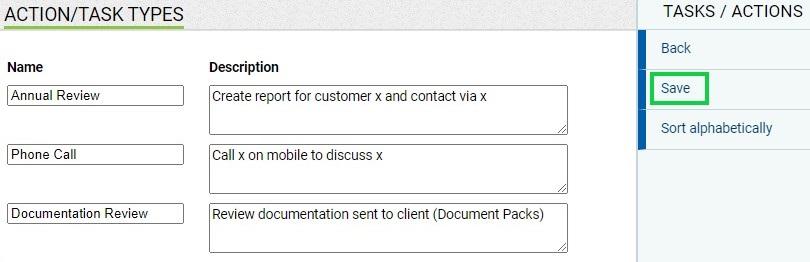
  • Tools > User Preferences > under Tasks / Actions choose Action / Task Types


  • Enter the name of your Task Type followed by the default description you would like to show for this task type when chosen


  • Once you have updated your descriptions, select 'Save' under Tasks / Actions


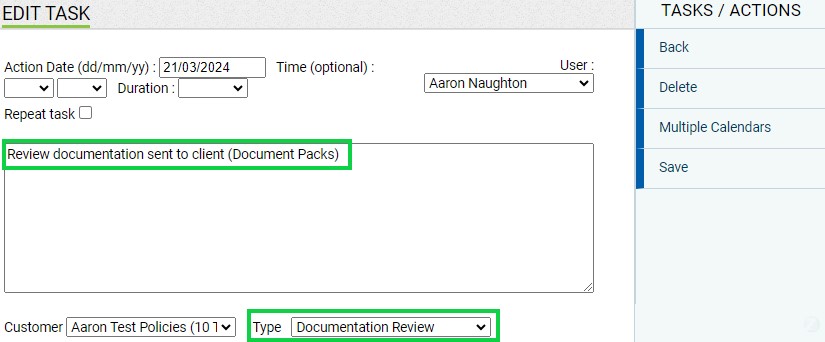
Once these Action / Task Types are set, when adding a Task your default description will automatically populate when you select the Task Type as shown below;


Note that you can still free type in this description box with any additional text as well.


If you would like more information on creating Action / Task Types, please do not hesitate to give the BIS team a call on 01-4960006 or email info@brokerinformationservices.ie.


Our April monthly tip will be emailed to you in a few weeks time, so keep your eyes peeled for some more great information.

Previous Tips for The BIS Platform

Assigning Handlers

CP116 Link for your website

PEPs Screening

Policy Alterations

Letter / Report Templates

Email Merge / Client Newsletters

Sales Pipeline

Scanned Documents Uploader