|
|
Why Are You Getting This?
You signed up to receive The Privacy Professor Tips, or initiated contact to stay in touch with Rebecca and/or Privacy & Security Brainiacs (PSB) and consented to receive the Tips. Please read our Privacy Notice & Communication Info at the bottom of this message for more information. You may unsubscribe from there as well.
| | Heed All the 'Storm' Warnings! | | |
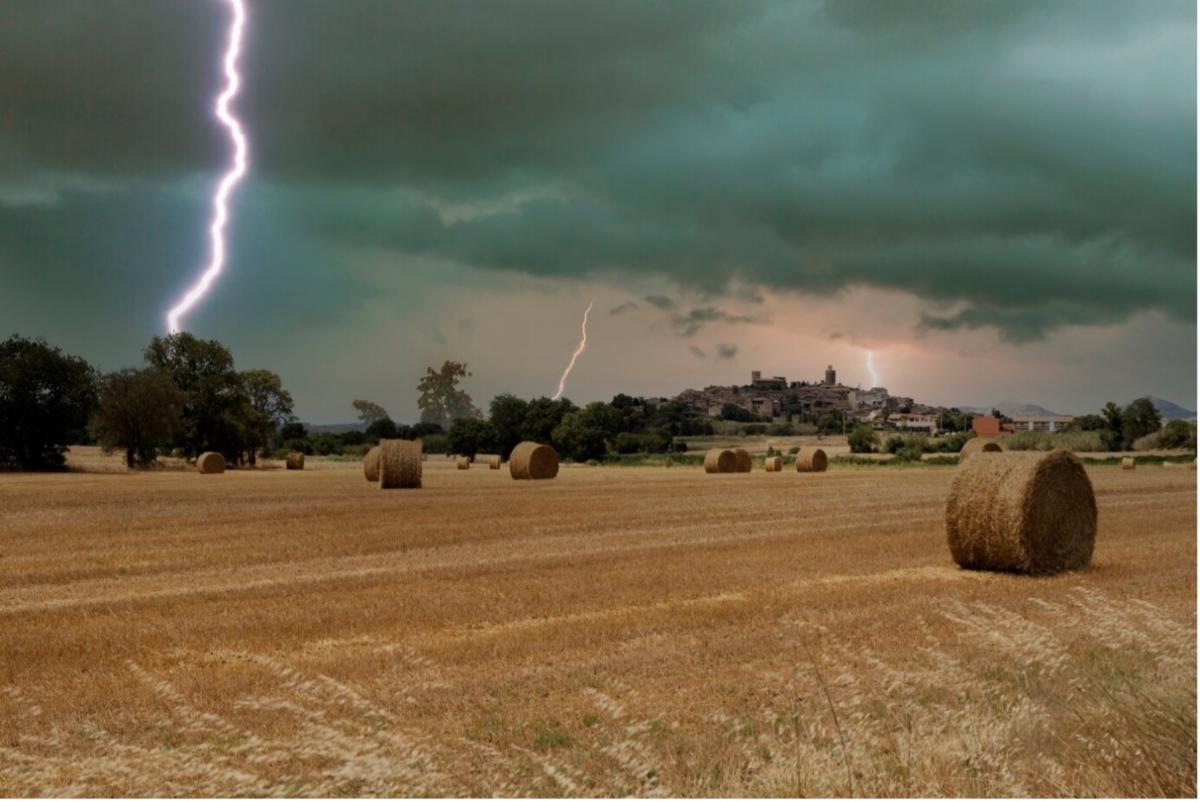
As we enter the stormy season here in US Midwest, with lightning storms, hail, and in what is often referred to as “tornado alley” and derecho corridor, I'm thinking about the significant progress that's been made to our severe weather warning systems in the past half century.
Whereas citizens were once had to depend upon to the way the sky looked off in the distance to know if there was a storm coming (really hard to do in the dark of night), we now have everything from radio broadcasts to smartphone alarms to AI enhanced forecasting to give us the heads-up we need. Often the warnings we get are extremely detailed, letting us know sometimes many days in advance down to the minute when and where storms will be the worst, and even the expected speed of the wind, the size of the hail and more.
The red flags that indicate oncoming security and privacy 'storms' are always increasing. While many are not as accurate as those from meteorologists, they are still much more sophisticated than in the past. The problem is, people, including those who are not privacy and security experts, need to recognize then heed the warnings for them to be effective.
Add to this our current stormy, turbulent and uncertain economy in the U.S., as well as in many other countries, and we are in a perfect storm for a spike in security incidents, privacy breaches, and a growing number and new types of cybercrimes.
How much attention are you paying to data security and privacy warnings? Reading this month's Tips message is a good indicator that you are doing pretty well. Keep up the good work; heads-up awareness is one of the best things you can do to prevent a data security and privacy storm from destroying your life. Share widely with your friends, family and co-workers so they can also avoid the storms of security incidents and privacy breaches.
We freely distribute the Privacy Professor Tips monthly publication to help both businesses and individuals, of all ages, to help identify risks throughout their daily lives, and to help them know how to prevent security incidents, privacy breaches, and to keep from being a victim of scams. We love getting your questions! Send them our way, and you may see it in an upcoming Monthly Tips issue.
We hope you are finding all this information interesting, thought-provoking and valuable. Let us know! We continue to appreciate, and love, the feedback you are sending us! We always welcome your messages. In fact, we’ve received so many messages about how much readers appreciate the news items we provide and wish we’d provide more, that we have decided to eliminate our “Beacons” section and focus primarily on news, questions and answers (which we also receive a lot of great feedback on), and mentions of our new courses and activities, since those are also well-received.
Thank you for reading!
| | |
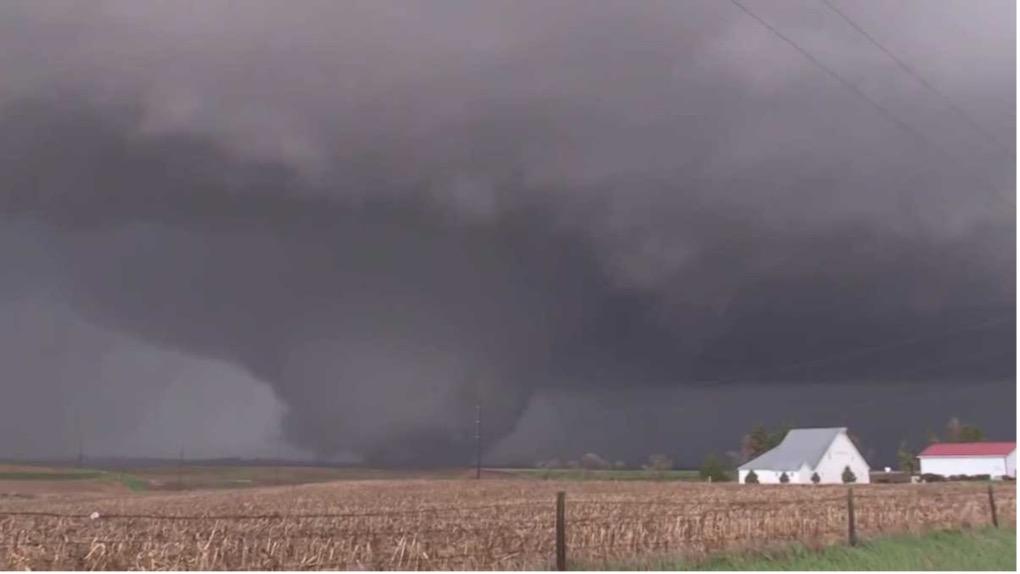
A recent huge tornado that went through our state, Iowa.
Photo from KCCI News
| | |
May Tips of the Month
- News You May Have Missed
- Privacy & Security Questions and Tips
- Where to Find the Privacy Professor
| | |
We are finding more unique news stories to share with you than ever before. We also share news items that we believe are important for most folks to know, but that often do not get much mention in traditional news, or even in security and privacy news outlets.
Here are just a few of the 100+ news stories we discovered throughout the past month that provide a wide range of interesting security and privacy related news. These news items demonstrate that such types of risks exist basically anywhere in the world, and that everyone needs awareness.
This month we limited the list to 39 news items. Here they are, in no particular order. Sometimes we will also include a few sentences about the situation to provide some advice or additional insights, or a related news item. Do you have interesting, unusual, bizarre or odd stories involving security and privacy? Some of the most interesting, bizarre or odd stories are in local news! Or questions about any of the notes we included for the stories we listed this month? Let us know!
| | |
1. Maryland Woman Loses $3 Million in Pig Butchering Crypto Scam. “The scammer, who posed as an investor, convinced her to put money into what seemed like a profitable opportunity. To make the ordeal appear real, they first directed her to the legitimate Coinbase website before switching to fake platforms. The victim saw some supposed high returns from her initial investment and even withdrew a small amount, which made the scheme seem trustworthy.”
2. 4 in 10 Americans Have Lost Money to Fraud, AARP Survey Finds. A new report explores worries about scams and understanding of criminals’ tactics
3. LG’s Integrated TV Ad Tech Analyzes Your Emotions. LG has licensed tech that claims to interpret TV users’ feelings and convictions. The company will use this data to more directly target the ads it’s showing to users of its smart TV platform.
4. The NYPD is Sending More Drones to 911 Calls, But Privacy Advocates Don’t Like the View. City officials say the so-called drones as first responders (DFR) program is making New York safer, but civil liberties and privacy advocates argue that police have not been transparent about operations that allow law enforcement sweeping surveillance capabilities that could easily be abused. “Imagine you’re relaxing in your backyard. You look up to see a drone flying overhead. Police sent it because a neighbor reported a petty crime down the street from your house. The drone is pointing a camera at the entire block and is recording everything that you and your neighbors are doing. The police will save the footage for at least 30 days.” The DFRs can fly for up to 40 minutes at a time.
5. We had many readers send us messages about government surveillance; in the US and throughout the world. Here are three of the messages that multiple people passed on to us; one about surveillance in the US, and one about surveillance in the country of Georgia (between Russia and Turkey).
a. How Governments Spy On Protestors—And How To Avoid It
b. Georgia’s Surveillance Surge: Chinese Cameras Spark Protest Crackdown Fears
c. How Americans Are Surveilled During Protests. “Today on Uncanny Valley, we tell you how you can best protect yourself from surveillance technology at protests.”
6. How to Protect Yourself From Phone Searches at the US Border. Customs and Border Protection has broad authority to search travelers’ devices when they cross into the United States. Here’s what you can do to protect your digital life while at the US border.
7. Where Does Hurricane Waste Go? We Tracked It With Air Tags to Find Out. The small 1.54-square-mile Treasure Island would produce over 128,000 cubic yards of debris after the storms — roughly 2 million standard kitchen trash bags worth of waste. NOTE: This is showing a beneficial use of tracking tags. However, it provides a good opportunity to remind you that these tags are also increasingly being used to track people, by putting them in their clothing (pockets, etc.), accessories, vehicles, etc. when they aren’t paying attention. So…pay attention when you are out and about!
8. KU Health Physical Therapist Accessed Women’s Plastic Surgery Files, Lawsuit Says. A University of Kansas Health physical therapist is accused of unlawfully accessing the medical records, including nude clinical photos and body measurements, of over 400 women, a class action lawsuit led in U.S. District Court in Kansas alleges. The lawsuit, which lists two Jane Does as plaintiffs filing on behalf of hundreds of other victims, was led against KU Health, Lawrence Memorial Hospital, an affiliate of KU Health where the victims underwent procedures, and Epic Systems Corporation, which hosted the electronic records.
9. Nissan Leaf Hacked for Remote Spying, Physical Takeover. Researchers find vulnerabilities that can be exploited to remotely take control of a Nissan Leaf’s functions, including physical controls. The researchers showed that an attacker could exploit the vulnerabilities to spy on the owner by tracking the car’s location, taking screenshots of the infotainment system, and recording people talking in the vehicle. They were also able to remotely take control of various physical functions, including doors, wipers, the horn, mirrors, windows, lights, and even the steering wheel, including while the car was in motion.
10. Car Subscription Features Raise Your Risk of Government Surveillance, Police Records Show. Records reviewed by WIRED show law enforcement agencies are eager to take advantage of the data trails generated by a flood of new internet-connected vehicle features.
11. Iowan, Sentenced to 50 Years in Federal Prison, Had Millions of Files of Child Pornography. The convicted man admitted he had recently produced child sexual abuse material and had been sexually abusing a child. He also admitted to collecting child pornography since 1996. Forensic analysis of Knowles's computers found 1.07 million images and videos of child pornography, some of which included local victims. NOTE: This not only is a vile physical crime, it is violating the victims’ privacy and lives by having these images indefinitely circulated, which will continue to harm them for the rest of their lives. Be aware of who your children are with, online and in person.
12. Russia Seeds Chatbots With Lies. Any Bad Actor Could Game AI the Same Way. In their race to push out new versions with more capability, AI companies leave users vulnerable to “LLM grooming” efforts that promote bogus information. NOTE: This is a significant threat, when cybercrooks and other bad people use false information to train AI, the AI will produce incorrect results. Always keep this in mind when you are using AI tools, especially the free ones; just because you obtained an answer does not mean it is correct. The AI could have been fed false information to intentionally cause false results.
13. Cyber Sabotage in the Skies: IAF Aircraft Targeted During Myanmar Quake Mission. “A GPS-spoofing attack targeted an Indian Air Force C-130J aircraft while it was delivering aid over Myanmar. The aircraft was flying as part of Operation Brahma, India’s coordinated response to the massive 7.7 magnitude earthquake that struck the Southeast Asian country on March 28, killing over 3,600 and injuring thousands more... Defense experts cite 465 similar incidents reported near Amritsar and Jammu since late 2023, suggesting a broader pattern of aerial deception.”
14. Google Starts Tracking All Your Devices As Chrome Changes. Digital fingerprinting, which Google prohibited as “wrong” in 2019, has now been resurrected. As of February 16th, digital fingerprinting has also been expanded to track all your devices, such as smart TVs and gaming consoles, providing a rich new seam of your data for the advertising industry to mine.
15. ‘Medical Calamity’: Dozens of Dutch Sperm Donors Fathered At Least 25 Children. Discovery that clinics have been breaking rules raises genetic risks in such a small, densely populated country. “A law aimed at reducing the risk of involuntary incest and inbreeding should have barred donors from fathering more than 25 children in the Netherlands since 1992, but proved difficult to enforce because of strict privacy laws.” NOTE: This is a good example of why it is important for lawmakers to write privacy laws in such a way that they protect privacy, but also allow for possible exceptions for unique, tightly scoped situations, with accompanying associated privacy mitigation requirements for the exceptions.
16. The Zoom Attack You Didn’t See Coming. Did you know that when participating in a Zoom call, you can grant permission to other participants to control your computer remotely? While this feature may come in handy when dealing with trusted family, friends and colleagues, threat actors have started abusing it to install malware on targets’ computer. The Zoom remote control attack: This specific tactic has been leveraged by an individual or group that The Security Alliance (SEAL) – a nonprofit dedicated to enhancing security within the cryptocurrency and decentralized finance sectors – has dubbed ELUSIVE COMET.
17. Seattle Crosswalk Buttons Hacked to Sound Like Jeff Bezos; SDOT Exploring ‘Stronger Security Measures’.
18. The Composer Still Making Music Four Years After His Death – Thanks to an Artificial Brain. In Australia, a team of artists and scientists have resurrected the US composer Alvin Lucier. It raises a storm of questions about AI and authorship. NOTE: This also brings up many privacy after death issues. AI is not 100% at providing results, but it 100% can be manipulated to give results that others want. Knowing this, it may become a good practice to include within wills whether or not an individual wants to have their pre-death content used to create “new” content attributed to them, or anyone else, after death.
19. Widespread Microsoft Entra Lockouts Tied to New Security Feature Rollout. “Windows administrators from numerous organizations report widespread account lockouts triggered by false positives in the rollout of a new Microsoft Entra ID's "leaked credentials" detection app called MACE. These alerts and lockouts began last night, with some admins believing they were false positives as the accounts have unique passwords that are not used on any other sites or applications.”
20. British Soldiers Tune Radio Waves to Fry Drone Swarms for Pennies. Truck-mounted demonstration weapon costs British 10p ($13.31 USD) a pop, says the British Ministry of Defense (MOD).
21. Your iPhone Is A Target For Thieves. Do this to help protect your data. A bit of due diligence could help prevent months — or more — of digital heartbreak.
22. The American View: AI Surveillance in Schools – Safety Net or Privacy Nightmare? “The authors explored how school districts in Washington State, North Carolina and Oklahoma U.S.A. have implemented machine learning solution to monitor all of their students’ activity on their school issued equipment and across their networks to detect keywords that might indicate the student was suicidal, homicidal, bullied, mentally or emotionally troubled, or otherwise in need of intervention.” “Examples included botched intervention attempts that actively made things worse, including a school outing a closeted LGBTQ student to their homophobic parents. Several sources quoted in the article complained of false positives, leaks of sensitive information, misprioritization of risk indicators.”
23. Billion-Dollar Cyberscam Industry Spreading Globally, UN Says.
24. Draft Executive Order Outlines Plan To Integrate AI Into K-12 Schools. A policy under consideration by the White House and seen by The Post instructs federal agencies on how to incorporate artificial intelligence into classrooms. NOTE: If implemented, hopefully this will include privacy and cybersecurity requirements for schools to follow to ensure the AI is not using student or staff data in training publicly available AI tools, and that the data is not false information.
25. Legends International Notifies Customers, Employees Of Data Breach. Legends International is a large sports venue support company.
26. Mozilla Is Already Revising Its New Firefox Terms To Clarify How It Handles User Data. The terms had been criticized for appearing to give Mozilla broad ownership of user data, but the company now wants to emphasize the “limited” ways it uses your data. “Mozilla says that “there are a number of places where we collect and share some data with our partners” so that Firefox can be “commercially viable,” but it adds that it spells those out in its privacy notice and works to strip data of potentially identifying information or share it in aggregate.”
27. TRM Links North Korea to Record $1.5 Billion Record Hack. The hack is the largest exploit on record. The attackers compromised one of Bybit’s offline cold wallets in what was possibly a supply chain attack, insider threat, or a sophisticated private key compromise.
28. Amazon Is Removing An Echo Privacy Setting That Keeps Alexa Recordings From The Company. An opt-in Alexa feature called 'Do Not Send Voice Records' stops requests from being sent to the company. It will soon be removed from Echo devices, Amazon confirmed to USA TODAY.
29. Meta Whistleblower Alleges Company Worked With China On Censorship. At a congressional hearing, Sarah Wynn-Williams, a former global public policy director at Facebook, said she watched as executives decided to provide the Chinese Communist Party with access to the data of Meta users, including that of Americans.
30. Scientists Discover Major Differences In How Humans And AI 'Think' — and the implications could be significant. Study finds that AI fundamentally lacks the human capability to make creative mental connections, raising warning signs for how we deploy AI tools.
31. An AI Image Generator’s Exposed Database Reveals What People Really Used It For. An unsecured database used by a generative AI app revealed prompts and over 95,000 explicit images—some of which are likely illegal. The company deleted its websites after WIRED reached out. “In recent years, dozens of “deepfake” and “nudify” websites, bots, and apps have mushroomed and caused thousands of women and girls to be targeted with damaging imagery and videos.”
32. Biometrics Vs. Passcodes: What Lawyers Recommend If You're Worried About Warrantless Phone Searches. Do passcodes really protect you more from warrantless phone searches than biometrics? It's complicated.
33. NSA, CISA, FBI, and International Partners Release Cybersecurity Advisory on “Fast Flux,” a National Security Threat. ““Fast flux” is a technique used to obfuscate the locations of malicious servers through rapidly changing Domain Name System (DNS) records associated with a single domain name. This threat exploits a gap commonly found in network defenses, making the tracking and blocking of malicious fast flux activities difficult.”
34. The Final Version Of The Children’s Online Privacy Protection Act (COPPA) Update was released on April 22, 2025
35. A Whistleblower's Disclosure Details How DOGE May Have Taken Sensitive Labor Data. Heard on All Things Considered.
36. Does DOGE Have Your Personal Information? DOGE is not an independent agency or Cabinet-level post. Treasury payment systems are usually restricted to a handful of people DOGE now has access to the sensitive data of millions of Americans.
37. DOGE Plans to Rebuild SSA Code Base in Months, Risking Benefits and System Collapse. Social Security systems contain tens of millions of lines of code written in COBOL, an archaic programming language. Safely rewriting that code would take years—DOGE wants it done in months.
| | Check out our Privacy & Security Brainiacs blog page for more unique security and privacy news items. Have you run across any surprising, odd, offbeat or bizarre security and/or privacy news? Please let us know! We may include it in an upcoming issue. | | |
Privacy & Security Questions and Tips
Rebecca answers hot-topic questions from Tips readers
May 2025
| | |
We continue to receive a wide variety of questions about security and privacy. Questions about current hot topics in society are of particular note. Thank you for sending them in! This month in addition to our Question of the Month we’ve included five Quick Hits questions.
Are the answers interesting and/or useful to you? Please let us know! Keep your questions coming!
| | |
Question of the Month:
Q1: How can I remove my data from my 23andMe account?
| | |
A1:
Here’s what worked for a friend of mine a few weeks ago:
First, I recommend you download your personal data from your 23andMe account. Here are some steps to accomplish this:
1) After you login to your 23andMe account, go to the “Settings” section of your profile.
2) Scroll to the bottom of the page to the section labeled “23andMe Data”.
3) Click “View” next to “23andMe Data.”
4) To download a copy of your genetic data for personal storage, choose the option to download it to your device before proceeding.
5) Delete your data at the very bottom of the page where it says, “Permanently Delete Data.”
Don’t forget about your physical bio (saliva and DNA) sample! I recommend you destroy that as well. To destroy it if you previously chose to let 23andMe store them, you can switch your preference on the account settings page under “Preferences.”
6) Click “Edit”
7) Scroll down to the “Sample Storage” section and click “Permanently discard samples”
I also recommend you revoke your permission to allow your genetic data to be used for research. “Research” is a broad term, and you have no control over the type of research, analysis, searches, etc., that will be performed, nor the entities that will be doing those actions, or simply obtaining your data and physical bio samples. You can withdraw your consent on the account settings page, under “Research and Product Consents.”
8) Click “Edit”
9) Click “change consent”
10) Scroll down to bottom of the page and check boxes to not give consent.
11) Submit your selection.
Then submit your request to delete your 23andMe account here: https://customercare.23andme.com/hc/en-us/articles/212170688-Requesting-23andMe-Account-Closure
If you have any other questions, call 23andMe directly at 1 + (888) 367-7556.
| | |
Quick Hits:
Here are five more questions we are answering at a comparatively high level. We provide more in-depth information and associated details about these topics in separate blog posts, videos on our YouTube channel, in infographics and e-books, LinkedIn posts to our business page, and within our online training and awareness courses.
| | |
Q2: What is a new security and/or privacy threat that everyone should be on the lookout for?
A2:
The short answer is: QR codes on flyers. In our June 2024 Tips we covered the security and privacy risks of using QR codes to pay for time on parking meters, for restaurant bills, and other payment situations that were quickly increasing in popularity. They are still being widely used. Now there is another quickly increasing use of QR codes: Putting them on physical paper flyers to advertise a wide range of things like garage sales, neighborhood events, specific societal viewpoints, searches for lost pets, and an unlimited number of other topics. The crooks have noticed this, saw an opportunity, and are increasingly using flyers with QR codes to advertise jobs, “easy money” investments, “once in a lifetime opportunity!”, guaranteed loans, and more. They often prey upon those who have lost jobs, lost their savings, or otherwise are in dire financial need. Please stay aware that these may very well malicious.
These are being placed not only in cities, but also, possibly even more often, in rural areas and in small towns, where the economy woes have hit really hard, especially with so many factories and remote services being cancelled and government grants and programs being eliminated.
Have you received any of these flyers at your home? We have received six of them since the beginning of this year here in central Iowa. Some by postal mail in our mail box, some stuck into our front door handle, and one that someone taped to our front door window.
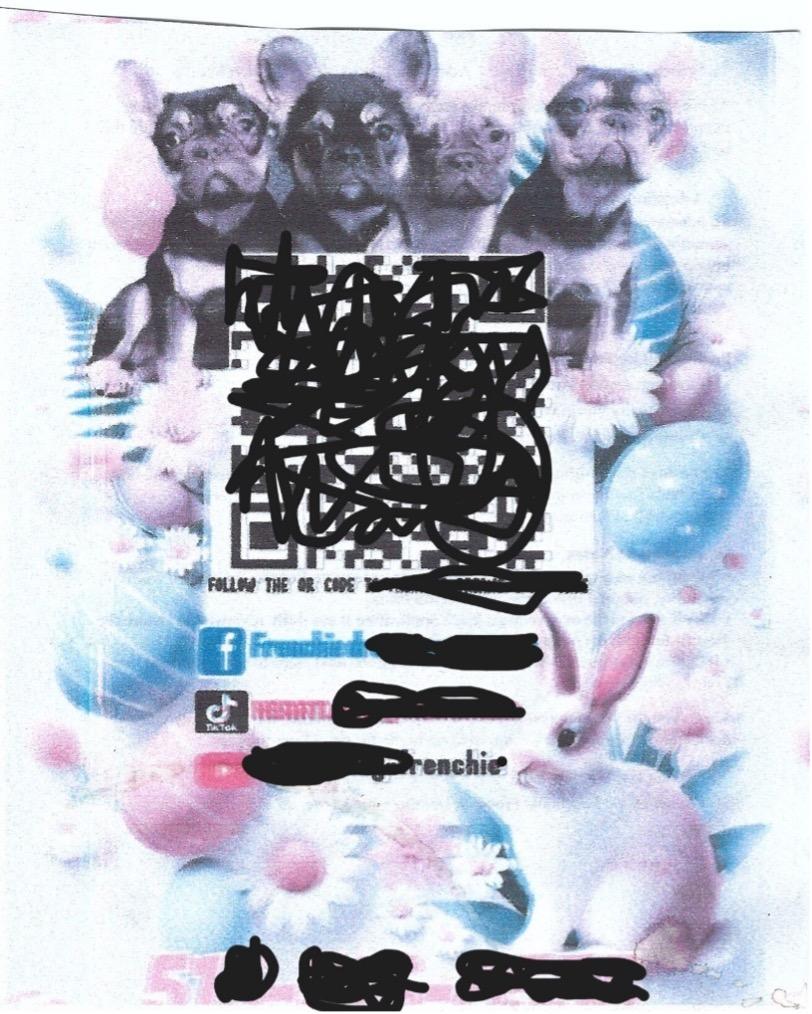
Here is an image of one of them I received placed in my front door handle, advertising on a 3.25” x 2.75” scissors-cut piece of paper someone who sells French bulldogs. Most of the images and writing were really blurry, but that QR code was quite clear. I made the QR code unusable, and blocked out other identifying information.
| Source: Rebecca Herold’s front door handle 😊 | |
In this particular situation, I checked the QR code to see if it was malicious. It was not. However, others I had received were. The fact that people are increasingly using these types of flyers with QR codes on them for non-malicious purposes makes this a type of phishing (aka social engineering) tactic very successfully used by cybercrooks. This is a type of physical phishing attempt (spreading paper flyers throughout neighborhoods) that utilizes technology (scanning the QR code on the flyer) to trick people into being victims.
In addition to the other tips provided in the June 2024 Privacy Professor Tips previously referenced, here are just a few QR code scanners you can use to check before you click on a QR code. Be sure to read the associated information about each, especially about how and to whom they share data, options for data deletion, and encryption of data transmission.
Do you use a QR code security and privacy scanner that you like but we don’t have listed? Let us know.
Bottom line: Never “click” a QR code, whether it is on a physical paper, sticker, etc., or online, before first checking to see if it is malicious. If you don’t do this comparatively quick check, you could cause yourself a lot of trouble, time loss, data loss, likely financial loss, and given the types of locational tracking tech malicious QR codes can plant in your phone and computer, physical risks.
| | |
Q3: What are the privacy risks of online funerals and memorials?
A3:
Great question! This is one I’ve thought about regularly throughout recent years. People are often very emotionally vulnerable during funerals, memorials, celebrations of life, and similar types of events. This often leaves them vulnerable to a wide range of attempted attacks from cybercrooks who want to take advantage of this during such events. These events also could lead to physical risks based upon what is shown and talked about during the event. When these events are online, they can potentially expose information to a much wider audience that cybercrooks would love to take and use to exploit those vulnerabilities.
Here are a few privacy and security risks, and ways to mitigate them, that folks who are planning such events, and those who will be attending them, need to keep in mind.
Security and Privacy Risks:
- Personal information disclosure
- Event information becomes permanent online
- Lack of control over online memorial Content
- Cybersecurity threats from the memorial platform
- Phishing and Scams
- Malware Distribution
- Data Loss and Corruption
Actions to Mitigate these Risks:
- Adjust privacy and security settings to the strongest levels
- Use secure information and file sharing methods
- Save the final version of the memorial program in a non-editable format
- Before starting the memorial, let attendees know the security and privacy protections that are in place, and the actions they need to take to attend the online event to support security and privacy
- Use reputable websites for online memorials
- Verify the online service’s links and donation requests methods are secure
- Make sure strong multi-factor passwords and encryption are used
- Ensure the host applies regular security and privacy patches/updates
- Ensure the host regularly backs up their memorial servers
- Be very cautious of friend requests from unknown profiles related to a recent death announcement
- Monitor online activity for any suspicious activity or comments on online memorial pages
- Educate yourself and others about the potential risks
To save space in this month’s Tips we didn’t provide all the related details. However, on May 3 we’re publishing a new blog post with expanded details for the above on our Privacy & Security Brainiacs blog page.
| | |
Q4: Can the information I post on LinkedIn be used by anybody for any reason?
A4:
This is a timely question! Thank you for sending it. The answer is a resounding: No!
Just because someone posts a comment, article, endorsement, recommendation, or other type of post to LinkedIn, or any other type of social media site, it does not mean that others are allowed, under the LinkedIn Terms of Use in addition to all the applicable data protection laws and regulations throughout the world, to copy and paste it elsewhere, or use it for other things.
Here’s a good example that recently happened to me. Throughout the many years I’ve been on LinkedIn, I’ve written several recommendations for connections that I personally know. Earlier this year I received a message from someone who is a connection of mine on LinkedIn, angry at me, for “giving my contact information to some loan shark! Why did you do that?”
Fact is, I did not do that.
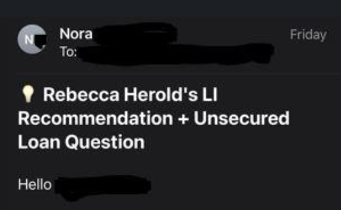
Soon after I received another message from another LinkedIn contact; he had forwarded an email he had received that had the message title shown below:
| | |
He asked if I knew about this, and wanted to let me know if I didn’t. Of course, I did not know these messages were being sent. He also sent me the full message, which referenced the recommendation I gave to him years ago, and then tried to relate my recommendation with my contact’s potential need for a loan.
The implications from putting my (or anyone's) name in the title and within the message body, for any reason at all without my (or anyone’s) consent, are many. One of the reasons I started using the 💡 at the beginning of my name on LinkedIn a few years ago was to help me see indicators of when an automated process, including via AI, was likely to be incorporating my name into their ads/etc. It is alarming to see how quickly and with complete impunity organizations are adopting these practices.
I called the owner of the small loan company that was sending these messages. It turns out that he had contracted a third-party marketing and sales business. He knew they were using AI to create and send emails with marketing messages about his services, but he said he did not know they were scraping information, including people’s names and what they had posted, from online posts from LinkedIn, and possibly other social media sites, and including them within the marketing messages. He said he would ask them to stop taking other people’s posts and names and incorporating them into the messages. Given I’ve not received any more notices about similar situations, perhaps they have indeed stopped.
Here’s a very important point to anyone thinking about using the personal information you find online and re-using it for marketing, research, sales, whatever, without the associated individuals’ consent: Don’t do it! That message they posted, or photo or video, etc., was not posted for you to use at your leisure, or for anyone in the world to take and use at their discretion. Doing so violates many different privacy laws and regulations worldwide, including many in the U.S., particularly the at least 22 U.S. comprehensive state privacy laws. And, as you can see by the irritated person who contacted me, thinking that the way the message was worded that I had given a loan company her name and contact information because I must have thought she needed money, such use does not only violate laws and regulations, it also can harm the relationships of the people whose information you gathered from online, and those to whom that information was sent within other types of messages.
| | |
Q5: I know that there are many texting scams that target individuals. Are there any that target businesses?
A5:
Yes! While many of them are similar to those targeting individuals, those targeting businesses are often looking for larger amounts of money, ways to infiltrate the business’s network, systems and files, and ways to launch ransomware.
A few brief examples include;
- Purported texts from banks to targeted victims saying there are suspicious activities in the business account.
- For businesses with vehicle fleets, texts claiming that there are unpaid tolls.
- Texts from impersonators claiming to be a personnel sourcing company with “perfect” candidates for the business’s posted job openings.
This is a growing problem. In fact, the FTC recently put out a warning about businesses being targeted by malicious texts. You can read it here.
| | |
Q6: Please resolve a disagreement that we are having here at my dental practice. Does HIPAA allow us to leave messages for patients at their homes, in voicemail or with their family members, to remind them of appointments or leave other types of messages related to them being our patient?
A6:
The short answer is yes, when following documented policies and procedures.
HIPAA allows healthcare providers to communicate with patients regarding their healthcare treatment, payment and operations (TPO). This includes communicating with patients at their homes, whether through the postal mail, by phone including voicemails, or in some other manner. HIPAA does not prohibit covered entities (CEs) (healthcare providers, healthcare insurers, and healthcare clearinghouses) from leaving voicemails for their patients if they follow established policies and procedures to reasonably safeguard the individual’s privacy, and to safeguard the associated protected health information (PHI).
The Department of Health and Human Services (HHS), which is the regulatory oversight agency for HIPAA compliance, requires CEs to safeguard PHI so that they limit the amount of information disclosed in voicemails, and provided to family members. For example, a CE should leave only its name and number, and if there is any other necessary information, to confirm an appointment, or, simply indicate they would appreciate asking the individual to call them back, which really is all they need to indicate in order to have the patient get back in touch with them.
HIPAA allows CEs to disclose limited information necessary to family members, friends, or other persons regarding an individual’s care, even when the individual is not present. However, CEs must use professional judgment to assure that such disclosures are in the best interest of the individual, and limit the information disclosed to the minimum necessary. Yes, I already said that, but that is a very important part of my answer, and also HIPAA compliance.
In situations where a patient has requested the CE to communicate with him/her in a confidential manner, such as by alternative means, using a specific phone number, or at an alternative location, the CE must accommodate that request, if it is reasonable. For example, HHS considers a request to receive mailings from the CE in a closed envelope rather than by postcard to be a reasonable request that must be accommodated. Similarly, a request to receive postal mail from the CE at a post office box rather than at their home address, or to receive calls at the patient’s office rather than at the patient’s home phone or mobile phone numbers are also considered to be reasonable requests if there are no extenuating circumstances (e.g., the request would put the patient, or the CE, at risk of harm).
By the way, in that image that is right before this question... There is at least one way in which that dental office is most likely violating HIPAA by the way in which it is visibly set up. Can you identify the violations?
| | |
Check It Out!
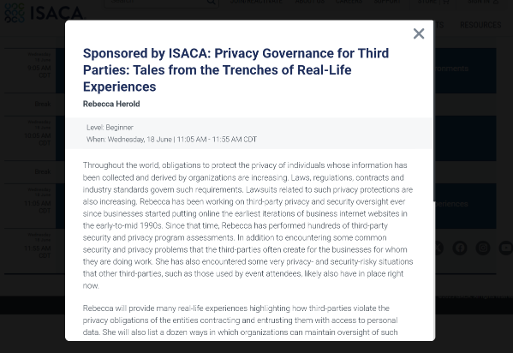
We are going to be posting more videos to our YouTube channel this year! We know; we are behind. We will be better at getting more online content created in latter 2025! To date we have not formally promoted it. We have found that our recently created video shorts are receiving a lot views and engagement! These are some wise and useful quick tips and facts from Dr. Mich Kabay, our premier Privacy & Security Brainiacs Master Expert. Check them out, along with the most recent one, “Violating Federal Law with Bad Coding Practices,” here.
| |
We have a few more shorts and medium- to long-length videos in production. In the meantime, please check them out, let us know of any topics you suggest we cover, “like” the videos, and subscribe. And of course, add comments for topics that motivate you to do so. These are some wise and useful quick tips and facts from Dr. Mich Kabay, our premier Privacy & Security Brainiacs Master Expert. Dr. Kabay’s course, “Secure Coding” provides over an hour of valuable information for every software programmer, developer and tester, of all experience levels.
What topics would you like to see us create videos, and more formal online courses, for? Let us know!
Have questions about our education offerings? Contact us!
| | Where to Find The Privacy Professor | | |
Permission to Share
If you would like to share, please forward the Tips message in its entirety. You can share excerpts as well, with the following attribution:
Source: Rebecca Herold. May 2025 Privacy Professor Tips
www.privacysecuritybrainiacs.com.
NOTE: Permission for excerpts does not extend to images.
Privacy Notice & Communication Information
You are receiving this Privacy Professor Tips message as a result of:
1) subscribing through PrivacyGuidance.com or PrivacySecurityBrainiacs.com or
2) making a request directly to Rebecca Herold or
3) connecting with Rebecca Herold on LinkedIn.
When LinkedIn users invite Rebecca Herold to connect with them, she sends a direct message when accepting their invitation. That message states that in the spirit of networking and in support of the communications that are encouraged by LinkedIn, she will send those asking her to link with them her monthly Tips messages. If they do not want to receive the Tips messages, the new LinkedIn connections are invited to let Rebecca know by responding to that LinkedIn message or contacting her at rebeccaherold@rebeccaherold.com.
If you wish to unsubscribe, just click the SafeUnsubscribe link below.
| | | | |