Hello Measure User


Hello,


We hope your year has been going well. 


In this newsletter you will see why it is important to update your Measure Desktop to 64-bit, a tip for stairs, and reasons why you might be interested in outsourcing your quantifying. 


Finally, don't forget to take advantage of our free online training.


Enjoy!!


Why Update To 64-Bit?

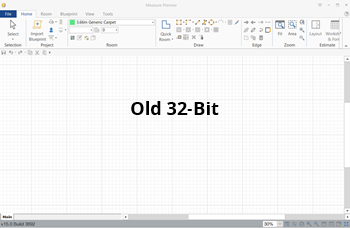
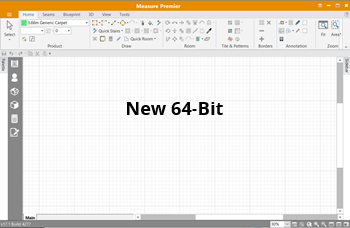
We notice that some users of Measure Desktop haven’t updated from the old 32-bit program to the 64-bit version that was released last year.


If this applies to you, it might be because you are comfortable with where everything is in the old version or simply because you haven’t gotten around to it.


We strongly recommend that you update for two main reasons:


First – there are a number of refinements in the new version that aren’t available in the old.


Second – because RFMS no longer supports the old 32-bit program, at some point, it may not work, possibly as a result of a future Windows update.

The version that we suggest users should generally be on is V17.1 Build 4224 – your version/build number can be found at the bottom left of the Measure screen.


At this time you won’t be able to update to this build through the program itself but we can send you the download and installation link.


If you need assistance updating please contact the Measure Team at RFMS Australasia - measure.au@rfms.com


Stairs Tip

Adding a Stair Configuration to Stair Library

Measure Mobile and Desktop come with a number of stair configurations pre-set for use.


The various elements that make up these stairs can be disassembled and reassembled to form different configurations as the need arises....

Read More
 

Why Outsource Quantifying?


QuantiSafe by RFMS has been up and running now for over two years. The goal from the outset was to provide a service whereby plans are quantified promptly, accurately, and priced affordably. We have achieved these goals and now have a growing number of clients that have trialled the service and take advantage of it regularly.


If you have read my previous articles on the subject, you might recall that QuantiSafe was the service I would have used if it had been available to me when I was a flooring retailer. Why? The same reasons our QuantiSafe clients tell us:


  • We were not quoting every opportunity that came our way. Our salespeople did not have the time to attend to all their responsibilities and still find time to quantify every plan on their desks.
  • A key to selling is responding promptly; quotes took too long to get into customers' hands because of the time required to quantify plans.
  • Between not quoting and late quoting, we were missing sales opportunities.
  • Quantifying impacted salespeoples’ time for more productive activities such as quoting, following up on quotes, and developing contacts.
  • Errors in quantifying impact the bottom line. Over-quantify, and we miss the sale or end up wasting product that should instead have been profit. Under-quantify, we have all the issues associated with keeping the job on track, plus the cost and reputational damage.

My conclusion as a retailer was that quantifying is not a sales function; my best quantifiers were not my best salespeople, and my best salespeople were not quantifying experts. All these years later, QuantiSafe would have been the solution.


The consensus is that salespeople spend 20-25% of their time quantifying plans. When it comes to commercial, the percentage is much higher. It’s not hard to calculate how much quantifying is costing you. Using QuantiSafe, you will spend less and make more sales.


Our QuantiSafe clients are more profitable; they are quoting more projects, making more sales, and making better use of their salespeople.


If you want to know more about QuantiSafe, check out our website, watch this short video, or click here, and we will contact you to arrange a free, no-risk trial.


Free Online Training

Want to improve your use of Measure Desktop, Measure Mobile, ROS, and CRM? We have some NEW training videos available for FREE.


Here are just a few of the many topics avaialble:


  • Modifying Room Properties
  • Holes
  • Stairs - Basic, Advanced
  • Notes and Photos
  • Proposal Document
  • Much more!!!


Measure Desktop
CRM with Measure Mobile
Measure Mobile
ROS
CRM
 

We hope you enjoy this newsletter. 


Please reach out if you have any questions.


The Team at Measure By RFMS


Helpdesk: measure.au@rfms.com


Webcasts
Visit Our Website
Tips + Tricks