Logging Provider Services
Non-Billable Logs
Providers can add comments that are not part of a student service log in the
Service Portal. If an IEP has not been finalized, a non-bIllable log should be created to document a service. A non-billable log will not be sent to DPHHS for reimbursement, but remains in the student online records.
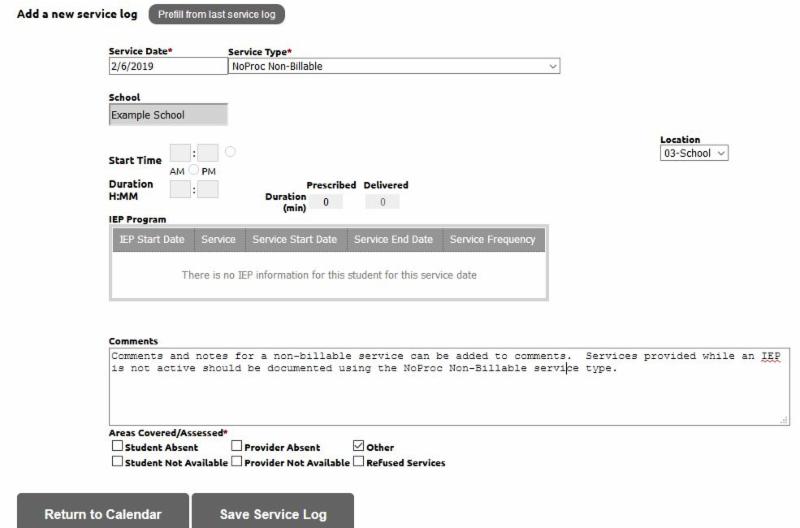
Non-Billable logs are created using the
Service Log Wizard. Instead of choosing a service code, choose NoProc-NonBillable from the drop-down menu. Notes can then be added in the comments section. A detailed explanation of how to create a non-billable log can be found
here.
A student with a Medicaid number will show as bold in the Service Portal. You should use the service code and not a non-billable log for non-Medicaid students with IEP directed services. This will allow services to be reimbursed should eligibility change.
Progress Reports
Progress notes should summarize the service comments and indicate the student's progress toward medical status, IEP goals, and changes in treatment plans with rationale for change. Choose the Progress Report option from the drop-down menu to enter your notes. Progress reports are considered non-billable and will remain in the student online records for future reference.
|