Monday Morning Coffee and Technical Notes

November 10, 2025 View as Webpage

Upcoming Events


November 10 – Station Log Review by Chief Operator


November 18 – ABA Engineering Webinar. Special guest will be Kirk Harnack Telos Alliance

Ole Man Winter is Knocking at the Door


Although winter weather is less of a concern in the south than it is in other parts of the country, all stations should still prepare by ensuring generators and transfer systems are working and fuel tanks are full.


Check access roads for any issues that could worsen during ice and snow. All back up systems, including transmitters, STL, and control systems should be tested.

Reviewing the Basics – PCR


The majority of television viewers have never heard of PSIP or PSI but they are quick to speak up when something is not right with it.

Problems with lip sync, missing captions or video description, incorrect or missing program guides are among the problems that PSIP/PSI errors can create.


The technical department should set up procedures to monitor the transport stream along with OTA and cable/satellite/streaming reception for any errors.

Probably the most important item in the transport stream is the Program Clock Reference (PCR). The entire ATSC system relies on correct timing of the creation and reception of all the elements in the transport stream. In a somewhat similar fashion, we had the same thing in NTSC with Vertical and Horizontal sync.


The encoder has an internal clock operating at 27 MHz which the various elements are locked to. A sample of this clock, called the PCR is inserted in the stream every 100ms and is used to lock the clock located in the customers receiver.


If the PCR time stamp does not occur when the receiver expects it “PCR jitter” can occur. This often happens anytime you multiplex streams....and the more services you are multiplexing into a stream the harder it is to keep the spacing for PCR accurate. Not only can this happen in the station encoder but also during re-encoding at a cable head in.


It is important for all television broadcast engineers to monitor and pay close attention to the quality of their signal plus listen to customers’ comments.

Don’t Forget the Paperwork!


Besides maintenance tasks around broadcast operations, there's also significant paperwork, like equipment manuals, logs, and licenses. While files are easier to stay organized at the studio, managing them at the transmitter is more challenging.


Documents and manuals are susceptible to damage from pests, which may consume them if left unsecured. To protect these materials, store them in airtight, sealed plastic containers. Additionally, it is advisable to seal any structural entry points in the building and arrange for regular pest control services—or perform inspections and treatments yourself—to further safeguard your property.


Be observant to the ground around the building itself. This area can also attract unwanted guests, and some could be harmful (snakes and wasps).

Keeping a clean and tidy transmitter site goes a long way in controlling infestation of unwanted guests, plus it is much more pleasant site to visit weekly.


Side Note: If your transmitter building is concrete or block, be sure to seal the surface with concrete sealer. Unsealed concrete will produce dust particles for years.

Develop a Trait of Becoming a Proactive instead of a Reactive Engineer


All broadcast engineers continually keep a watch on the transmitter forward and reflective power. However, good engineering practice recommends at least once a quarter logging all the available meters and indicators on the transmitter. 


Most equipment problems usually develop gradually due to component deterioration, except for sudden incidents like lightning strikes. Regular logging of various readings can help you to see if something is changing long before it fails. This is being proactive, catching issues before they become a problem.

EAS Equipment


The FCC requires proper operation of station EAS equipment. Follow the steps below to stay compliant.


1. Station has an approved EAS appliance which operates properly with the

most current firmware.

2. Station is monitoring the correct sources as assigned by the State

Emergency Communications Committee for your zone.

3. Station is receiving, relaying and transmitting all required EAS tests and

alerts.

4. Station is documenting proper operation weekly in the required “Station

Log”.


If you need to install or add EAS units for compliance, contact your broadcast equipment vendor.


If the unit you are installing is a DasDec from Digital Alerting Systems, you can download a quick setup guide to help configure the unit for your operation. As with all technical equipment, take time to read and follow carefully all instructions in the order they are laid out.


If you have issues with the configuration contact DasDec customer support at 585.765.2254.


Although Sage Alerting Systems is (at this time) not manufacturing new Sage Endec units, their support service is still available at  914-872-4069

Another Reminder concerning the Time Change


Since most of the country is now operating on “standard time” instead of “daylight saving time”, don’t let items that rely on real time get overlooked. This is especially important when it comes to transmitter power or mode changes.


The FCC takes a hard look at stations when operating in daytime mode during nighttime hours.  AM stations are reminded that the sunrise and sunset times on your station license are listed as standard time not daylight savings time.

Pro Audio –  Proper use of the Mute Button


Most mixing consoles have a mute button or a channel on/off button. Learning when  and how to use that button is important.


There are a couple of common mute mistakes;


1. Not muting unused open microphones. An open microphone that’s not being used can introduce noise and unwanted stage sounds into your mix. Also, in the right scenario, they can become the cause for feedback. Mute every unused open channel.


2. Un-muting with the volume up. While some mixing engineers encourage setting the fader before unmuting, this can be dangerous. The pastor starts talking and you’ve forgotten to un-mute his channel. Therefore, you un-mute it with the fader already at the nominal level. POW! His voice bursts through the air in a rather unpleasant fashion. Instead, move the fader down, un-mute the channel, and raise the fader up to the proper location. This one isn’t so much about not making a mute mistake but how to best recover from it.,


Be careful when using pre-fade on send or aux outputs. Pre-fade send: This is a signal that is tapped off of the channel strip before the main fader and mute button. This means that muting the channel will not cut the signal to that pre-fade send/aux.


On some mix consoles the mute button is global, meaning it mutes not just the main mix but any pre-fade sends as well, one should refer to the console manual for proper operation.

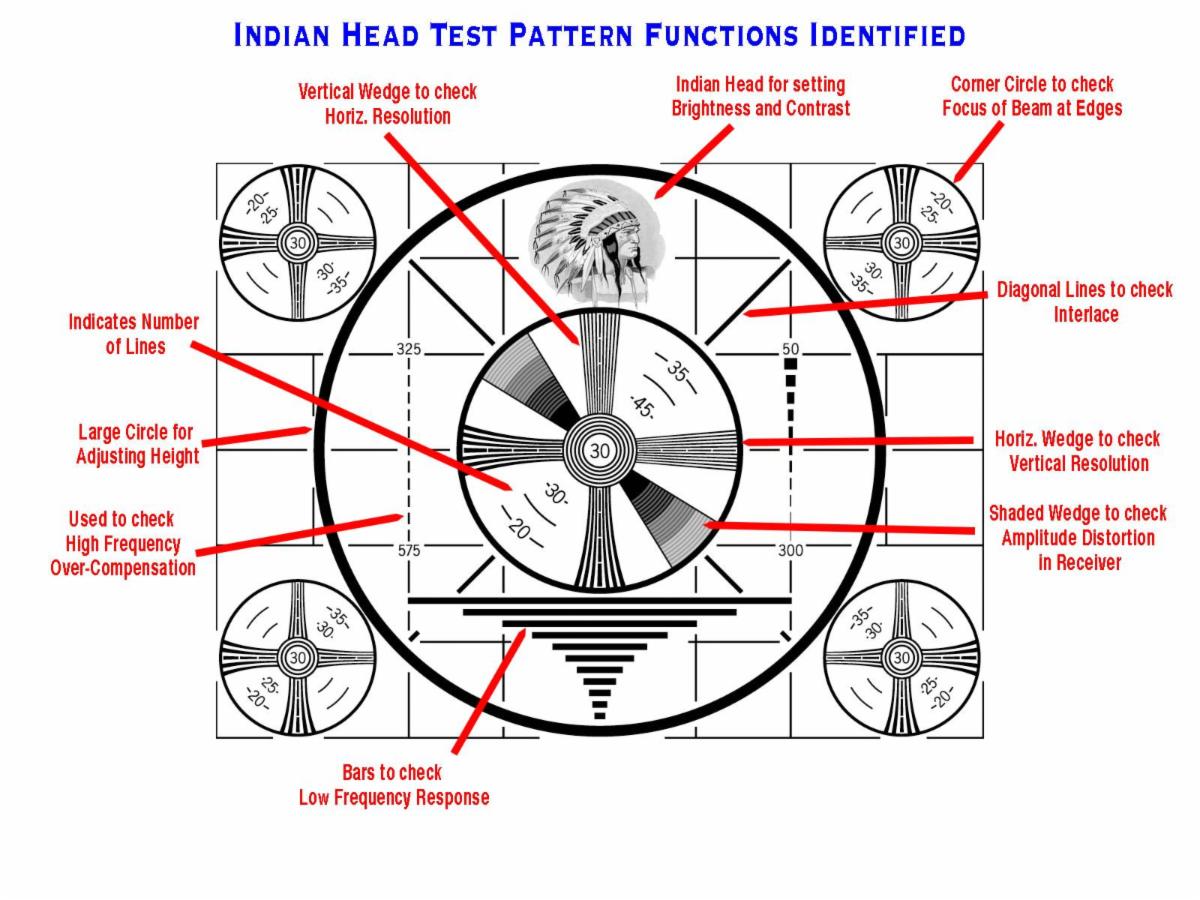
Yes Earl, the Indian Head Test pattern had a purpose!

Quote of the Week

   There is a great difference between knowing and understanding: you can know a lot about something and not really understand it.


Charles Kettering

Inspirational Quote of the Week


If you want God to open and close doors, let go of the doorknob.


The information offered in this newsletter is that of the editor and not of any other entity or individual.

We welcome any comments or suggestions about this newsletter, send to lwilkins@al-ba.com