Navigate Shout Outs to Location Specialist!

  • Location Specialists are super users in your area! We are in our second Cohort and they are thriving!
  • Camille is working with her whole IL team and integrating (wink, wink) into their everyday practices!
  • Angie is working with the Admissions counselors to update availability and create enrollment campaigns for the students who are in their funnels.
  • Sharon is getting STEM Starter Academy into Navigate and students have started to make appointments with her through Navigate. She even shows them who else they can make appointments with!
  • Rosita and Aliya in Student Records launched their first Messaging Campaign for the Fall Graduate reception and saw their number of registrations double!
  • Derick has worked on automation so all Veteran students are introduced to him upon acceptance with his contact information, and Derick becomes a part of the student's Success Team.
  • Catie is working on getting a Referral for Success Programs (SAMP/ALANA)
  • Anna-Marie in Student Accounts launched their first Messaging Campaign and their first Alert for students who still have an opportunity to waive their Health Insurance fee.

Your Location Specialists from Cohort 1 and Cohort 2 are doing awesome things. Please contact them if you have any questions about using Navigate in the areas they are serving.


Email Navigate at Navigate@hcc.edu for any other questions about using Navigate in your area.

Custom Dashboard Tiles from Reports

Users can create their own custom tiles for their Staff Dashboard. Dashboards can be made from any report. Review the reports you have permission for and look at your results. Is there something from the results you would like to have access to daily? Then you can create a dashboard for your own account!

Enrollment Campaign Dashboards

Utilizing your Dashboard to have up-to-date information about your Enrollment Campaign


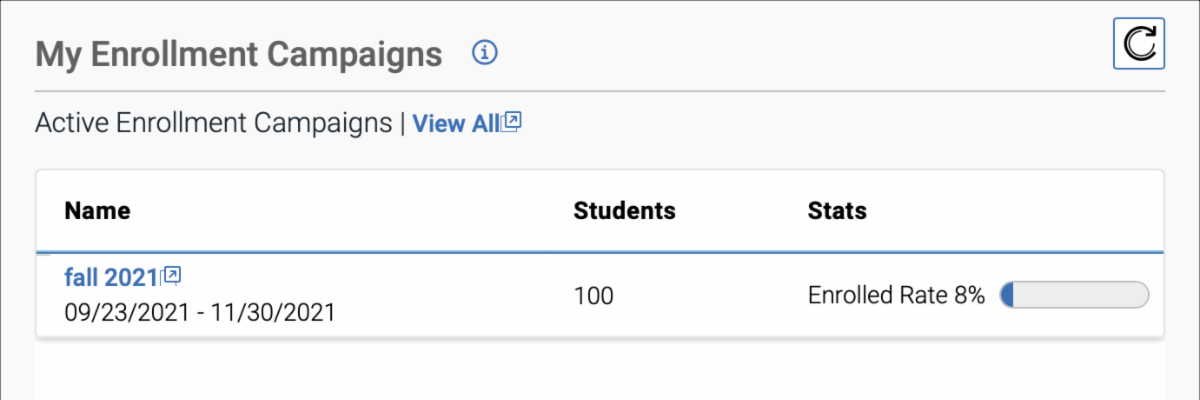
Navigate to your dashboard and find your tile for Enrollment Campaigns. This tile shows any active Enrollment Campaigns you have launched. Clicking the name of the Enrollment Campaign takes you to that campaign on the Campaigns tab.


Each active Enrollment Campaign in the list includes the following associated metrics: Number of Students, and Stats. The stat shown is the Enrollment Rate of students in the campaign.

Navigate Training

Join us for Navigate training, on Tuesdays at 1 p.m. Sessions are held Hybrid, In person in the Collaborative (FR 265). Don't forget to subscribe to the Learn Navigate Google Calendar


Looking for help with something else?

Join our Working Sessions and Sandbox Hour

Sessions are held Hybrid. Join us in person in Campus Center 103 (ACT Center Conference Room) or over Zoom.


Don't forget to reach out to your Location Specialist if you have questions about Navigate in your area.

Thank you,

HCC Navigate Leadership Team

If you have any questions please contact us at navigate@hcc.edu
HOLYOKE COMMUNITY COLLEGE
303 Homestead Ave., Holyoke, MA 01040