Welcome back to the Fall Semester!

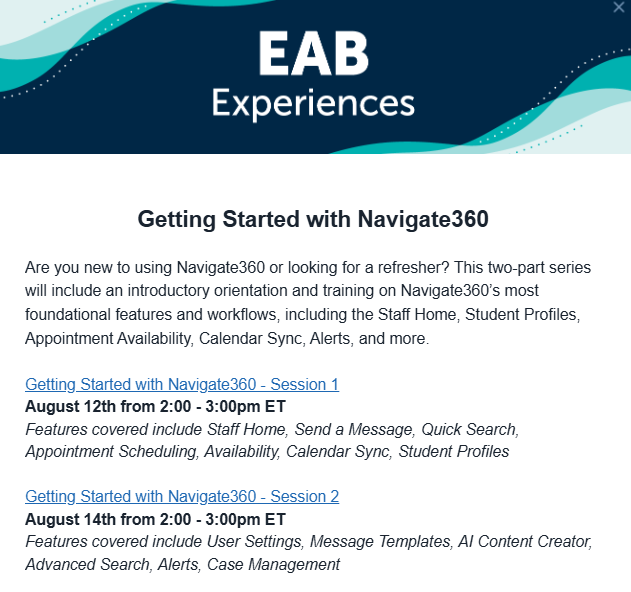
Gear up with some Getting Started with Navigate360 sessions.


EAB is leading two sessions this August, going over basic features of Navigate360. Log in to eab.com and register for these events. If you do not have an account, create one using your HCC email information.

Progress Reports

Progress Reports will be for ACT Center advisees, ALANA, Athletic students, Dual Enrollment, El Centro, ESL students, Gateway credit students, Marieb Adult Learner Success Program, OSDDS students assigned to a Professional Advisor in that area, Pathways, SAMP, and TRIO SSS.


  • Monday, 9.22.25 - Monday 10.6.25 at 11:59 pm
  • Cases Closed by 10.20.25


Who will it be coming from:

  • HCC Progress Report via email.gradesfirst.com 
  • Subject: HCC Faculty: Academic Progress Report Requested for Students Enrolled in Your Course(s) - Complete by Monday, October 6th


Email Navigate@hcc.edu if you have questions.

Check your Availability. Is it up-to-date?

Get ready for the fall semester and ensure your availability is up to date.


When setting the length of availability when choosing by term, your availability will be available to students from the first day of the term until the last day of the term, excluding final exam periods.


Tips:

  • Set a calendar reminder for yourself to check and update your availability at the start of each term or the end of each term
  • Set your availability for future dates
  • Make sure your HCC Google Calendar is synced
  • Mark your vacations/lunch/focus time on your HCC Google calendar so it is blocked for student scheduling
  • Communicate with your colleagues about your scheduling preferences

Fall Navigate Training

Join us for Navigate training Sessions. Subscribe to the Learn Navigate Calendar

  • Creating a Messaging Campaign Automation for New Advisor Assignments
  • August 14 - 9:30 am - 11 am
  • Hybrid - in the Collaborative
  • Finding your way around Navigate360
  • September 5 - 9-10 am
  • Hybrid - in the Collaborative, FR 265
  • Availability, Calendar Sync, and Appointment Summaries
  • September 10 - 10 - 11:30 am
  • Hybrid - in the Collaborative, FR 265
  • Creating a Messaging Campaign Automation for New Advisor Assignments
  • September 16 - 1 pm - 2:30 pm
  • Hybrid - in the Collaborative
  • Communication With Students through Navigate360
  • September 18 - 9:30-11 am
  • Hybrid - in the Collaborative, FR 265
  • Progress Report Working Session for Faculty
  • September 25, 10 - 12 pm
  • Hybrid - in the Collaborative, FR 265
  • Custom Dashboards - Progress Reports
  • September 25, 2 - 4 pm
  • Hybrid - in the Collaborative, FR 265
  • Progress Report: Case Management Working Session for Professional Advisors
  • October 9, 10-12 pm
  • Hybrid, ACT Center Conference Room, CC 103
  • Department Chairs and Program Coordinators - Enrollment Campaigns Working Session
  • October 21, 2 - 4 pm
  • Hybrid - in the Collaborative, FR 265
  • Open Registration Campaign 
  • October 23, 10-11:30 am
  • Hybrid - in the Collaborative, FR 265
  • Advanced Search/Reports/Custom Dashboards
  • November 13, 10-11:30 am
  • Hybrid - in the Campus Center, CC 103


Don't forget to reach out to your Location Specialist if you have questions about Navigate in your area.

Thank you,
HCC Navigate Leadership Team
If you have any questions please contact us at navigate@hcc.edu
HOLYOKE COMMUNITY COLLEGE
303 Homestead Ave., Holyoke, MA 01040