|
It would be impossible to begin this newsletter without acknowledging the profound events of the last few months - COVID-19, protests/riots, economic problems, and more. Everyone at Seattle Avionics offers our deepest sympathies to those affected and our most heartfelt thanks to the men and women putting themselves in harm's way to help the rest of us. The impact on aviation, our lives, our country, and the world is far from clear. But one thing I do know: Americans may disagree about things, but given some time, we're incredible at getting past our differences then focusing on our core values and coming together to make a better future.
Like many of you, we've been busy working from home for the past few months. Very busy, in fact, as we've made three app releases since April (
v4.5.2 released two weeks ago)!
Quick summary of the rest of the newsletter:
- Webinars are back! We have a whole series of live, free webinars starting next week on Tuesday, Wednesday, and Thursday. Sign-up now!
- Get FlyQ EFB 4.5.2 with the easy-to-see new Tab Bar and simplified radar colors for those with color blindness
- Using FlyQ with Avidyne, Dynon, AFS, and Garmin
- CFI/Student Pricing
- iOS 13.5.1 is approved for FlyQ EFB and InSight.
- Many tips and tricks
I'm Steve Podradchik, the CEO here. I write the newsletter so
email me personally if there is something you'd like me to cover next month. And use the "Follow" feature on our
Blog to keep up with daily news, product info, and more.
|
|
Webinars are Back!
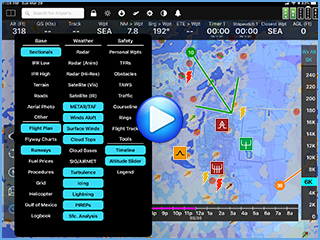
You've probably been flying less than usual so it's a great time to brush up on FlyQ and learn some new tricks, not to mention see all the great new weather features in FlyQ EFB 4.5.
In keeping, we're doing three different webinars for the next month, all offered on multiple days and multiple times. Each is one hour and requires a free registration.
Also, remember that we have more than 80 training videos on our YouTube channel.
Important! After you click to register, the sign-up page defaults to the first time that each webinar is offered. Be sure to check the date/time on the sign-up page to be sure you're registering for the date/time you want.
|
Topic
|
Dates/Times
|
| Intro to FlyQ EFB |
Tues. June 30, 2 pm
Tues. July 7, 5 pm
Tues. July 14, 2 pm
Tues. July 21, 5 pm |
| Advanced FlyQ EFB |
Thurs. July 2, 2 pm
Thurs. July 9, 5 pm
Thurs. July 16, 2 pm
Thurs. July 23, 5 pm
|
| What's New in FlyQ EFB 4.5 and 4.5.2 |
Wed. July 1, 2 pm
Wed. July 1, 5 pm
|
|
|
FlyQ EFB 4.5.2 and Other Recent Releases
We released
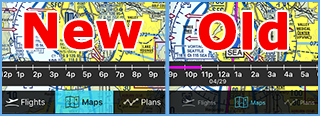
FlyQ EFB 4.5.2 earlier this month. It's a huge improvement to th
e readability of the tab bar at the bottom of the screen (see
New vs.
Old on the side graphic) and added an
optional simplified color scheme for pilots with color blindness.
That release was a follow-up to
FlyQ EFB 4.5 (released in early April) and
FlyQ EFB 4.5.1 (released in late April). In 17 years of making aviation apps, I have never seen such incredible excitement about a release! Pilots are loving its new
Timeline,
Altitude Slider, and
16 weather layers.
Watch the video or
read more.
And more is coming fast! We've been hard at work adding one of the most highly-requested features to FlyQ. Since it's FlyQ, we're not just copying how someone else did a feature but breaking new ground in terms of ease of use, conveyance of crucial information, and flexibility.
|
|
Using FlyQ with Dynon, Avidyne, AFS, and Garmin
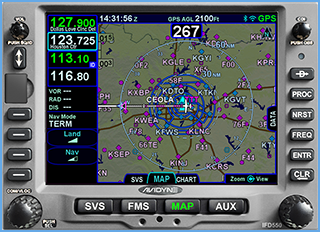
FlyQ has had the ability to transfer flight plans to and from Dynon, Avidyne, and AFS for some time. It can also use the GPS position, AHRS data, and ADS-B feed from these devices. Doing so is incredibly simple:
- Connect your iPad or iPhone to the Wi-Fi network created by your in-panel device.
- Start FlyQ EFB
- If you're using an iPad, you'll see a notification that you're connected (no message on the iPhone for technical reasons).
- At that point, GPS, AHRS, and, if applicable, ADS-B traffic and weather from your panel will be displayed on FlyQ.
- To transfer a flight plan (either direction), go to the Plans tab in FlyQ and tap the Action button (icon of a box with an arrow). You'll see options to send and receive.
FlyQ EFB also works great with Garmin, albeit a bit indirectly. You can read the long description here or simply add any ADS-B receiver that works with FlyQ like a Stratux, Stratus 3, Bad Elf, iLevil, etc. With that, FlyQ will get the same ADS-B data feed that the Garmin does (read the link for the details on this). The only thing you'll miss is the ability to transfer flight plans. |
|
$19 FlyQ EFB for CFIs and Students
CFIs get the full VFR + IFR package for just $19.
Student pilots (private private) get the VFR package for the same $19.
|
|
iOS / iPadOS 13.5.1
FlyQ EFB and InSight are approved for use with the most current iOS / iPadOS version, 13.5.1.
You also should have seen a notification in FlyQ (a red number over the bell icon at the top of the screen).
Apple has announced
iOS / iPad OS 14. It's an exciting release but strictly for developers now, not the general public. W
e have not started our testing against it yet
|
|
Tips and Tricks
Watch the Videos
Built-in Simulator
You can "play" a flight plan or a recorded flight you've already taken in 2D, 3D, or both at the same time! The feature lets you change the playback speed and jump to different spots in the route. Tap any of the five "status" icons at the top right then use the GPS tab to simulate the flight. Or hit the
Play button from any track in the
Flights tab, More info on page 47 of the
Pilot's Guide.
Use X-Plane, Prepar3d, or MS Flight Simulator
This one is a little much to explain here, although not difficult. See page 153 in the
Pilot's Guide.
Timeline
The new Timeline and Altitude Slider features behave differently when flying than in pre-flight mode (that is, on the ground) but we know that, given the current situation, a lot of people have not been flying so may not realize it. A few people have said that they would find it annoying to see the Timeline when flying. We agree! That's why it automatically disappears when it senses that you're flying -- no need to manually turn it off. Pages 108-109 in the
Pilot's Guide.
"Red Land"
Ever see a large area of orange/red over the ground and didn't know what it was? No, it's not some political statement; it just means that the TAWS (terrain avoidance) layer is on and you're at or near the ground so everywhere is red (danger!). You can choose to have FlyQ ignore TAWS when you're not flying: Go to
Settings. In the
Display section, enable
Only show TAWS when moving.
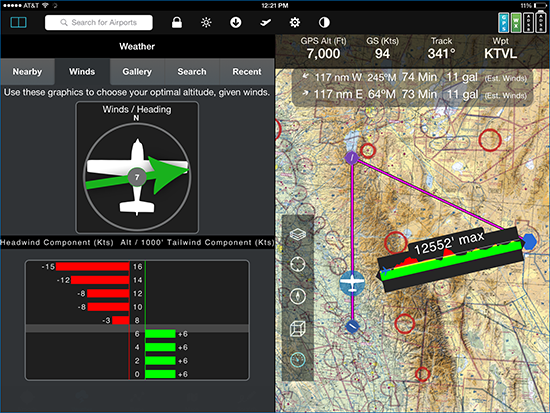
Distance/Terrain/Fuel/Speed Measurement (Terrain X-Ray)
FlyQ has a unique feature called Terrain X-Ray that not only shows distance and bearing between two points but also shows the terrain profile and fuel/time stats if you were to fly between the points (see the right-side of the image above). Just take fingers (generally on the same hand) and press-and-hold at two places on the 2D map.
Pilot's Guide, page 55.
Ghost Plane?
When using ADS-B, ever see a target that seems to be shadowing you and never goes away? Unless you really are being tracked by sinister forces, it's most likely your plane as seen from the perspective of some other ADS-B user. If you have ADS-B Out yourself (that is, you're transmitting your N-number to ATC), you can hide your plane by entering your tail number in
Settings within the
ADS-B / Devices category. It's called
Tail number to ignore. Be sure to include the
N. Only one entry allowed. Note: This can't work if you don't have ADS-B Out as, without it, ATC doesn't know your tail number so can't transmit it back up in the ADS-B data stream.
Expired Plates?
If you're checking for valid dates of the plate by looking at the side of the plate, you're being misled. The FAA prints two dates on the side of each plate. Although they look like expiration dates, they are not. They simply represent the print cycle of when that plate was last printed by the FAA. That is, even if a plate doesn't change for two years, every 28 days, it will have a new set of dates on the side. FlyQ ignores these dates and uses a database that the FAA publishes to download only the plates that really have changed or been added. Thus, even when all your plates are current, you may see 'old' dates on the side.
In the
ChartData Manager (down-arrow icon at the top of the screen), you can tell FlyQ EFB to download all plates, even the ones that have not changed but we strongly recommend against is because it dramatically increases monthly update time.
|
|