|
Hand Analysis
by Bucky Syndor
(sydnoriv@yahoo.com)
Postmortem Discussion From Last week's Article
GIB (Goren In a Box) is a very handy tool for deal analysis. It can be accessed on BBO in the following way:
- After opening BBO,
- Click on the “History” tab among the tabs running down the right-hand margin.
- Click on a (past) session which includes the deal you want to study.
- Click on the deal.
-
Click on the menu icon of the BBO deal you have called up.
- When a menu comes up, click on Export.
- When a new menu comes up, click on Handviewer link.
- A tinyurl will come up on your screen. Click on the tinyurl.
- The deal will open in a window all of its own.
-
Along the bottom of the window displaying the deal are 6 options, all of which are not bolded (i.e., not active). The 5th one is GIB.
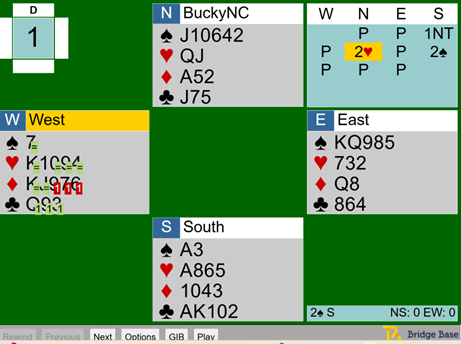
GIB works in the following manner. At any point from the opening lead to any point in the subsequent play, if one clicks on GIB, it will tell you whether playing (or leading) a particular card will allow the deal to be made (and with how many overtricks) or set (and by how many undertricks) if the deal is played “double-dummy” by both sides.
Here is an example, which is Board #1, the deal I write about in my article. The deal is awaiting W’s opening lead. If one clicks on GIB at this point, this is what will come up over W’s cards.
|