| Contact Us Division of Personnel Security and Access Control (DPSAC), Office of Research Services Building 31, Room 1B03
Hours: 8:00 a.m. - 5:00 p.m. Monday - Friday Personnel Security Helpdesk: 301-402-9755 E-mail: orspersonnelsecurity@ mail.nih.gov Access Control Helpdesk: 301-451-4766 E-mail: facilityaccesscontrol@ mail.nih.gov   |
|
| |
|
Verifying Residency and Citizenship When Registering Badge Applicants in NED - Where Errors Occur
In this issue of DPSAC News, the focus turns to NED registration and some of the common errors that the Division of Personal Security and Access Control (DPSAC) sees in regards to an individual's citizenship status. Most often, these errors occur when NED portal users enter Personally Identifiable Information (PII) for an applicant and make faulty assumptions about the individual's place of birth, residency or citizenship status.
It is very important that these questions regarding citizenship be answered accurately. They help determine the type of ID badge issued to the applicant, how long the badge will be valid, whether the person must visit DIS as part of the badging process and the type of background investigation that must be completed.
Entering the wrong information will cause significant delays in the badging process and will only create frustration for you and the individual as DPSAC will require the NED record to be updated to reflect the correct information before the badge process can be completed!
The best piece of advice DPSAC can give to Administrative Technicians (ATs) and Administrative Officers (AOs) who will be answering these questions is to never guess! If you are not sure of the correct answers, please contact the individual or his/her supervisor to find the correct information.
Points to remember:
- Don't assume that a person living in the U.S. has Lawful Permanent Resident (LPR) status. They may be residing and working in the U.S. under a temporary visa.
- A United States Lawful Permanent Resident (LPR) is someone who has been granted authorization to live and work in the United States on a permanent basis. As proof of that status, a person is granted a permanent resident card (Form I551), commonly called a "green card" which contains an Alien#/USCIS# specific to that person.
- An individual can be a citizen of a foreign country, but still be a U.S. Lawful Permanent Resident (green card).
- Only two fields on the NED Personal Information page are relevant in determining whether the Division of International Services (DIS) needs to validate an Applicant's work status: 'Country of Citizenship' and 'Lawful Permanent Resident (LPR).' DIS only validates Foreign Nationals (non-US citizens) who are *not* LPRs. This policy may change in the future!
- DIS validation is typically provided at the time of Entry on Duty (EOD)/check-in.
- DIS must verify the applicant's documents and complete a series of additional steps before the DIS Immigration Specialist can update the applicant's record in the NED Portal and allow the badge process to continue toward approval and issuance.
- DIS needs to review a non-LPR, foreign national's work authorization and immigration documents in order to enter their "Alien Authorized Work Until Date" (AAWUD) in NED.
Important: NED will not send the badge request to DPSAC until DIS has validated the non-LPR, foreign national's work status.
The AO Sponsor who can answer these questions and is familiar with the various citizenship and residency requirements and proactively reaches out to his or her applicant to clarify citizenship questions will be helping his/her applicant avoid the inevitable delays that occur when citizenship and residency fields are entered incorrectly in NED.
Please note that PII should always be transmitted securely.
Below are brief descriptions of the citizenship categories to help AO sponsors complete the residency and citizenship fields accurately:
U.S. Citizen:
U.S. citizens are:
- individuals born in one of the several states of the United States, District of Columbia, Puerto Rico, Guam, Northern Mariana Islands, or Virgin Islands;
- foreign-born children, under age 18, residing in the U.S. with their birth or adoptive parents, at least one of whom is a U.S. citizen by birth or naturalization; and
- individuals granted citizenship status by the U.S. Citizenship and Immigration Services (USCIS) (naturalized U.S. citizens).[1]
Lawful Permanent Resident (LPR):
- A United States LPR is someone who has been granted authorization to live and work in the United States on a permanent basis. As proof of that status, a person is granted a permanent resident card (Form I-551), commonly called a "green card," which contains an Alien#/USCIS# specific to that person.
Never hesitate to reach out to the applicant if there's a question about the individual's work or citizenship status. A quick conversation or e-mail exchange with the applicant can help avoid errors and minimize delays in the badging process.
[1]
A person who was not born a U.S. citizen may acquire U.S. citizenship through a process known as naturalization. To become a naturalized United States citizen, one must be at least eighteen years of age at the time of filing, a legal permanent resident
(or non-citizen national) of the United States, and have had a status of a legal permanent resident in the United States for five years before they apply (this requirement is reduced to three years if they (a) acquired legal permanent resident status, (b) have been married to and living with a citizen for the past three years and (c) the spouse has been a U.S. citizen for at least three years prior to the applicant applying for naturalization.)
|
| OPM Publishes FY 2017 Pricing Schedule for Background Investigations
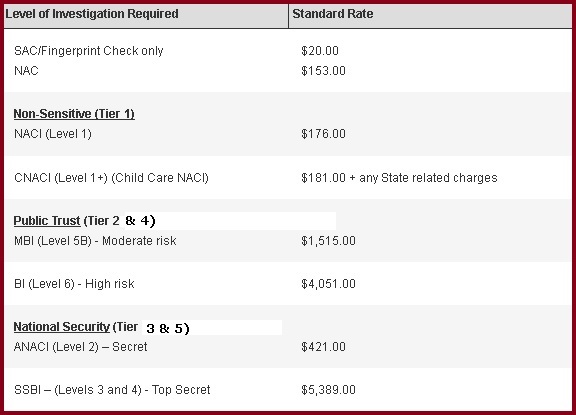
The Office of Personnel Management (OPM) has published the FY 2017 pricing schedule for Background Investigations in OPM
Federal Investigations Notice - No. 16-06: Investigations Reimbursable Billing Rates Effective October 1, 2016.
According to the notice, "for FY 2017, the OPM is issuing prices to fully recover an estimated 5.4% increase in the costs necessary to sustain and advance the program." To read Notice 16-06 in its entirety and view all FY 2017 billing rates, please click on the link:
Federal Investigations Notice No.16--06.
Costs for the eight most commonly ordered investigations at the NIH are listed in the table below:
|
FAQs
Q. If I discover that my HHS ID Badge certificates are expired, can I have my IC's Lifecycle Work Station (LWS) operator reissue new certificates.
A. Yes. The digital certificates on your HHS ID Badge/PIV Card may expire before your badge. You will need to renew these certificates before they expire.
Once your PIV Card certificates are expired, you can have them reissued either by an LWS operator or at a DPSAC Badge Issuance Station. In either case, you will need to make an appointment.
If you receive an e-mail notice telling you to renew your digital certificates, please do so as soon as possible.
|
Do not lend your ID badge to anyone! --
lending out your ID badge is prohibited. The issuance of ID badges is based on strict identity proofing and the determination of one's suitability for a specific position classification.
All Building 31 badging services -- Enrollment, Badge Issuance and Customer Service -- now offered at a single, convenient location in 1B03. All badging services in Building 31 are available between 8:00 a.m. and 5:00 p.m., Monday through Friday. DPSAC will continue to offer Enrollment and Badging services in the South Lobby of the Clinical Center from 7:30 a.m. to 4:30 p.m. on weekdays.
AOs who wish to obtain sponsor authority -- must complete the sponsor training (see:
http://www.ors.od.nih.gov/ser/dpsac/Training/Pages/administrators.aspx) and e-mail a copy of your signed certificate to the NIH HSPD-12 Program Office at
hspd12@od.nih.gov. Upon receipt of the certificate, the Program Office will authorize the AO as a Sponsor.
Please note: ONLY individuals with an Administrative Officer role are eligible to be HHS ID Badge/PIV Card Sponsors.
ICs that want to add Lifecycle Work Station (LWS) operators to the approved roster -- send a written request to Richie Taffet at: taffetr@mail.nih.gov. Your request should include:
- the new operator's name
- his/her Institute/Center (I/C)
- his/her NED number
- the operator's e-mail address, building/room and phone number
- the hours of operation of the Lifecycle Work Station
Once Mr. Taffet has approved the request, he will forward the name(s) to
HHSIdentityAdmins@deloitte.com to complete the approval process, add the name(s) to the LWS operator roster, and inform the IC that the individual is now approved to operate the LWS.
Need to make changes to the LWS operator directories? -- drop an e-mail to Lanny Newman,
newmanl@mail.nih.gov, and let him know what needs changing (e.g., adding new operators or LWS locations, removing operators, etc.). Remember, before a new operator can be added to the LWS directory, s/he must first be approved by Richie Taffet (see preceding Helpful Tip).
If an LWS is not available in your IC or your immediate area, and you work in the greater Bethesda or Rockville area -- please call 301-402-9755 to schedule an appointment with the Division of Personnel Security and Access Control located in Building 31, Room 1B03 or in Building 10, South Lobby, Room 1C52.
If you work outside the Bethesda/Rockville area, contact your local badge issuance office. You can find contact information for all badge issuance offices at:
http://www.ors.od.nih.gov/ser/dpsac/Pages/contactinfo.aspx.
Know someone who should be reading DPSAC News? -- have the person contact Lanny Newman,
newmanl@mail.nih.gov, and ask to be put on the mailing list.
|
Safety Corner
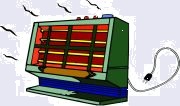
Play it Safe when Using Space Heaters in NIH Buildings
The following fire safety awareness article was prepared by the Division of the Fire Marshal, ORS.
Each year at this time, questions arise concerning the use of space heaters at NIH owned facilities. The guidelines that follow below do not pertain to NIH leased facilities. Please be aware that if you work in a leased facility, there may be more stringent requirements from the building owner and/or local fire-safety "Authority Having Jurisdiction."
Please check with your Office of Research Facilities (ORF) Facility Manager (
http://orfapps.od.nih.gov/BuildingsandFacilityManagers.asp) before purchasing or using a space heater in any NIH leased facility.
Before a space heater can be considered for an NIH-owned facility, any difficulties in regulating or maintaining a comfortable temperature must first be directed to ORF to have a building engineer attempt to make mechanical adjustments to the heating system.
If it is determined by ORF that an area cannot be adequately heated, written approval will be provided by the ORF Facility Manager assigned to the building to support the purchase and use of a space heater in designated areas only.
Space heaters are not permitted, under any circumstances, in laboratories, patient care units, or clinics.
Prior to installing any space heater, ORF must also verify that the electrical service to the area is adequate to safely accommodate the heater. Space heaters can easily overload electrical circuits in a building, therefore, additional circuits may need to be installed.
If electrical work is required, the occupant's IC should initiate a work request. If ORF has available funds and it is clear the building is not capable of providing reasonable levels of heat (70 degrees) in that particular room, ORF will fund the electrical work.
The Division of the Fire Marshal, Office of Research Services, does not endorse any particular brand or manufacturer of space heaters; however, a convection-type heater is preferable. Convection models slowly warm the air around them and pose less of a burn hazard since their surface temperatures are generally lower.
Prior to purchasing the heater, be sure that the unit has been tested by an approved testing laboratory such as Underwriters Laboratory (UL) and is equipped with ALL of the following features to minimize fire hazards typically associated with these devices:
- A multi-directional tip-over switch - space heaters can easily tip over. This switch automatically turns off the unit regardless of which way it may fall.
- An overheat sensor - this sensor limits the heat output of the space heater and automatically turns off the unit if it becomes too hot.
- A visible on/off indicating switch and light.
- A heater that is cool to the touch and that has guards over the heat coils.
Proper placement of the space heater is important for safety as well as for comfort. Make sure the unit is placed on a level floor on a hard, non-combustible surface instead of carpet.
All combustible materials (e.g., paper, plastics, wood, etc.) must be stored at least three feet away from the heater. The power cord must not be covered by carpeting or other materials and extension cords should not be used. Electrical current used for space heaters can cause extension cords to overheat and potentially cause a fire. Plug the space heater directly into a properly grounded outlet.
Never leave the heater in operation when an area is unattended or unoccupied.
If you have questions concerning the selection and use of space heaters, please contact the Division of the Fire Marshal, Office of Research Services at 301-496-0487.
|
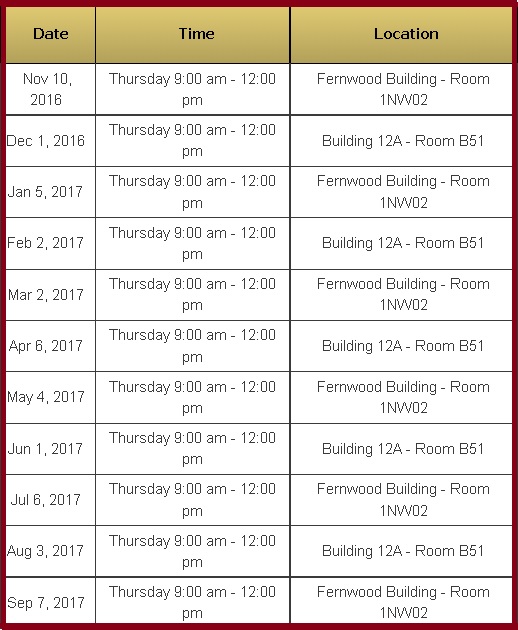
NED Training Schedule for FY '17
Description:
This course provides an overview of the NED Portal and the NIH business functions it supports from the perspective of a NED Portal user with the AO or AT role. Upon completing the course, students will have a solid working knowledge of the NED Portal and be able to perform the following tasks: Register/Activate, Update, Modify, Transfer, Badge Renewal, and Deactivate.
The course will also familiarize students with other aspects of the NED Portal so they can: set their primary SAC coverage using Preferences, determine the status of a person's ID badge and/or network account request, look up and view information in a person's NED record, and utilize NED reporting capabilities.
Intended Audience:
New or relatively inexperienced NED Portal users with the Administrative Officer (AO) or Administrative Technician (AT) role.
Prerequisites:
Basic personal computer skills and experience with web-based computer applications.
Reasonable Accommodations/Interpreting Services:
For deaf or hard-of-hearing individuals requiring interpreting services, please enter your request online in the Interpreting Services System at least five (5) days before the start of the class.
If you have any questions regarding this service, you may contact the ORS Division of Amenities and Transportation Services (DATS) Interpreting Team at (301-402-8180). Individuals who need other reasonable accommodations to participate in any of the Center for Information Technology (CIT) Training courses should let CIT Training know at least 5 days prior to the class.
|
|
A biweekly e-newsletter from the Office of Research Services, Division of Personnel Security and Access Control (ORS/DPSAC) to keep you informed as NIH rolls out "Homeland Security Presidential Directive 12" (HSPD-12) establishing a common identification standard to better safeguard NIH and its workforce.
|
|
| |
|