October 2024 Newsletter

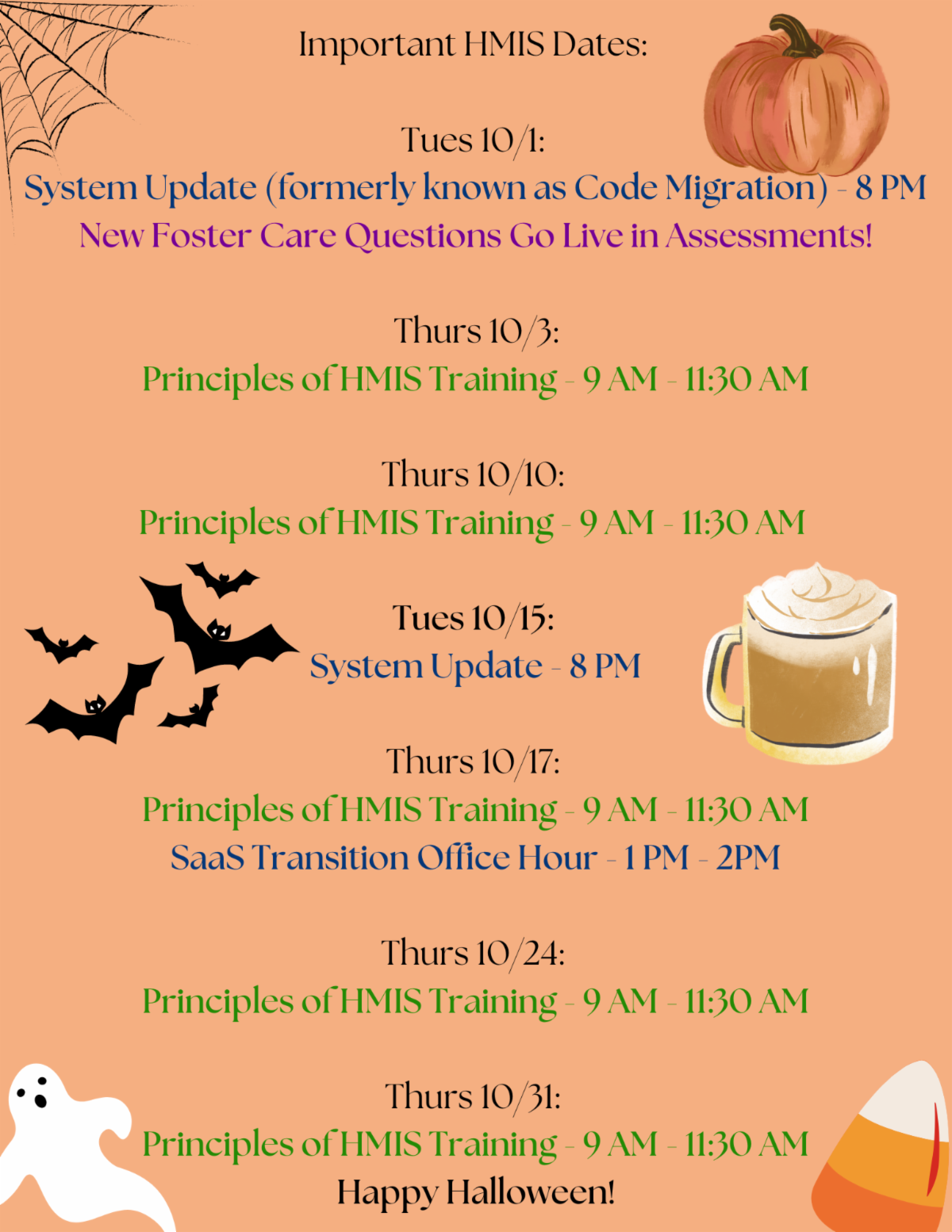
Monthly HMIS Calendar

"Code Migrations" now "System Updates"

The regular maintenance completed on the database, formerly called "Code Migrations," will now be referred to as System Updates in notifications to users. This change is intended to provide a clearer description of these events, and to more closely match the language provided by our software vendor.

HMIS Server Transition

Starting soon, our HMIS will transition from a self-hosted software environment, in which we store our community data on a machine we maintain, to a SaaS model, where we will be maintained by our vendor, CaseWorthy.


If you would like to learn more about this change and the impact it will have on users, click here to read the full handout with all current details:

More Info

Case Note Editing Unavailable

HMIS Users are currently unable to make any edits to their own case notes. Users are normally able to edit case notes up to 48 hours after posting. We are monitoring the issue and will keep everyone updated on its status. We apologize for any inconveniences this may cause.


Until the form is fixed, we recommend the following workarounds: (1) Delete and re-create the case notes OR (2) add an addendum. The How-To Addendum guide can be found in MY CASEWORTHY > Training Guides > Case Note Addendum Workflow Guide

FY2024 Data Quality Reports

Due to the start of the new fiscal year, this month agencies will receive Data Quality Reports that will cover the entirety of FY2024 (Oct. 1 2023 - Sep 30 2024). DQ points-of-contact should be on the lookout for these emails soon.

Client Identifier Reminders

With a new federal fiscal year beginning and reporting season around the corner, the HMIS Team would like to provide a few reminders regarding client-identifying information and digital record-keeping.


  • When submitting any tickets to the HMIS Team, the only information necessary to help us find the client you are referring to is the Client ID# and first and last initials. Identifying the client using names, dates of birth, last 4 of SSNs, etc., is considered a violation of your HMIS Security Awareness Agreement. If you are do not know the Client ID# and are wishing to find a missing profile, you can let us know about the issue and we can reach out to further assist.

Please note that our ticketing system cannot accept encrypted emails, so this is not an acceptable workaround.


  • Always doublecheck your screenshots! Client information in pictures attached to tickets/emails is still considered a PII violation. Be sure to either crop out or digitally draw over anything unnecessarily identifiable.


  • When sending HMIS reports to the HMIS Team, funders, or any other staff, edit the files to only include the data needed. Many freshly-pulled reports include ALL demographic information on a client's profile, so be sure to delete any columns containing PII before resending it over email.


  • Electronic transmission of HMIS data containing PII must be through secure direct connections (ex. Teams) or, if transmitted over the internet, encrypted using 128-bit key or via password protected files.
Visit our Website
Submit a Training Request

HMIS Team

VP of Transformational Services | David Huete

HMIS Director | Nina Gall

HMIS Business Systems Analyst | Jenni Hernandez

HMIS Security & Compliance Specialist | Ashley Boyer

HMIS Training Coordinator | Gloria Collins

HMIS Systems Administrator | Spencer Walker

HMIS Database Administrator| Villian Asong

HMIS Data Analyst | Jose Marines

HMIS Application Support Specialist | James Moses

HMIS Senior Data Analyst | Lori Stewart

HMIS Data Quality Analyst | Tracie Dixon

Why am I receiving this email?

If you are receiving this email, it is because you either have an active San Antonio/Bexar County HMIS account, or you are designated as an important point-of-contact for HMIS-related updates. As an HMIS User, it is important for you to stay up-to-date on all major updates regarding the database.


We ask that you do not Unsubscribe from these alerts as long as you use HMIS.


If you believe this description no longer applies to you, please submit a ticket to HMIS.Support@Havenforhope.org to request your account be deactivated.


(Our Contact lists are uploaded on a monthly basis, so please allow time to account for this.)