View This Email as Webpage

This is a mini email series to ARRO staff on how to master the Paycor platform. Past issues of the Paycor Learning Series emails are now available online. You can access the archives on the People department page on the Intranet portal.

End-of-Year Review

Everything You Need to Know About W2s,

1095-Cs and Paperless Form Elections

With the end of the year rapidly approaching, Paycor is designed to make your pay stubs, pay history, and tax documents easily accessible. Paycor allows you to determine how you would like to receive your W2s and 1095-Cs. Don’t want the paper copy of your tax forms mailed to you? You can elect to go paperless and just have access to your tax documents electronically through your Paycor account. You must elect within Paycor to go paperless before December 1, 2024. If you do not elect paperless, you will receive your tax documents in the mail (they will also still be available electronically within your Paycor account). 


Accessing Paperless Options


To get started:


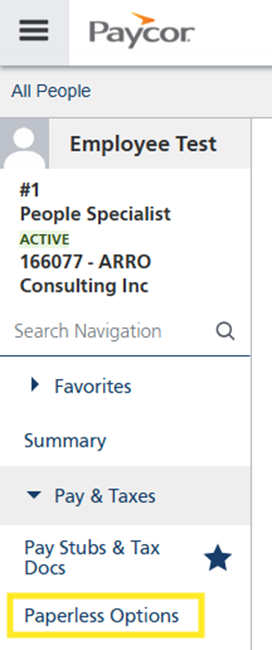
1. Log in to Paycor and select “Profile Summary,” “Pay & Taxes” and then “Paperless Options.”

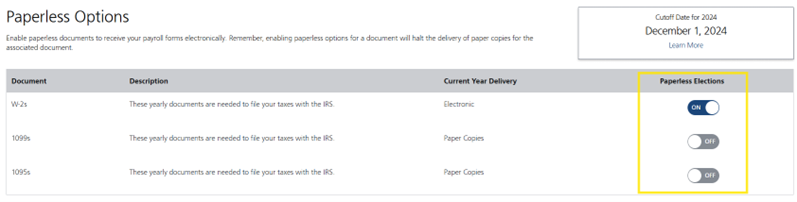
2. On the Paperless Options screen, you can set your desired election for W2s and/or 1095-Cs, by clicking on the button for each under “Paperless Elections.” If paperless is currently OFF, you will be prompted to give your consent to receive the form electronically. Once you have reviewed the disclosure - if you agree - click “Sign & Continue.” The Paperless Election status for that form will then show ON

Viewing Pay Stubs, History and Tax Documents


To get started:


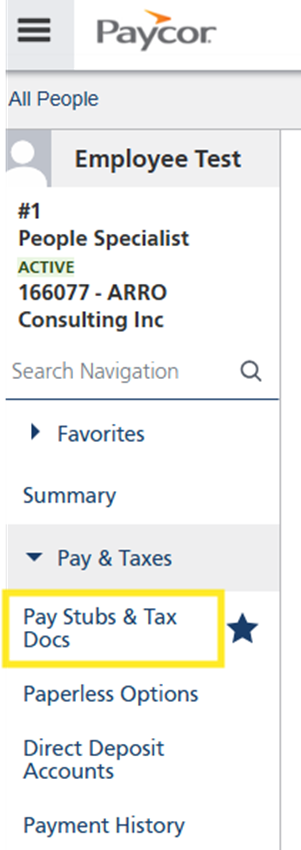
1. Log in to Paycor and select “Profile Summary,” “Pay & Taxes” and then “Pay Stubs & Tax Docs."

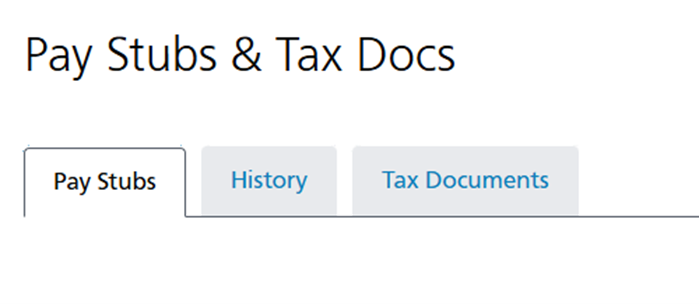
2. You will see a tab for Pay Stubs, History, and Tax Documents

a. Pay Stubs: This will default to the current year. To go back to a prior year, change the year in the dropdown menu on the right. You can access pay stubs from December 2023, when we switched to Paycor. You can view and/or print a PDF of each pay stub.


b. History: Allows a quick view of your pay data for a select period. You can view the current year-to-date details, current month, current quarter, prior year or a custom range.


c. Tax Documents: As soon as your 2024 W2 and 1095-C documents are available, you will be able to view and/or print. W2s should be available by January 31st and 1095-Cs will be available no later than March 31st. You will also be able to access your documents for prior years. 

Paycor’s Pay & Taxes allow you quick and convenient access to your pay details. If you have questions or need assistance navigating the platform, our People Team is here to help you! 

Have Paycor questions?

Please reach out to the People Team

anytime at people@arroconsulting.com.


Past issues of the Paycor Learning Series emails are now available online. You can access the archives on the People department page on the Intranet portal.