Provider News & Info


Spring 2026

Upcoming PA requirement for outpatient surgeries effective July 1

PEHP is committed to helping our members receive high‑quality, cost‑effective care in the most appropriate setting. To support this goal, we are implementing the following updates:


Preferred Site of Service: Ambulatory Surgical Centers

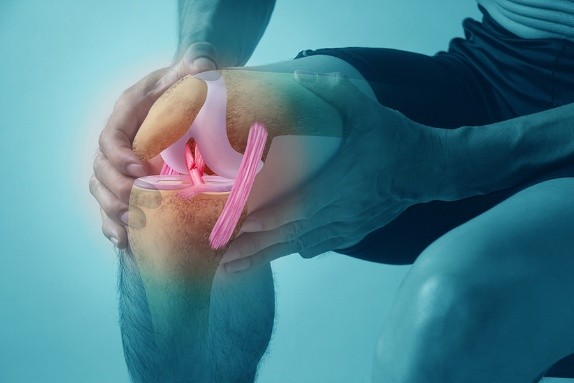
Effective July 1, 2026, Ambulatory Surgical Centers (ASCs) will be the preferred site of service for elective outpatient total hip, knee, and shoulder arthroplasty procedures. When clinically appropriate, these procedures are expected to be performed in an ASC.


Preauthorization (PA) Requirement for Outpatient Hospital

Effective July 1, 2026, preauthorization will be required for elective total hip, knee, and shoulder arthroplasty procedures when performed in an outpatient hospital setting. Authorization will be approved when one of the following criteria is met:

  • When the patient’s medical or surgical complexity exceeds ASC capabilities; or
  • No ASC is available within a convenient driving distance from the patient’s home.


The policy and PA form are available on the Provider Portal under the Resources menu.

If you have any questions, please contact us via the Message Center in the Provider Portal.

Infusion medication site of service changes effective July 1

Effective July 1, 2026, all infusion medications must be administered in a home health environment or infusion center instead of an outpatient hospital setting, unless an outpatient hospital setting is medically necessary and authorized by PEHP.


Current PEHP members who are already receiving infusion medications in an outpatient hospital setting will be required to transition to a home health environment or infusion center by September 1, 2026.


If you have any questions, please contact us via the Message Center in the Provider Portal.

How to submit pharmacy preauthorization requests for GLP-1 and other drugs

GLP‑1 Medications (Mounjaro, Ozempic, Ozempic Tablets, Trulicity)

All new requests for covered GLP‑1 medications must be submitted online using our web form. Please complete the form in full, including a valid email address. All determinations will be returned via secure email.

All Other Medications

Requests for all other medications must be submitted via fax at 801‑245‑7774 or through the Message Center in the Provider Portal. If you don’t have access to the Provider Portal, please contact your administrator to grant you access.

Note: Drug names are listed by the brand name. Some medications have multiple forms for specific covered indications. Please ensure you select and complete the correct form.


Reminder: For PHI compliance, PEHP cannot accept member-specific information via email. Determinations will be returned by fax to the number provided.


Disputes and Appeals

If you disagree with PEHP’s decision, you may submit a dispute (first level) or appeal (second level) by faxing the following documents to 801‑245‑7774:

  • A cover sheet with your return fax number and office contact
  • The PEHP denial letter
  • A provider letter detailing the reasons the denial should be overturned
  • Supporting clinical documentation


Disputes and appeals may take up to 14 business days. Determinations will be faxed to the number provided.

Reminder: National Drug Code (NDC) Billing Requirement

PEHP follows the national CMS requirement to include an 11‑digit NDC with the appropriate HCPCS code when billing for physician‑administered drugs. This policy has been in place since July 1, 2023, and PEHP continues to enforce it for hospitals, IPPS/OPPS providers, and professional claims. Claims will be denied when the required NDC and HCPCS details are not submitted.


Simplify specimen pickup with Labcorp

Labcorp offers flexible pickup options like secure pickup boxes and courier services to help streamline your practice operations and maintain specimen integrity.


To get started, contact your Labcorp representative for more information. You can also log in to Labcorp Link for step-by-step guidance on setting up pickup services.

How to check claim status

To check the status of a claim, review the Explanation of Payment (EOP) in the Provider Portal. There are two options: Claims Inquiry and Communications Archive as shown in this video: How to view an EOP


Claims Inquiry

  • Log in to the New Portal.
  • Select Claims Inquiry from the Office Management menu. Search using the patient name and date of service. Do not enter a provider. Click all statuses. Ignore the Remittance Advice tab - that is not where you search draft numbers to locate EOPs.

OR

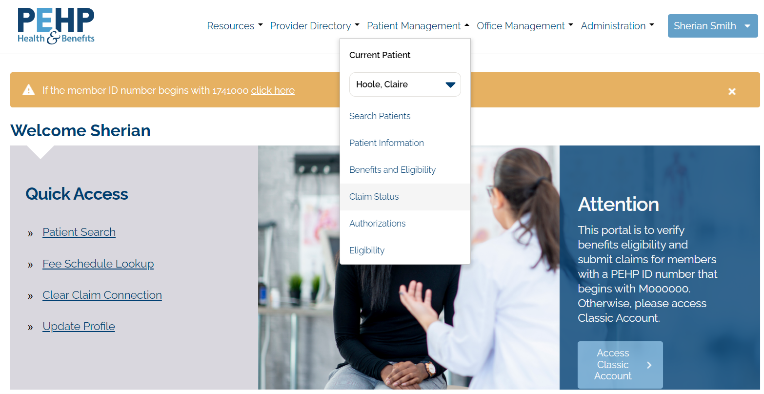
  • Under the Quick Access menu, select Patient Search. This menu will allow you to jump between options for your current patient. Click on Claim Status to see your patient’s history of claims.


Click View EOP to see claim processing of Finalized or Finalized/Denied claims.

--Pending/In Process will not have an EOP viewable yet.

--Acknowledgement/Rejected/Invalid Information means the claim Rejected. The reason is not available from Claims History or EOP. You’ll have to review the submission for errors.


Do not click on the Claim Number. The information that loads is not complete and may not be accurate depending on status of claim.


Communications Archive

  • This method allows you to search by date of deposit to find EOPs filed under the draft number.
  • Log in to the New Portal.
  • Select Communications Archive from the Office Management menu.
  • Under Select Provider, type in the name associated with your Tax Identification Number. If multiple options load in the drop down, select the option that begins with S followed by a number (S0000 or S1111).
  • Under Document Type, choose EOP.
  • Change the dates to several days before the deposit and up to ten days after the deposit.


If you need to follow up on a denial, please send us the claim number via the Message Center. Note: We will no longer provide claim status via the Message Center unless related to a denial. 

2026 medical fee schedule notice

Per your Provider Agreement Section 5.4, this serves as Notice that PEHP will be updating the medical reimbursement fee schedule effective July 1, 2026. 


As part of our annual review process, the updated medical fee schedule reflects the CMS 2026 Relative Value Units (RVUs). To see how this may impact your reimbursement, use the Fee Schedule Lookup tool in your PEHP Provider Portal.

You can compare past and current fees and download them to Excel. The 2026 fee schedule will be available for your review online no later than July 15, 2026.


Note: Contracted PT/OT/SP providers may refer to the updated per diem rate on the PEHP website.


Questions? Contact us via the secure Message Center in the Provider Portal.

How to access the Medical & Dental Fee Schedule Lookup

  1. Log in to the New Portal 
  2. Under the Quick Access menu, click Fee Schedule Lookup.
  3. On the next screen, select only the Supplier ID (e.g. S0000xxx or S1111xxx) from the dropdown menu. Selecting a Location or Provider record will not display the fee schedule. Note: For offices with multiple NPIs and locations, click Search Provider, type in the name associated with the TIN and then More Info to find the Supplier ID (e.g. S0000xxxx or S1111xxx).
  4. Complete all fields and click the Lookup Fees button. Note: CDT dental codes must have the D###.

How to contact us


Claims, provider portal, and other customer service items

If you need to report a new issue or have any concerns, the best way to reach us is via the secure Message Center in the New Provider Portal. When calling us (801-366-7555), please select the correct queue within the provider phone tree to avoid longer wait times.


Important! If you need to send us documents, please use the Message Center.


PEHP Provider Contracts

If you have questions about your contract with PEHP, please contact the following:


Todd Sprouse, Director of Provider Contracting

801-803-0143

todd.sprouse@pehp.org


Mike Corrigan, Senior Provider Contracting Manager

801-597-5682

mike.corrigan@pehp.org


Cammie Keim, Provider Contracting Manager

801-366-7339

cammie.keim@pehp.org

Facebook  Twitter  Instagram  YouTube