Provider News & Info


Winter 2026

Taxonomy code required on all claims effective April 1, 2026

Starting April 1, 2026, all electronically submitted claims must include the provider’s taxonomy code to be processed correctly. Claims missing a taxonomy code will be denied.


Taxonomies power the fee schedule that is used to process and pay claims. If the taxonomy billed on a claim differs from what PEHP has on file, the claim may be processed under a different fee schedule, which could result in reduced reimbursement.


To prevent payment issues:

  • Review and confirm that the taxonomy billed on all claim forms matches the one on file with PEHP.
  • If an update is needed, complete the Provider Account Information Form to request a change.
  • Notify your clearinghouse that your taxonomy code is required for submitting claims to PEHP.


If you have any questions, please reach out to us via the Message Center in the New Portal or call 801-366-7555.

Corrected claim submission requirements

To ensure timely and accurate processing of corrected claims, providers must follow the X12 standards when submitting electronically. Corrected claims that include the proper frequency code and original claim number can be auto-processed, significantly reducing turnaround time for payment.

Corrected Claim Requirements for 837 Transactions

Corrected claims submitted electronically should include Claim Frequency Type Code “7” in the CLM 05-3 and a REF segment with an F8 qualifier in the REF 01 and original claim number in the REF 02.


Professional Claims – 837P Billing Requirements:

2300 Loop

- CLM05-3 = Frequency Type Code “7”

- REF01 = F8 (Original Reference Number)

- REF02 = Original claim number


Institutional Claims – 837I Billing Requirements:

2300 Loop

- CLM05-3 = Frequency Type Code “7”

- REF01 = F8 (Original reference number)

- REF02 = Original claim number


Example:

CLM*1234567890*325***11:A:7*Y*A*Y*I~

REF*F8*C000000001234567~


Please Note: If the original claim has been rejected, do not submit as a corrected claim. Please submit a fresh claim. Corrected claims submitted for rejected claims will not load into the claims adjudication system.

Attention Dentists: Preauthorization required on certain procedures

Starting this year, PEHP will require Preauthorization (PA) for certain dental procedures. Preauthorization is not the same as pre-determination or sending document attachments. It is a formal process where you request approval from PEHP before performing a procedure so we can confirm clinical necessity. Failure to obtain PA will result in claim denial.


The PA process is completed electronically. Download and complete the applicable dental preauthorization form and include any required documentation, then submit either via fax or through the Message Center in the PEHP Provider Portal. Once approved, you’ll receive a PA number to include on your submitted claim.


For full details, please review the Dental CDT Code Guide and other resources at www.pehp.org/providers/dental-preauthorization.


While PEHP will not charge check fees or reject paper claims, we strongly encourage you to submit claims electronically and receive payment via EFT.


Here’s why:

  • Speed: Nearly 90% of electronic claims are paid automatically, meaning they’re processed immediately.
  • Efficiency: Paper claims require multiple steps—printing, mailing, scanning, error checks, and manual entry—adding unnecessary delays.
  • Faster Payments: With EFT, payments are deposited directly after processing. No waiting for checks to be printed, mailed, and posted.

If you have any questions or need support with PA, please contact us via the Message Center in the New Portal or call 801-366-7555.

Dental Predeterminations no longer accepted

To process claims faster, PEHP no longer accepts dental predeterminations. You can easily find Allowable Amounts, Benefit Levels for Services, and Preauthorization (PA) requirements online.


PA Forms & Dental CDT Guide

www.pehp.org/providers/dental-preauthorization   


Dental Fee Schedule Lookup

Log in to your PEHP Provider Portal and find it under the Quick Access Menu. See how.

How to submit medical and dental claims using the New Portal

Covered Drug List updated for 2026

The PEHP Covered Drug List helps members and providers choose safe, effective, and cost-efficient medications.


Our Pharmacy and Therapeutics Committee, made up of local physicians and pharmacists, reviews brand and generic drugs quarterly to ensure the list offers the best value based on safety, efficacy, side effects, and cost.


Updates are implemented twice a year (January and July) to help guide members toward the most effective therapy while managing rising pharmacy costs.

Looking for pharmacy preauth form?

All pharmacy PA forms are available online: www.pehp.org/providers/pharmacy/preauthorization


Note: PEHP does not provide PA forms over the phone. Providers can download the forms from our website and submit them to us through the Message Center in the Provider Portal.

How to check claim status

To check the status of a claim, review the Explanation of Payment (EOP) in the Provider Portal. There are two options: Claims Inquiry and Communications Archive as shown in this video: How to view an EOP


Claims Inquiry

  • Log in to the New Portal
  • Select Claims Inquiry from the Office Management menu. Search using the patient name and date of service. Do not enter a provider. Click all statuses. Ignore the Remittance Advice tab - that is not where you search draft numbers to locate EOPs.

OR

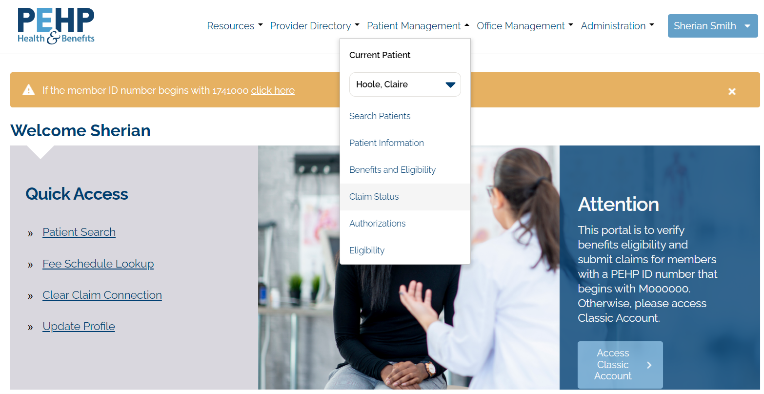
  • Under the Quick Access menu, select Patient Search. This menu will allow you to jump between options for your current patient. Click on Claim Status to see your patient’s history of claims.


Click View EOP to see claim processing of Finalized or Finalized/Denied claims.

--Pending/In Process will not have an EOP viewable yet.

--Acknowledgement/Rejected/Invalid Information means the claim Rejected. The reason is not available from Claims History or EOP. You’ll have to review the submission for errors.


Do not click on the Claim Number. The information that loads is not complete and may not be accurate depending on status of claim.


Communications Archive

  • This method allows you to search by date of deposit to find EOPs filed under the draft number.
  • Log in to the New Portal. 
  • Select Communications Archive from the Office Management menu.
  • Under Select Provider, type in the name associated with your Tax Identification Number. If multiple options load in the drop down, select the option that begins with S followed by a number (S0000 or S1111).
  • Under Document Type, choose EOP.
  • Change the dates to several days before the deposit and up to ten days after the deposit.


If you need to follow up on a denial, please send us the claim number via the Message Center. Note: We will no longer provide claim status via the Message Center unless related to a denial. 

Help keep lab costs low for your patients

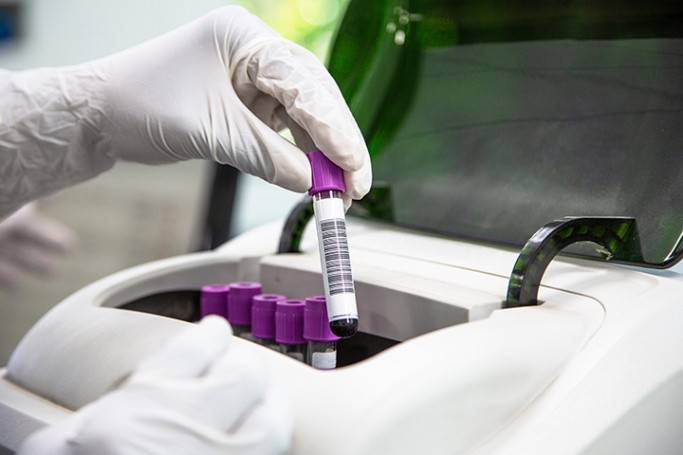
When ordering lab work, please send tests to LabCorp whenever possible. LabCorp consistently offers the lowest cost option for patients.


Avoid sending labs to hospitals unless absolutely necessary, as hospital lab services are substantially more expensive and can increase out-of-pocket costs for patients.


Consider getting a LabCorp drop-off box at your facility for added convenience.


Contact LabCorp

Client Services Center: 800‑444‑9111

Account Setup Support: 800‑328‑2666 

How to access the Medical & Dental Fee Schedule Lookup

  1. Log in to the New Portal 
  2. Under the Quick Access menu, click Fee Schedule Lookup.
  3. On the next screen, select only the Supplier ID (e.g. S0000xxx or S1111xxx) from the dropdown menu. Selecting a Location or Provider record will not display the fee schedule. Note: For offices with multiple NPIs and locations, click Search Provider, type in the name associated with the TIN and then More Info to find the Supplier ID (e.g. S0000xxxx or S1111xxx).
  4. Complete all fields and click the Lookup Fees button. Note: CDT dental codes must have the D###.

How to contact us


Claims, provider portal, and other customer service items

If you need to report a new issue or have any concerns, the best way to reach us is via the secure Message Center in the New Portal. When calling us (801-366-7555), please select the correct queue within the provider phone tree to avoid longer wait times.


Important! If you need to send us documents, please use the Message Center.


PEHP Provider Contracts

If you have questions about your contract with PEHP, please contact the following:


Todd Sprouse, Director of Provider Contracting

801-803-0143

todd.sprouse@pehp.org


Mike Corrigan, Senior Provider Contracting Manager

801-597-5682

mike.corrigan@pehp.org


Cammie Keim, Provider Contracting Manager

801-366-7339

cammie.keim@pehp.org

Facebook  Twitter  Instagram  YouTube