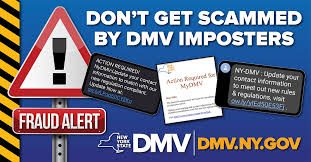
Public Service Announcement

DMV SCAMS

There are 228 million licensed drivers in the United States and 276 million registered vehicles, according to the Federal Highway Administration. Our need to regularly update or renew the documents that keep us on the road creates lots of work for the state-level agencies commonly known as DMVs (for department or division of motor vehicles) — and lots of opportunities for scammers.

The scam often starts with a text message purporting to be from your state’s DMV. (Some state motor-vehicle agencies do send text notifications, but only to consumers who’ve signed up for the service.) It might say you’re at risk of having your license suspended over an overdue fee, or you’re due a refund on fees you’ve already paid, or you have to enter personal information to meet the federal government’s looming Real I requirements for air travel.

This year's spiking gas prices brought a new twist, according to the New York DMV: Scammers are sending out texts claiming drivers are in line for a $1,500 fuel rebate from the state.

Other scammers send out emails designed to look like they come from the state motor vehicle agency, complete with logos or copied content, warning that you need to update your personal information to keep your license or that you have an unpaid ticket. Even if you don’t provide any data, clicking a link in the message could infect your device with malware.

Some criminal operations skip the texts and emails and go straight to the bogus website. They register websites that contain state names and terms like “license,” “registration” or “dmv” and rely on search engines to serve up the sites to consumers looking online for driver information.

Warning Signs
  • You get a text message out of the blue that claims to be from your state DMV, even if you haven’t opted to get text notifications from the agency.

  • A supposed DMV text or email says you owe a payment or are eligible for a refund and provides a link to address the matter.

  • The message asks for personal information like your driver’s license number or date of birth. 

Do's
  • Do scrutinize any DMV text message for signs that it may not be authentic, such as misspellings or unusual grammar.

  • Do know your state motor vehicle office’s correct name. Crooks often use the generic “DMV” in scam messages, even in states with different agency names, such as Massachusetts’ Registry of Motor Vehicles or Illinois’ Department of Driver Services.

  • Do confirm that a supposed DMV email or website is genuine before responding, clicking a link or entering information. Look for a .gov suffix in the address, which every state motor vehicle agency uses except for Wyoming’s.

  • Do look for a disclaimer — sometimes hidden in small print at the bottom of a page — that a website claiming to offer driver services is not actually connected with a government agency.

  • Do pay fees with a credit card, which offers the most consumer protection. If a charge turns out to be fraudulent, you can contact your card issuer and dispute it.

Don'ts
  • Don’t click on links in an unsolicited text message or email, even if it claims to be from the DMV or another government agency. 

  • Don’t pay to access DMV forms or information. State governments provide them for free. 

  • Don’t provide personal information in response to a text or email. State government offices will not ask for private data in this way.

  • Don’t pay what seems like an unusually high price for a license or registration renewal. That’s a tipoff it’s a possible scam.  

Registration is Open
for our Summer In-Person Classes.

Registration is open until classes are filled or10 AM sharp one-day before the start of a class.

Seating is limited due to social distancing, so register early!

Register and pay online to participate in our classes.
COVID PRECAUTIONS FOR IN-PERSON CLASSES
All students, as well as FSL SeniorNet volunteers, attending summer in-person classes, must be vaccinated and boosted against COVID.
Please bring documentation of such to the first class.
Until further notice, masking and social distancing will also be enforced. The COVID situation is very fluid and restrictions are subject to change.  
FSL SeniorNet @ Family Service League, Olsten Family Center
790 Park Avenue, Huntington, NY 11743 1-631-470-6757
Summer semester classes are in person.
✨ Limited seating so register early. ✨
IMPORTANT: READ COVID PRECAUTIONS ABOVE

  • Smartphone Photography - starts Sept 8
  • Apple's iCloud: An Introduction - starts Sept 13
FSL SeniorNet @ Family Service League, South Shore Iovino Family Center
1444 Fifth Avenue, Bay Shore, NY 11706 1-631-647-3100
Fall semester classes are in person.
✨ Limited seating so register early. ✨
IMPORTANT: READ COVID PRECAUTIONS ABOVE

Watch this space for news about our Fall Semester

Our Webinars are held over Zoom, the free video chat program, unless specified as an in-person seminar.

  • Smartphone Photography on Thursday, Sept 1 at 10 AM
  • iPhone: The Camera on Tuesday, Sept 6 at 10 AM
  • Windows 11*: An Introduction on Tuesday, Sept 13 at 2PM
*This seminar is in-person at the Northport Library
  • Introduction to the Cloud on Wednesday, Sept 14 at 10 AM
  • Windows 11: An Introduction on Monday, Sept 19 at 2 PM
IMPORTANT STUFF TO KNOW!
✨COVID PRECAUTIONS✨
All students, as well as FSL SeniorNet volunteers,
attending summer in-person classes,
must be vaccinated and boosted against COVID 19.
Please bring documentation of such to the first class.
Until further notice, masking and social distancing will also be enforced. The COVID situation is very fluid and restrictions are subject to change.  

ALL CLASSES:
Registration is open until 10 AM sharp one day before the start of a class.
To participate in our classes register and pay online with a credit or debit card. If you prefer to pay by check or cash, contact the office at 631-470-6757, or register in person on Registration Days at Huntington or Bay Shore.

ONLINE CLASSES
To participate in our online courses, you need to download Zoom on your computing device*. The Zoom link will be included in the confirmation sent by ezregister.com. The teacher will also send the Zoom link and manual before the class.

WEBINARS ARE ONLINE:
Registration is open until one hour prior to the webinar's start time.
The Zoom link will be included in the confirmation sent by ezregister.com. The teacher will also send the Zoom link and handout before the webinar.

SEMINARS ARE IN-PERSON & LIBRARY HOSTED:
Registration is managed by our host library. Their registration link will be provided on their website, our email blasts and our webpage.

SOLD OUT:
Please call 631-470-6757 or send an email to fslseniornet@fsl-li.org
to receive an email with information as to when the course (webinar, seminar or class) is offered again.
Be sure to include the name of the course you are interested in.

COMPUTING DEVICES:
*Computing devices include Windows and Mac Desktops & Laptops,
iPads, and Android Tablets.
It is NOT recommended to Zoom using your smartphone
due to the smaller screen size.

ZOOM HELP IS AVAILABLE:
 If you need instructions on downloading and using Zoom click here:

SeniorNet Community Programs