Celebrate World Assistive Technology
Day with ATLA! | | |
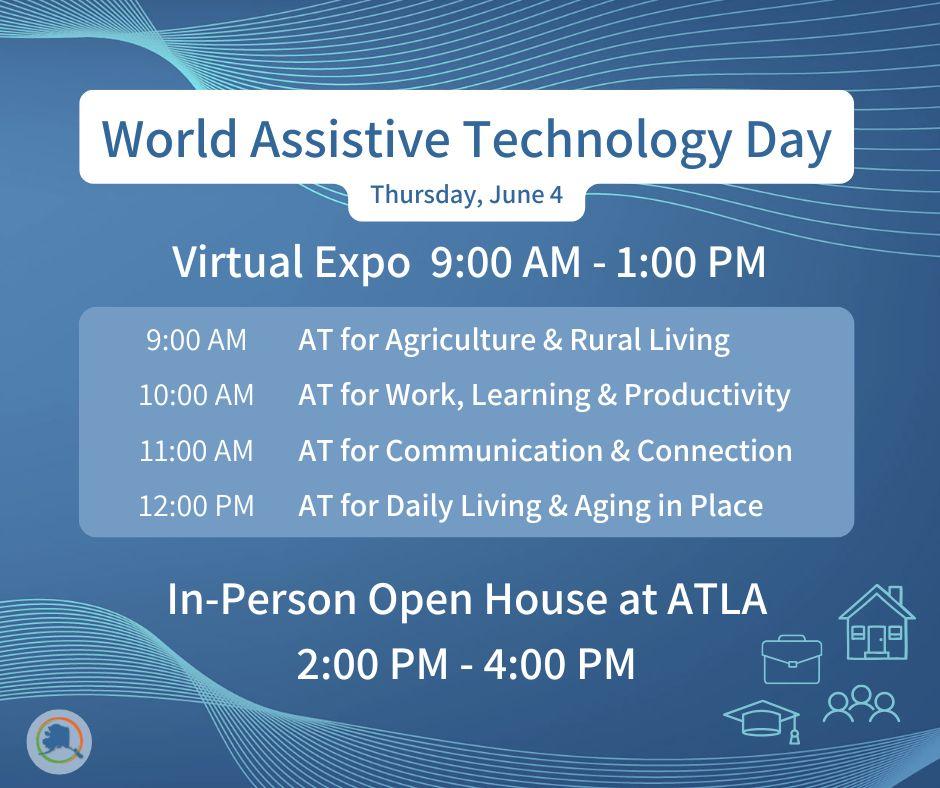
Join us on Thursday, June 4, for a full day of learning, exploration, and connection in celebration of World Assistive Technology Awareness Day.
We’re hosting a free virtual expo from 9:00 AM – 1:00 PM, followed by an in-person open house from 2:00 PM – 4:00 PM at our Demonstration Center.
| | This year’s theme, AT Everywhere: Supporting Independence in Every Environment, highlights how assistive technology (AT) can support everyday life, at home, at work, in school, and out in the community. From rural living to staying connected, AT offers practical solutions that help people maintain independence in ways that work for them. |
- 9:00 – 10:00 AM | AT for Agriculture & Rural Living
- 10:00 – 11:00 AM | AT for Work, Learning & Productivity
- 11:00 AM – 12:00 PM | AT for Communication & Connection
- 12:00 – 1:00 PM | AT for Daily Living & Aging in Place
Each session features real-life examples from ATLA specialists working with communities across Alaska. You’ll see a range of tools, from simple, low-tech solutions to newer technologies like AI and smart home support.
- Agriculture & Rural Living: Explore tools that support safety and independence in outdoor work, gardening, and homesteading.
- Work, Learning & Productivity: Discover supports for reading, writing, organization, and task management, including emerging AI tools.
- Communication & Connection: Learn about options that support communication in different environments and preferences.
- Daily Living & Aging in Place: See how AT and smart home technology can make everyday routines easier and support safety at home.
The virtual expo is free and open to the public. Registration is required.
If you need accommodations to participate, please let us know during registration. Real-time captioning, interpreting, and materials can be available in advance. We will do our best to meet additional requests.
|
- 2:00 PM – 4:00 PM | Hands-on Exploration at ATLA
After the virtual sessions, stop by ATLA for a hands-on experience from 2:00 – 4:00 PM. Try out AT, ask questions, and connect with our team in a relaxed, welcoming environment. Interpreters will be available.
| | |
Did you know you can use one simple voice command to complete multiple tasks at once? With Amazon Alexa Routines, the number of steps needed to complete everyday tasks is reduced, which can be especially helpful for people with mobility limitations, memory challenges, low vision, or fatigue.
What is a Routine?
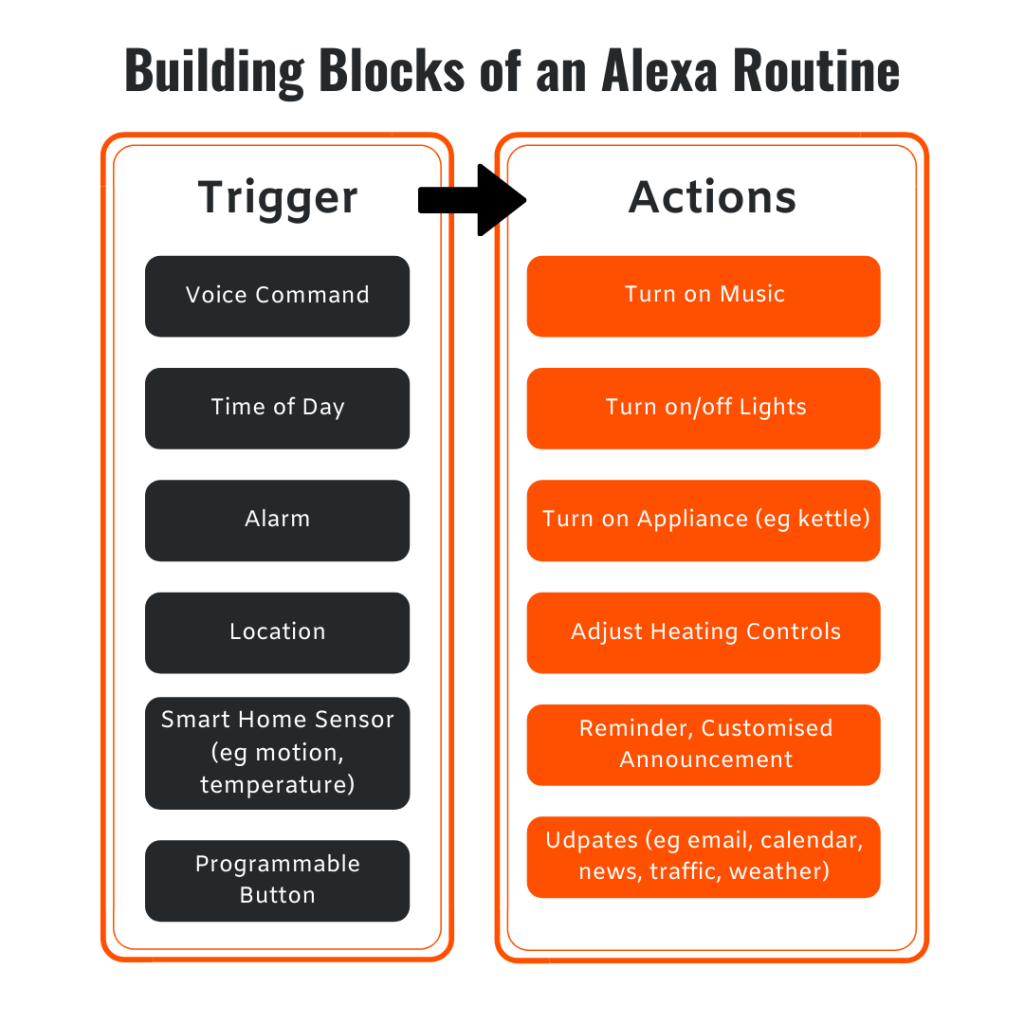
A Routine lets you start a series of actions with a single command, schedule, or event. Instead of doing tasks one at a time, Alexa can do them all for you.
Examples of Helpful Routines:
- “Good Morning” Routine
Turn on lights, hear the weather, review your calendar, and play music or news, all hands-free.
- Medication or Reminder Routine
Set daily reminders with spoken alerts and visual cues (on devices with screens).
- Evening Wind-Down Routine
Dim the lights, lock the doors, lower the blinds, and play calming sounds to prepare for bedtime.
- Leaving Home Routine
Turn off lights, adjust the thermostat, and get reminders for important items like keys or appointments.
For Alexa to control other devices such as lights, locks, blinds, and thermostats, the devices must be smart, compatible, and connected to Alexa.
How to Create a Routine
- Open the Amazon Alexa app on your phone or tablet.
- Tap More (bottom right), then select Routines.
- Tap the + icon in the top right corner.
- Choose a clear, simple name (for example, “Morning Coffee”).
- Select a “trigger” - what will start the Routine:
- Voice: A phrase like “Alexa, start my day.”
- Schedule: A set time or sunrise/sunset
- Smart Home: A device action, like a door opening
- Alarms or Sounds: An alarm dismissal or sounds like a dog barking or a baby crying
- Select an “action” - what Alexa should do. You can add multiple actions, such as:
- Turn lights or devices on/off.
- Say a custom message.
- Play music, news, or radio.
- Add a delay between actions.
- Select which device will run the Routine, then tap Save.
| Check back next month for another simple tech tip that could make a big difference. | | |
Visit the iPad Resource site and find tips, tricks, training videos, website resources, and some of our staff's favorite applications (apps) on this site. If you're not sure what apps are, there's a video for that! The resources are organized by the iPad user's level of beginner, intermediate, and advanced.
We have recently added a support page for troubleshooting common problems iPad users may face.
| | Donate gently used assistive technology devices, and ATLA will provide them to other Alaskans in need at no cost. The donation is 100% tax-deductible and is a great way to give back to the community. Check here monthly for items that may benefit you or someone you know! | | |
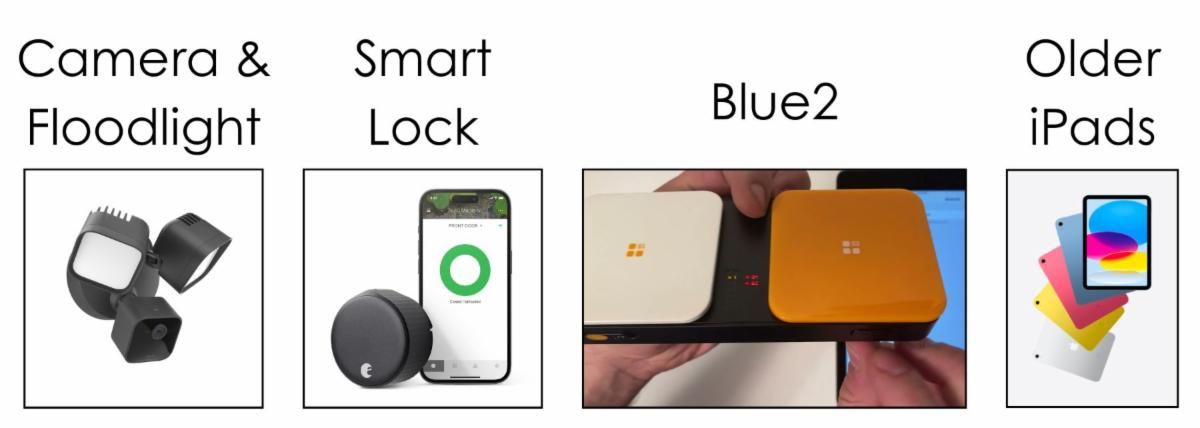
Blink Outdoor + Floodlight Camera (2021)
A wireless outdoor camera with a built-in floodlight that provides motion alerts, live video, and added visibility for safety and home monitoring.
August Wi-Fi Smart Lock (ASL-05)
A keyless smart lock that lets you lock and unlock your door using a phone or voice command, making it easier to manage home access.
AbleNet Blue2 Switch
A wireless switch that connects to phones, tablets, and computers to provide simple, accessible control for apps, communication, and device navigation.
Older iPad Models (cannot update to recent iOS)
Useful for apps that do not require the latest iOS or built-in accessibility features.
| | Please expect contact within 14 business days of the ReUse Request submission. Individuals will be contacted in order of form submission. Please do not call or email staff with item requests. If items are to be shipped to an individual, ATLA will cover the shipping cost up to $20.00. *This form is only a request; equipment is not guaranteed.* | |
Join other people with disabilities, caregivers, parents, and professionals!
Keep up-to-date on the latest assistive technology topics!
| |
iPadⓇ, AppleⓇ , iPhoneⓇ, and iOSⓇ are all trademarks of Apple Inc.
You are receiving this email because of your relationship with or interest in Assistive Technology of Alaska. Should you receive this message by mistake, please click "unsubscribe" below.
| | | | |