Reminder: You will need to use the self-service portal to manage your agency contacts

As the designated admin for your agency, you now have the capability to manage contact information for everyone in the office on the NatGen policy system, natgenagency.com.


This new system tool allows you to view currently active users, add new users, remove inactive users and update contact information for all agency employees who access our policy system - without the need to call National General. 


We recommend familiarizing yourself with the new tool, as our agency services department will no longer accept requests for the following tasks beginning in January:


• Agency address, phone, fax, email update. 

• Contact/producer removal or termination.

• Add new contacts.

• Update information on existing contact record(s).

How to access the self-service portal

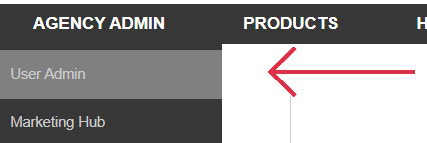
To access this self-service portal, go to the "Agency Admin" tab, then select "User Admin" as shown to the right.


From here, you can add, update and remove Agent, Customer Service Representative, and Owners. As the admin, you can view the User ID for all agency contacts and provide it to a user if they forgot their User ID for natgenagency.com.  

If you need additional assistance, check out our on-demand webinar

Access our on-demand webinar to learn about the new self-service portal by clicking the link below:


We thank you for your cooperation as we continue to make system improvements which enhance security and ease of doing business.

Contact us for assistance

Customer Service

1-877-468-3466

Technical Support

1-888-222-4911

Reach out to your NatGen sales representative to learn more


NatGenAgency.com

NatGen_all_vert_white_rev.png

© 2023 National General, an Allstate company. All Rights Reserved.

Eligibility, discounts and coverages may vary by state. 

Underwritten by member companies of the National General.


View as Webpage