RETAIL PRO USER GUIDES
Retail Pro University is pleased to announce the release of our first Video User Guide.

What is a Video User Guide?

Video User Guides are downloadable PDF documents which link to a set of training videos on Retail Pro TV (RPTV) relevant for a particular role, like POS users, managers, buyers, etc. 

Whereas RPTV videos have historically focused on setup for Retail Pro Prism, the videos linked in these guides explain how to use these features. 

The first release of these Video User Guides is for the Point of Sale user role and will soon be followed by a Video User Guide for the Manager role. 

RETAIL PRO REPORTS
With COVID, retailers are searching for more ways to sell and save, and are turning to their POS data for insight. 

Retail Pro has 2 ways to help you with this: prebuilt reports and custom reports. 

Prebuilt Reports:
To help you find the answers you need daily, you can use the library of prebuilt reports for Retail Pro Prism Reporting. 

These are free to download from the My Retail Pro resource portal if you have an active Software Assurance plan. 

Custom Reports:

For all the new questions that came with COVID, you can leverage Retail Pro Professional Services to get custom reports. 

You can get reports like these below, or you can request specific data fields to report on for your custom questions.
  • Sales Style Best Sell Top 25 
  • Sales Transaction Details
  • Z-out Cash Over Short 
  • Monthly Sales Report by Store
  • Employee Time Clock
  • Price Changes
  • Discount Report 
  • VAT Report 
  • Open PO Report
RETAIL PRO SUPPORT
RetailPRO Updates
Updates may be available for your version. Please click the link below and have our RPRO Team ensure you are on the latest release for your Retail Pro version.

RETAIL PRO PRISM - RETAIL PRO 9 - RETAIL PRO 8
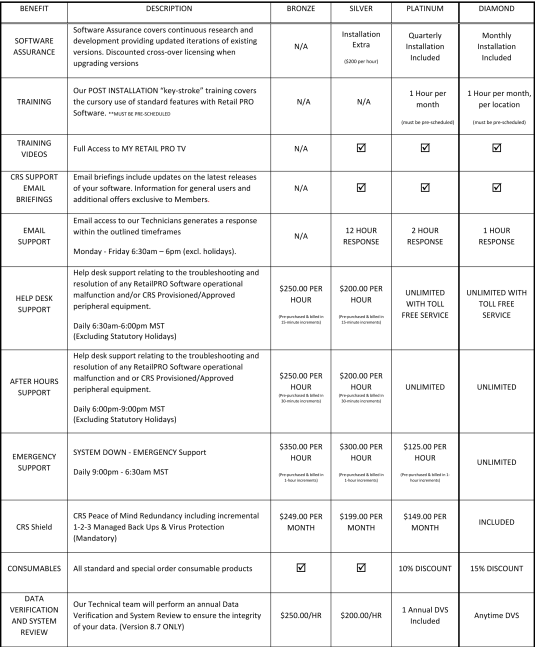
SOFTWARE SUPPORT PLANS
We know that a monthly support package is the best way to make sure you have the support and updates needed to maximize your Software investment.

We have revised our Software Maintenance & Support packages recently to include quarterly updates, Business Continuity, My RetailPRO and User Training each month.

Click below to see a detailed explanation of the support packages available.
MONERIS SUPPORT NOTIFICATION
Dear Merchant,

If your point-of-sale (POS) solution uses an integrated terminal connected to a POS application. The following message is about transaction limits for both contact and contactless INTERAC transactions on said integrated terminals. 

Under INTERAC Debit Regulations, merchants are not permitted to set a per transaction limit on terminals. As a result, we ask that you check with your POS application provider to ensure no transaction size limits are set for INTERAC transactions. 

An altered transaction limit on your POS solution may prevent you from taking advantage of any increased limits for contactless transactions that INTERAC may set in the future. If your POS application has altered the INTERAC transaction limit on any of your terminals, we ask that you contact your POS application provider to ensure they reset the limit as soon as possible. 
Canadian Retail Solutions | 780-449-0070 | support@retailbycrs.com