|
Supply Chain Management News
June 2023
| |
|
Dear Campus Community,
Supply Chain Management (SCM) would like to inform you of important updates and events.
This month's features:
- Bears that Buy Open Office Hours: Here to Make Purchasing BEARable
- Accounts Payable July 2023 training session
- NEW! BearBUY Agreements
- SNEAK PEEK! Guided Dashboards in BearBUY
- COMING SOON! BearBUY 23.2 Upgrade Release
- NEW! Skilled Freelancers through Upwork!
If you have any questions, please contact the BearBUY Help Desk at
510-664-9000 (options 1, 2) or bearbuyhelp@berkeley.edu for immediate assistance.
Thank you for your continued support,
Supply Chain Management
| |
|
|
Bears that Buy Open Office Hours:
Here to Make Purchasing BEARable
| |
|
Please join us at our next remote office hour on Tuesday, July 18, 2023!
Do you need assistance with Purchasing and using BearBUY, or do you have general questions that you would like to ask?
SCM is pleased to announce a new remote open office hour program based on the concept, Bears that Buy Open Office Hours: Here to Make Purchasing BEARable!
Representatives from Supply Chain Management will be on hand to listen to your questions and provide information about purchasing at Berkeley. We encourage you to submit questions in advance on this Google sheet.
The open office hours will be held every 3rd Tuesday of the month from 10:00 a.m. to 10:50 a.m.
Instructions and Zoom URL:
| |
|
Accounts Payable training session on
Tuesday, July 18, 2023, at 10:00 a.m.
| |
|
The Accounts Payable Team is offering a new training session on Tuesday, July 18 at 10 am. This session will cover accounts payable and banking processes, including payment methods, payment channels, and helpful tips. This session will also include information on reimbursement, what is allowable and what is not allowable, common problems, and tips for completing reimbursements. If you previously attended one of the sessions you will automatically receive a meeting invitation to the next one. If you have not received a meeting invitation and want to attend a training session, please contact Accounts Payable at disburse@berkeley.edu and request the meeting information.
| |
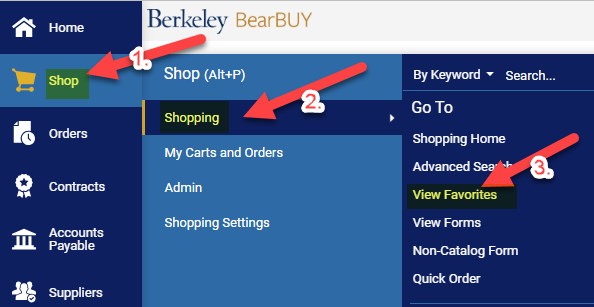
- In the blue vertical menu on the left-hand side of BearBUY, press on Shop-View Favorites:
| |
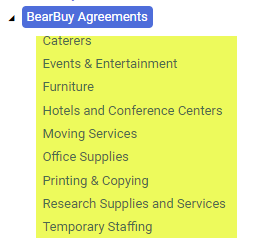
- Scroll down to find “BearBUY Agreements”
- There are 9 sub-categories: Caterers, Events & Entertainment, Furniture, Hotels & Conference Centers, Moving Services, Office Supplies, Printing & Copying, Research Supplies & Services, and Temporary Staffing:
| |
The suppliers in these subcategories are preferred suppliers that do not have a catalog. Each preferred supplier is tied to the correct form for use in BearBUY. | |
SNEAK PEEK! Guided Dashboards in BearBUY | |
|
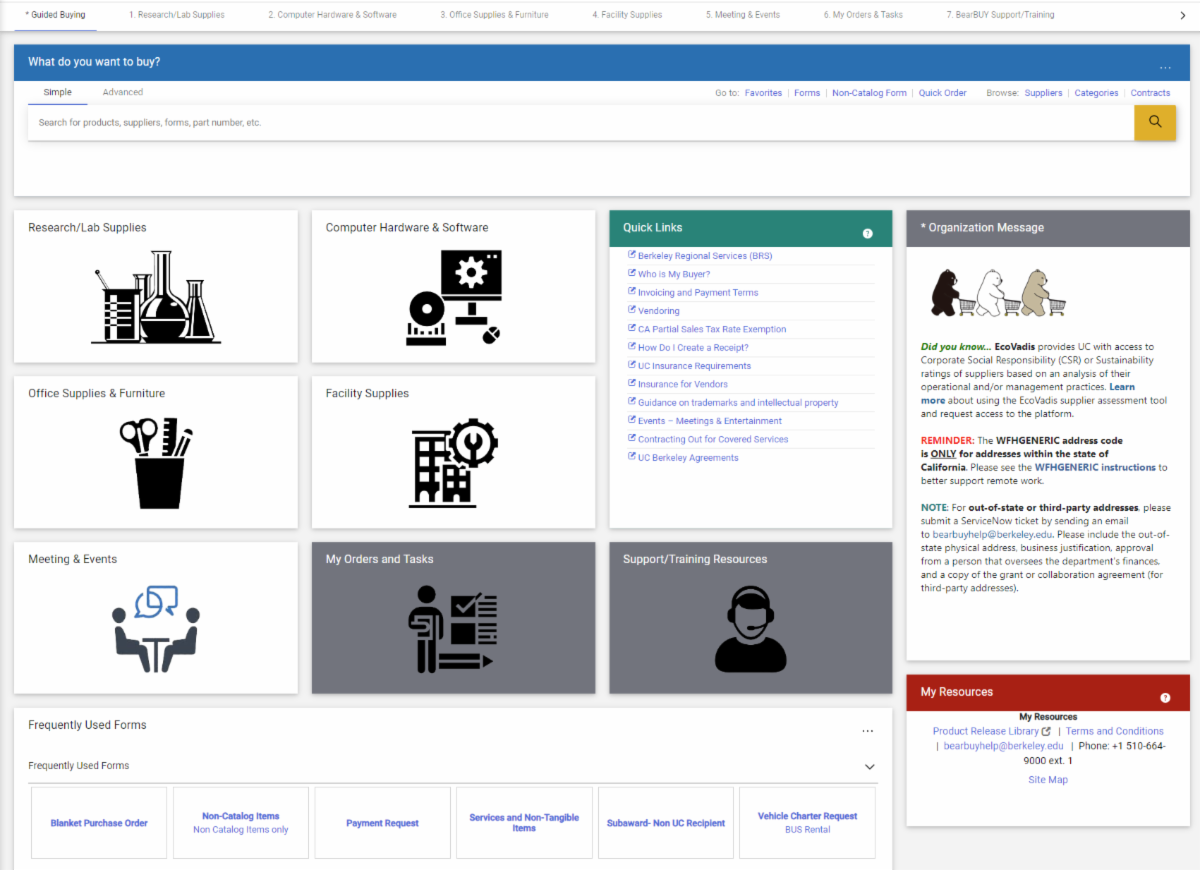
SCM is pleased to share the development of guided dashboards in BearBUY to simplify and maximize your buying experience. The new guided dashboard landing page is intended to be an informative, user-friendly interface for infrequent users. These landing pages are intended to continually evolve in response to campus user feedback so please do not hesitate to share your thoughts via supplychain@berkeley.edu. These dashboards will remain in development for the next 90 days.
| |
|
The guided dashboards will have 3 immediate benefits:
- Provides at-a-glance visibility
- Saves time and resources
- Improves decision-making
There are 5 new guided dashboards: Research/Lab Supplies, Computer Hardware & Software, Office Supplies & Furniture, Facility Supplies, and Meetings & Events. The guided dashboard option allows SCM to focus on each category (i.e. Office Supplies & Furniture) by providing more specialized information like supplier diversity (Small Business First), things you would not find in a catalog or product search, news & announcements, and a list of contacts of preferred suppliers right at your fingertip.
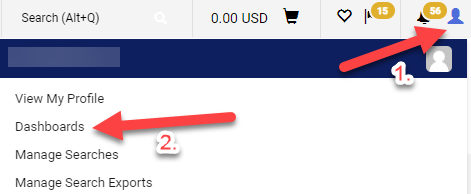
To take a sneak peek of the guided dashboard work-in-progress, press on your avatar in the upper right-hand corner of BearBUY and select “Dashboards” from the drop-down menu:
| |
COMING SOON! BearBUY 23.2 Upgrade Release | |
|
The 23.2 upgrade release in BearBUY will go live on Monday, July 17, 2023.
Release notes and any revised job aids will be sent to the BearBUY community on Friday, July 14, 2023.
| |
NEW! Skilled Freelancers through Upwork! | |
|
SCM is excited to announce the launch of the Upwork Enterprise and UC Berkeley partnership which is now available to use for all employees and faculty! This partnership will give you access to:
- A global talent pool of 20 million freelancers across 10K+ skill sets in over 180 countries.
- Source, engage and pay your global talent workforce in an easy-to-use solution.
- A dedicated program team that can set up your projects and guide you through future engagements.
- Work classification and work protection services for your projects to ensure you are compliant with labor laws.
- Paying your existing talent that you are working with today through Upwork’s Bring Your Own Talent solution.
The Upwork team is more than happy to come to your team meetings or meet 1-on-1 for a demo or to help you get started on your projects. You can learn more about Upwork through our Upwork website or reach out to our dedicated Upwork team to help get your project started at ucberkeley-programteam@upwork.com.
| |
Order Status
Please note that your SCM assigned Buyer will not receive the requisition until it has been approved by the department Org Node approver.
| |
Expediting an Order
If an order warrants expedited handling, please change the priority on the requisition to "Urgent". If you have already submitted the requisition, please contact your assigned Buyer via email and be sure to include the requisition number.
| |
Who is My Department's Assigned Buyer?
If you are unsure of how to start your purchasing transaction, contact your Buyer for assistance by using your Org Node and Department Name to find your assigned Buyer located in this matrix.
| |
Splitting Chart of Accounts (COA) At Header Level Vs. Line Level
Splitting COA at the Header Level will apply the split to all lines on the PO.
Splitting COA by Line Level allows you to customize COA percentage allocated to that specific line.
BEST PRACTICE for Subawards
-
Line 2 should always be set at the Header Level Chartstring using Account Code 57810.
-
Line 1 should be overridden at the Line Level Chartstring using Account Code 57811.
| |
SCM Service Level Turnaround Times
Urgent requests will be handled on a first-in-first-out basis. Standard turnaround time (Service Level Agreements) for purchase and contract types are available on our Service Level web page.
Please be aware that contract negotiations with suppliers may cause delays.
| |
Ship To Address vs Final Destination
A Ship To Address is the address that is sent to the supplier. When the supplier is delivering items, they will deliver to the ship to address (which is also visible on the PO they receive).
A Final Destination code is an address only associated to UC Berkeley. Final destination code are used when departments have a central receiving location. The ship to address is the central receiving facility. When the packages are received, the department central receiver looks the PO up in BearBUY and looks for the final destination code. The final destination code is then the office/room number of where shopper needs the items. Final destination codes are never sent to the supplier and are NOT reflected anywhere on the PO.
| |
Below are links to the BearBUY homepage, instructional aids, training courses, and information on how to create Service Now tickets for BearBUY related issues.
| |
Whether you are an experienced or a new BearBUY shopper, it is always best practice to take the BearBUY: Basics for Shoppers training if you haven't already.
To take this ESSENTIAL training, please click on this course #: BEESS950-Online
| | | | |