|
Supply Chain Management News
June 2026
| | |
Dear Campus Community,
Supply Chain Management (SCM) has important updates and upcoming events to share with you.
This month's features:
- Department Name Change
- BearBUY Chatbot (Jaggaer Assist)
- Coming Soon: BearBUY 26.2 Upgrade Release
- Reminder: Tango Gift Card
- Reminder: Bears that Buy Open Office Hours
If you have any questions, don't hesitate to contact the BearBUY Help Desk at 510-664-9000 (options 1, 2) or bearbuyhelp@berkeley.edu for immediate assistance.
Go Bears!
Thank you for your continued support,
Supply Chain Management
| | | |
Effective May 1, 2026, the Office of Business Contracts and Brand Protection (BCBP) will become the Business Contracts Office (BCO).
During this transition period we will make every effort to promptly assign and process new matters, but please be patient as we will be short-staffed in the near term as we work to backfill the position.
Also please note that when UCOP implements a new system-wide contract lifecycle management (CLM) system, we will be shifting our workflow and processes as we transition from BCMS.
| | BearBUY Chatbot (Jaggaer Assist) | | |
Get Answers Faster with Jaggaer Assist — Now Live in BearBUY!
Need help with BearBUY? Jaggaer Assist is now available and ready to provide instant support whenever you need it. Designed to deliver fast, accurate answers to common BearBUY questions, Assist helps you find information quickly, complete tasks more efficiently, and navigate the system with confidence.
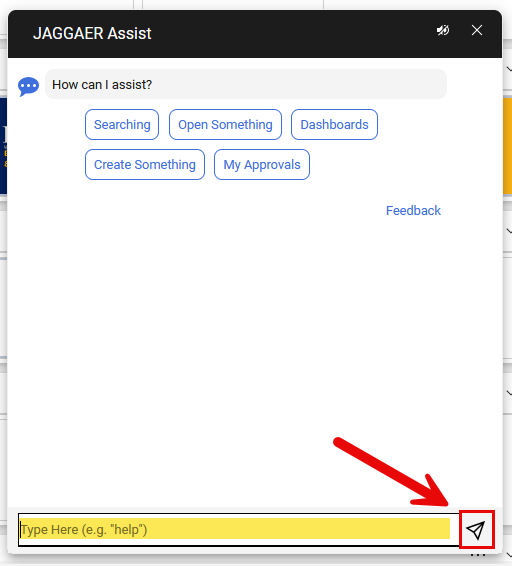
| | | | To begin, select the Assist icon located in the lower-right corner of BearBUY. | | | |
Enter your question in the field at the bottom of the pop-up window and click the arrow icon to submit.
Assist is designed to interpret natural-language questions and provide clear, conversational responses. Users are not required to use specific keywords or phrasing to receive relevant guidance.
| | | |
Ask Questions Naturally:
No special commands, keywords, or technical phrasing required. Simply ask your question the way you normally would, and Assist will provide clear, conversational guidance tailored to your needs
Support That Works the Way You Do:
Assist understands everyday language, making it easier than ever to access helpful information without the guesswork. Whether you're looking for instructions, troubleshooting guidance, or answers to common questions, help is just a question away.
Help Us Make Assist Even Better:
We're committed to continuously improving the BearBUY experience, and your feedback plays a vital role. After using Assist, please take a moment to share your thoughts through our Google Form. Your insights will help shape future enhancements and ensure Assist continues to meet the needs of our community.
Bonus Incentive:
As a thank-you for your feedback, participants who submit the form will be entered into a raffle for a Tango Gift Card!
Try Jaggaer Assist today and discover a faster, smarter way to get the support you need in BearBUY.
| | |
Coming Soon: Scheduled
BearBUY 26.2 Upgrade Release
| | | |
As part of the Jaggaer 26.2 upgrade, BearBUY will be unavailable starting next month from Friday, July 17, 2026, at 5:00 p.m. PST to Sunday, July 19, 2026, at 9:00 a.m. PST.
The 26.2 upgrade release in BearBUY will go live on Monday, July 20, 2026.
Documentation of new features and changes can be found on the BearBUY New Features webpage.
| | |
In February 2025, SCM launched the digital reward links with Tango, a BHN company, that may be used for either allowable gift and recognition programs or research participation incentives.
Reminder:
Campaign field and Shipping Information:
-
Limited to ONLY alphanumeric characters (i.e., a, b, c, A, B, C, 1, 2, 3) and spaces (no underscore).
-
Do NOT include any symbols and/or special characters (`, ~, !, @, #, $, %, ^, &, *, (, ), -, _, +, =, {, }, [, ], |, \, :, ;, “, ‘, <, >, ., ?, /, or comma).
How to Check if Tango Processed My Digital Gift Card Order?
- If your Tango purchase order has been successfully received and processed, an invoice should be generated within 24 hours against the purchase order.
What to do if Recipient(s) Did Not Receive Reward (Gift Card) Link?
-
Before contacting support, please have the recipient(s) check their Spam and Deleted (Trash) folders. The reward email will be sent from "noreply@tangocard.com."
-
If the recipient(s) have confirmed that the email is not in those folders, please send a message to bearbuyhelp@berkeley.edu.
Please review the updated Tango Gift Cards job aid to explore improved methods for navigating the Tango punchout catalog.
| | | | |
Bears that Buy Open Office Hours:
Here to Make Purchasing BEARable
| | | |
Please join us for our next remote office hour tomorrow, Tuesday, June 16, 2026, from 10:00 a.m. to 10:50 a.m.
We encourage you to submit topics of discussion and/or questions in advance using this Google form.
Representatives from the Procurement, BearBUY Solutions, Account Payable, and BRS teams will be available to answer your questions and provide information about purchasing at the University of California, Berkeley. Open Office Hours will be held on the third Tuesday of each month from 10:00 a.m. to 10:50 a.m.
Instructions and Zoom URL:
| | |
Order Status
If you need assistance with determining the status of your order in BearBUY, visit the How to Find the Status of Your Order page on the SCM website.
Please note that your SCM assigned Buyer will not receive the requisition until it has been approved by the department Org Node approver.
| | |
Who is My Department's Assigned Buyer?
If you are unsure of how to start your purchasing transaction, contact your Buyer for assistance by using your Org Node and Department Name to find your assigned Buyer located in this matrix.
| | |
Contracts in BearBUY
If you need help searching for a contract and applying it to your cart in BearBUY, please view the Searching for Contracts and Applying a Contract to Your Cart in BearBUY job aid.
| |
SCM Service Level Turnaround Times
Urgent requests will be handled on a first-in-first-out basis. Standard turnaround time (Service Level Agreements) for purchase and contract types are available on our Service Level web page.
Please be aware that contract negotiations with suppliers may cause delays.
| |
Below are links to the BearBUY homepage, instructional aids, training courses, and information on how to create Service Now tickets for BearBUY related issues.
| | |
Whether you are an experienced or a new BearBUY shopper, it is always best practice to take the BearBUY: Basics for Shoppers training if you haven't already.
To take this ESSENTIAL training, please click on this course #: BEESS950-Online.
| | | | |