October 20, 2025

Supply Chain Management News

October 2025

Dear Campus Community,


Supply Chain Management (SCM) has important updates and upcoming events to share with you.


This month's features:  


  • BearBUY Enhancements
  • Bears that Buy Open Office Hours
  • Fourth Street Moving Sale
  • Inactivate BFS G/L Account Codes in BearBUY Only
  • Scheduled BFS Maintenance
  • 3rd Annual Sustainable Travel Virtual Event
  • Bill-To Address Update
  • Supply Chain Management Moved


If you have any questions, don't hesitate to contact the BearBUY Help Desk at 510-664-9000 (options 1, 2) or bearbuyhelp@berkeley.edu for immediate assistance.


Go Bears!


Thank you for your continued support, 

Supply Chain Management

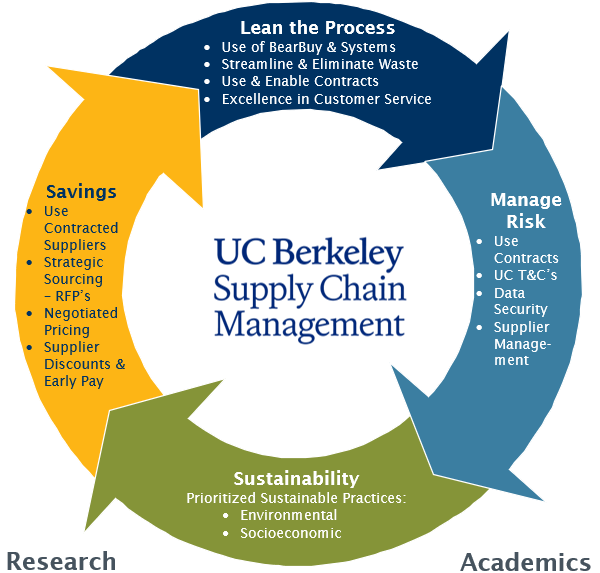
Procurement Life Cycle
UC Berkeley BearBUY Logo

BearBUY Enhancements

We're excited to announce that the BearBUY enhancements are here!


These improvements include in-app guidance with walk-throughs and hover-over text, providing you with on-demand help to simplify navigation and streamline your purchasing process. You will also see pop-up messages and notifications to keep you informed about system changes and new features.


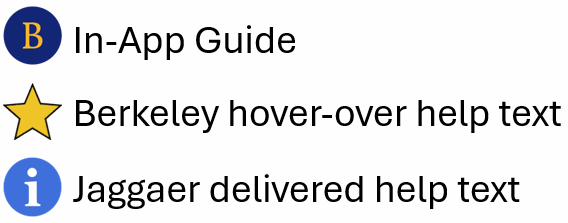
The following is the icon legend:

BearBUY Icon Legend

TIP: The placement of icons may shift due to your screen size.


----------


Effective today, Monday, October 20, 2025, the “Non-Catalog Items Form” guide is now available in BearBUY. This guide provides step-by-step instructions for accurately completing and adding the Non-Catalog Items form to your active cart in BearBUY.

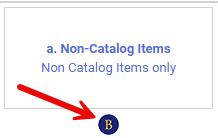
Non-Catalog Items Form Guide Icon

In the coming weeks, we will launch the “How to Set Your Defaults in BearBUY” guide, which provides step-by-step instructions for setting basic defaults in your BearBUY profile. Additional guides and helpful resources will be added continuously throughout the fall to further enhance your experience.

Bears that Buy Open Office Hours:

Here to Make Purchasing BEARable

Please join us for our next remote office hour tomorrow, Tuesday, October 20, 2025, from 10:00 a.m. to 10:50 a.m. We will be giving a demo of the two new BearBUY guides we have created to enhance your experience and provide in-app help.


We encourage you to submit topics of discussion and/or questions in advance using this Google form.


Individuals from the Procurement, BearBUY Solutions, Account Payable, and BRS teams will be present to address your questions and provide information about purchasing at the University of California, Berkeley. The Open Office Hours will be held every third Tuesday of the month from 10:00 to 10:50 a.m.


Instructions and Zoom URL:

Fourth Street Moving Sale

On October 21-22, 2025, from 8:30 a.m. to 3:00 p.m., Excess & Surplus is inviting the campus community to an on-site sale of furniture and other items at 1608 Fourth Street, Berkeley, CA 94710.


The sale will also be open to the general public:

October 23-24, 2025, from 8:00 a.m. to 3:00 p.m.

October 25, 2025, from 8:30 a.m. to 12:30 p.m.


Items for sale: 

  • Chairs (ergo, conference room, stacking, bar height, etc.)
  • Couches
  • Whiteboards
  • Tables
  • Coffee tables
  • Desks
  • FIle cabinets
  • Storage cabinets
  • Computers/laptops
  • Office supplies
  • And more...


Payment:

  • Campus departments can pay with a valid chartstring using an IOC form. 
  • Private sales can be paid with Visa, MasterCard, Discover, American Express, and Debit Cards only. No cash.


Pick up/Delivery:

  • Moving Services can facilitate campus deliveries. 
  • Private sales MUST be removed by the buyer on the day of purchase. 


Please email ucsurplus@berkeley.edu for questions. 


Looking forward to seeing you at our big sale!

Inactive BFS G/L Account Codes in BearBUY Only

As part of an ongoing effort to streamline Berkeley's Chart of Accounts and enhance financial reporting and data integrity, General Accounting is simplifying non-capital expense accounts by retiring several general ledger accounts.


The retired Account codes will no longer be selectable in BearBUY, effective Friday, October 24, 2025, EOD for new Shopping Carts, Purchase Requests, or Change Order Requests. New Invoices against existing purchase orders will be processed until General Accounting issues an effective end date for these account codes. Purchase Requests currently in workflow can be completed. BearBUY administration strongly encourages campus shoppers and approvers to stop using the account codes listed below starting today, Monday, October 20, 2025, to ensure the best end-user experiences and facilitate future change orders and invoices.

Please see the accounts to be inactivated and the account code that should be used instead:


Equipment accounts to be inactivated:

55303: Non-inv Sport Goods - DO NOT USE

55309: Non-inv Equip-<$200 - DO NOT USE

55313: Non-inv Equip-<$200 - DO NOT USE

55323: Sport Goods/Equip - DO NOT USE

55329: Equip-Other =>$1.5K - DO NOT USE

55399: Non Capital Equip - DO NOT USE

** Please use 55319 Equipment<$5K per Item instead of the above accounts.


Computer equipment accounts to be inactivated:

55201: Non-inv-Comp<$200 - DO NOT USE

55211: Equip-Comp=>$200 - DO NOT USE

** Please use 55221 Computer Equip <$5K per Item instead of the above accounts.


Fabrication accounts to be inactivated:

55311: Fab Equip=>$200 - DO NOT USE

55321: Fab Equip =>$1.5K - DO NOT USE

** Please use 55301 Non-inv Fabricated Costs<$5K instead of the above accounts.


Furniture accounts to be inactivated:

55302: Non-Inv Furniture - DO NOT USE

55322: Office Furniture - DO NOT USE

** Please use 55312 Office Furniture<$5K per Item instead of the above accounts.


Special Collection account to be inactivated:

55324: SpecialColl=>$1,500 - DO NOT USE

** Please use 55314 Special Collections<$5K instead of the above accounts.


Action Required

  • Immediately cease using these G/L codes for all purchase requisitions, expense reports, journal entries, and any other financial documentation.
  • If you have any questions, please contact gao@berkeley.edu.

Scheduled BFS Maintenance

The BFS system will perform maintenance on Friday, October 31, 2025, from 6:00 a.m. to 7:00 p.m. PST. BearBUY will be unavailable during this maintenance period.


After the maintenance, please delete your browser cache, close all your browsers/tabs, and open a new window before you log in to BFS.


Please prepare for planned system downtimes and visit the Controller’s Office website for the 2025 BFS maintenance schedule.

3rd Annual Sustainable Travel Virtual Event

The Third Annual Sustainable Travel Event will be held virtually on Thursday, November 6, 2025, from 11:00 a.m. to 2:00 p.m.


Join the UC Berkeley Travel Team, Campus Sustainability Office, and the Central Travel Office at UCOP as we explore innovative and sustainable business travel options, including ways to reduce our travel-related carbon footprint. This year, we're excited to host the event online! Going virtual eliminates travel emissions for presenters and attendees, making it easier for more people to participate, including guests from additional UC campuses. The agenda will include presentations and panel discussions featuring representatives from various travel companies and their sustainability initiatives, along with practical steps individuals can take to make more sustainable travel choices.


Please visit the Sustainable Travel Event website for more information, including registration.


Please contact the Travel Team with any questions at travel@berkeley.edu.

Bill-To Address Changed in BearBUY Purchase Orders (POs)

Effective Friday, November 7, 2025, UC Berkeley’s Accounts Payable Department will update the University’s billing address. As a result, the Bill-To address on BearBUY purchase orders will be updated as follows:


Paper invoices sent to UC Berkeley will be rejected.

Submit invoices via an approved electronic method.

If you need to set up your electronic method, go here: https://controller.berkeley.edu/invoicing

Accounts Payable

University of California, Berkeley

3200 Regatta Blvd, Suite E

Richmond, CA 94804

United States


All catalog suppliers were given a 30-day notice before this billing address update. No disruption to the export of purchase orders is expected. In the weeks following the update, we will follow up with each catalog supplier to confirm receipt of our purchase orders.

Supply Chain Management Moved

Effective November 1, 2025, Supply Chain Management has moved out of the Fourth Street Building. The following is our new address:


Supply Chain Management, MC: 7600

2850 Telegraph Avenue, Suite 335A

Berkeley, CA 94720-7600

Helpful Hints

Order Status


If you need assistance with determining the status of your order in BearBUY, visit the How to Find the Status of Your Order page on the SCM website. 


Please note that your SCM assigned Buyer will not receive the requisition until it has been approved by the department Org Node approver.

Who is My Department's Assigned Buyer?


If you are unsure of how to start your purchasing transaction, contact your Buyer for assistance by using your Org Node and Department Name to find your assigned Buyer located in this matrix.


Contracts in BearBUY


If you need help searching for a contract and applying it to your cart in BearBUY, please view the Searching for Contracts and Applying a Contract to Your Cart in BearBUY job aid.

Splitting Chart of Accounts (COA) At Header Level Vs. Line Level

Splitting COA at the Header Level will apply the split to all lines on the PO. 

Splitting COA by Line Level allows you to customize COA percentage allocated to that specific line.

BEST PRACTICE for Subawards
  • Line 2 should always be set at the Header Level Chartstring using Account Code 57810.
  • Line 1 should be overridden at the Line Level Chartstring using Account Code 57811.

For any questions on how to split a COA, please contact your regional purchasing team: https://regionalservices.berkeley.edu/home.
SCM Service Level Turnaround Times

Urgent requests will be handled on a first-in-first-out basis. Standard turnaround time (Service Level Agreements) for purchase and contract types are available on our Service Level web page. 

Please be aware that contract negotiations with suppliers may cause delays.
Ship To Address vs Final Destination

A Ship To Address is the address that is sent to the supplier. When the supplier is delivering items, they will deliver to the ship to address (which is also visible on the PO they receive).

A Final Destination code is an address only associated to UC Berkeley. Final destination code are used when departments have a central receiving location. The ship to address is the central receiving facility. When the packages are received, the department central receiver looks the PO up in BearBUY and looks for the final destination code. The final destination code is then the office/room number of where shopper needs the items. Final destination codes are never sent to the supplier and are NOT reflected anywhere on the PO.  

BearBUY Resources

Below are links to the BearBUY homepage, instructional aids, training courses, and information on how to create Service Now tickets for BearBUY related issues. 

Whether you are an experienced or a new BearBUY shopper, it is always best practice to take the BearBUY: Basics for Shoppers training if you haven't already.


To take this ESSENTIAL training, please click on this course #: BEESS950-Online.