Top Topic: Recognize Excellence

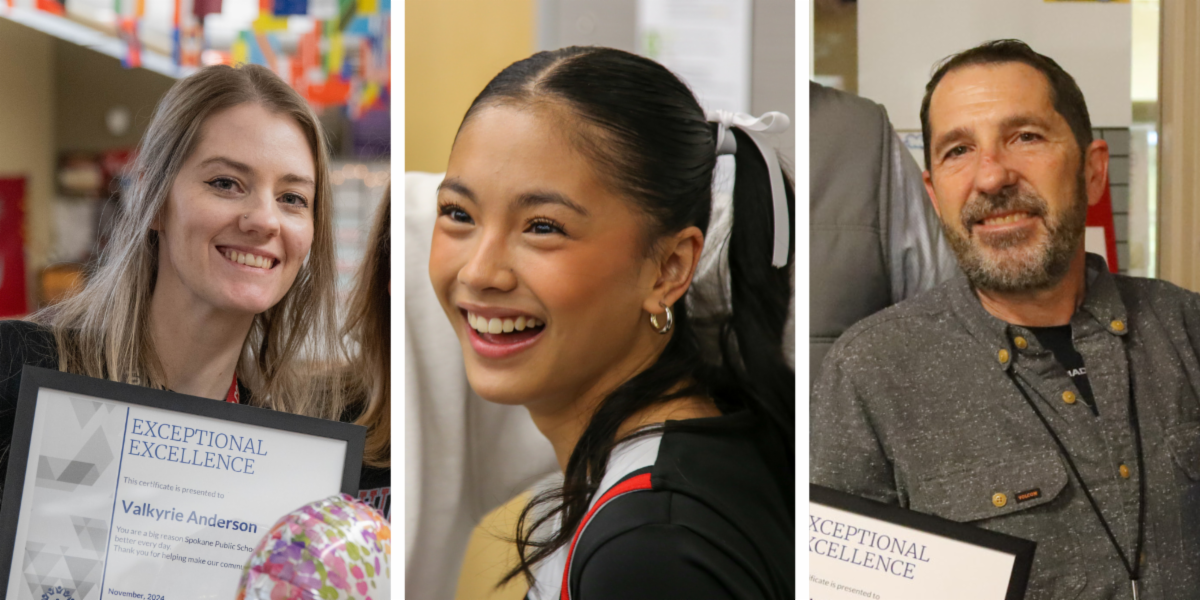
Collage of three smiling people with awards.

With half the school year behind us, take a moment to reflect on the individuals in your school who have made a big impact and submit a nomination for our Excellence Awards!


We’re seeking nominations for the following categories:


We also encourage you to invite your community to submit nominations in staff and family newsletters and on social media – a pre-written post is in the SPS Content Library on Class Intercom!


If your nomination is chosen, the SPS Comms team will coordinate with your school to arrange a surprise announcement for the winner with photos, video and happy tears* – all of which can be featured in your newsletters, social media and website!


*Happy tears not guaranteed

Got Content?

Illustration of a calendar with one day checked.

Struggling to come up with content for your website, social media and newsletter? Here are a few upcoming events that may be relevant in your school communities. Share them in a way that highlights the unique people and learning opportunities at your school!


  • January: National Mentoring Month
  • Jan. 1: 2025-26 Registration opens
  • Jan. 16: Temperance & Good Citizenship Day
  • Jan. 16 & 17: Elementary Conferences
  • Jan. 20: Martin Luther King Jr. Day
  • Jan. 31: Semester Break
  • February: African American History Month
  • February: Career & Technical Education Month
  • Feb. 3-7: National School Counseling Week


As you may have noticed, February is Career and Technical Education Month, a great time to draw attention to all the classes, clubs and other academic programs your school offers students interested in exploring their CTE pathways. For ideas, navigate to the SPS Facebook and search "CTE Month" to see a range of ways we've celebrated in past years.


And if your school is doing something out of the ordinary to recognize these events or if you have other special stories to tell, send us your BIG NEWS!


Want more ideas? Check out 105 Social Media Prompts or reach out to one of the experts below for support!

Social Media

Let's Talk

Theresa Tanner

509-354-5932

Trish Gray

509-354-7340

Story Ideas and Media Requests

E-Newsletters and Thrillshare

Ryan Lancaster

509-354-7363

Kevin Dudley

509-354-7348

Top Tips: Social Media


Class Intercom Updates

You may have noticed some changes in Class Intercom recently. They have introduced a new feature, Tasks, and redesigned their dashboard. 


Check out this Tasks Video Walk-through to learn more about how Tasks can help you assign responsibilities to other members of your Class Intercom team.

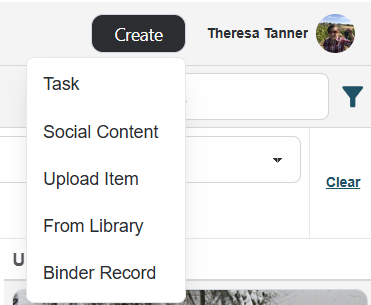
Screenshot of Class Intercom Create button dropdown

They have also changed their Top Menu items. Select the “Create” button to open a drop-down with options. To create a post, select “Social Content.” To find a post in the Content libraries, select “From Libraries.”


Please contact Theresa Tanner if you have questions.

Top Tips: Let's Talk

Check Let's Talk Daily

Looking for a New Year’s Resolution? Make it your goal to log in to Let’s Talk at least once a day to address any dialogues that have been assigned to you.


Our goal is to respond within 2 working days. By checking daily, you can determine if you need to respond, reassign, or seek support from other staff in a timely manner. Even if you are not able to fully respond, please send an "In progress" update to the customer to let them know their dialogue has been received and you are working to address their message. 


If you have questions about using Let's Talk or making adjustments to your Let's Talk team, please contact Trish Gray.

Top Tips: E-Newsletters

Check Your Open Rate

Sending a parent or staff newsletter is great, but if it’s not reaching enough of your audience, you may need to change your approach to have the biggest impact. One way to see whether your newsletters are reaching enough people is by checking your open rate.


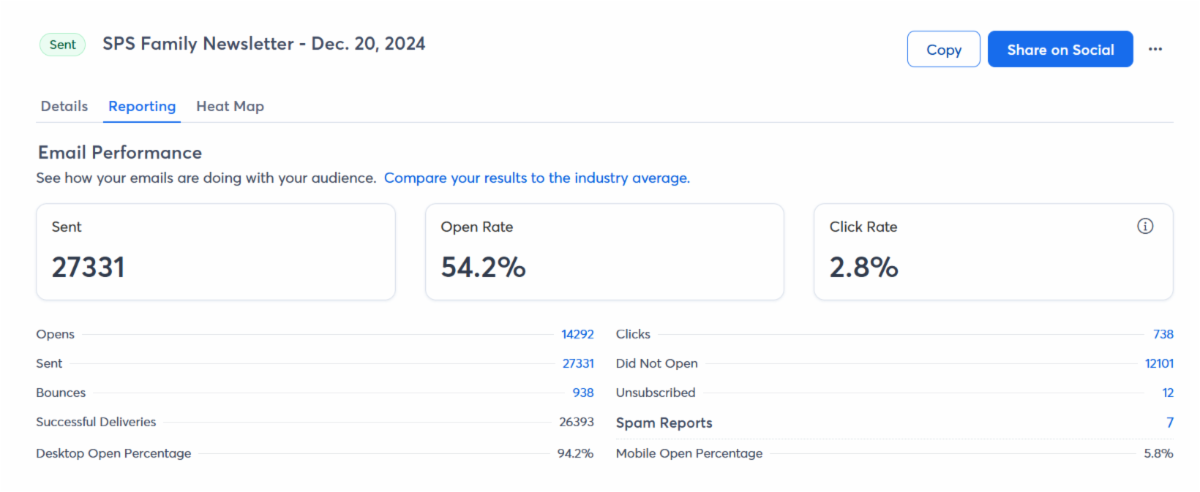
To find your open rate in Constant Contact, navigate to Sent Newsletters and click on the title. From there, you can see all sorts of stats. The open rate is front and center:

Screenshot of Constant Contact Open Rates dashboard

We recommend waiting at least 48 hours after sending your newsletter to check your open rate.


A good open rate is up for debate, depending on your audience’s habits, how many people you send to, and what email client your audience uses. If your open rate is more than 40%, you’re doing great! Open rates between 35% and 40% are still solid numbers. Secondary schools that send their newsletters to students might have unique circumstances based on student email use.


If you have concerns about your open rates, consider sending your newsletters on different days or different times. The ultimate goal is to have families engaged and informed. There is no one “right” time and day to send your newsletters. 


Contact Kevin Dudley if you'd like to brainstorm ideas

Top Tips: Thrillshare

Send A Reminder to Families Not Signed Up for Conferences

Elementary conferences are Jan. 16 and 17, and parents started signing up on Monday evening. As we approach Jan. 16, schools can send targeted messages to just those who have not yet signed up for a conference.


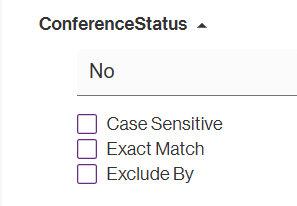
Here's how! In Alerts, navigate to Data Management, then your “[SCHOOL NAME] Guardians” list and use the left sidebar to expand the “ConferenceStatus” filter. Type in “No” and your list will filter just to those who have “No Conference Sign Up” in their record. 

Then, select the “Create List From Filtered” button atop the data list and name your list (we recommend naming it “No Conferences Sign Up – January 2025”). This list will automatically update each night in case you want to send more than one message reminding guardians to sign up for their conference.


Contact Kevin Dudley if you have questions.

Screenshot of Thrillshare ConferenceStatus option

Reminder: Inclement Weather Decisions

We want to make sure that administrators and staff are aware of what messaging to expect from the district if the decision is made to cancel school or delay the start of the school day due to inclement weather.


The Communications Team will:


  • Send an email, text message and a phone call to all parent/guardians and staff with the information by 6 a.m.
  • Add the announcement to the district homepage and every school homepage
  • Post the announcement on the district’s Facebook page and every school Facebook page
  • Notify local media


Please make sure you are familiar with our Inclement Weather Procedures if you receive questions from families. 


If you have questions or concerns, please contact Ryan Lancaster. 

Training & Resources

Training videos and documents, archives of these newsletters, and more useful resources can be found on the Staff website.

Communications Resources

Know someone else who could benefit from this information? FORWARD this email, or request that they be added to our mailing list.

Add to Mailing List
 
Facebook  Instagram  LinkedIn  X  YouTube
SPS Website