Binswanger + Salesforce

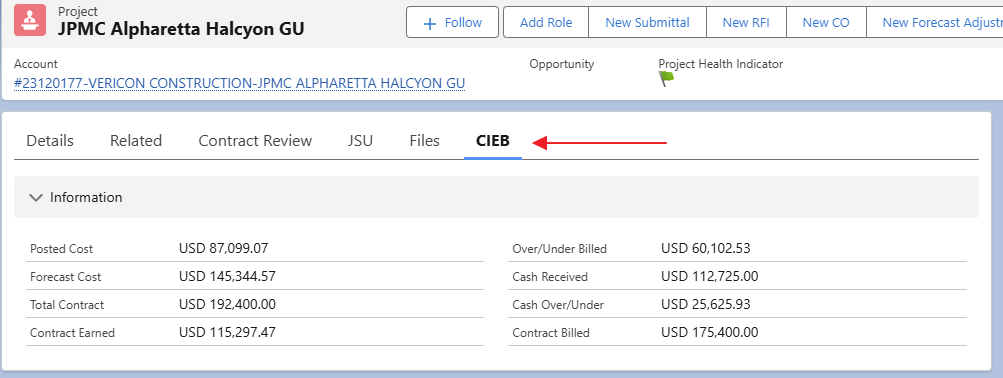
Project managers can now view the Cost in Excess of Billing (CIEB) directly within Salesforce. Simply click on the CIEB option within your project to access it. Here’s a quick guide to each field in CIEB and what it means:

  • Posted Cost: Total cost posted to the job.
  • Forecast Cost: Total expected cost of the job, calculated as Posted Cost + Estimated Cost to Complete.
  • Total Contract: Initial contract amount adjusted by any change orders.
  • Contract Earned: Revenue recognized based on the percentage of job completion, calculated as Total Contract x (Posted Cost / Forecast Cost).
  • Over/Under Billed: The difference between Contract Billed and Contract Earned.
  • Cash Received: Payments received from the customer.
  • Cash Over/Under: The difference between Cash Received and Posted Cost.
  • Contract Billed: Gross contract billed on the pay application, covering both completed and stored amounts to date.

With these insights, tracking financial metrics and managing project budgets becomes even more straightforward. Take advantage of this new feature to keep your projects financially on track!

DASHBOARD UPDATE

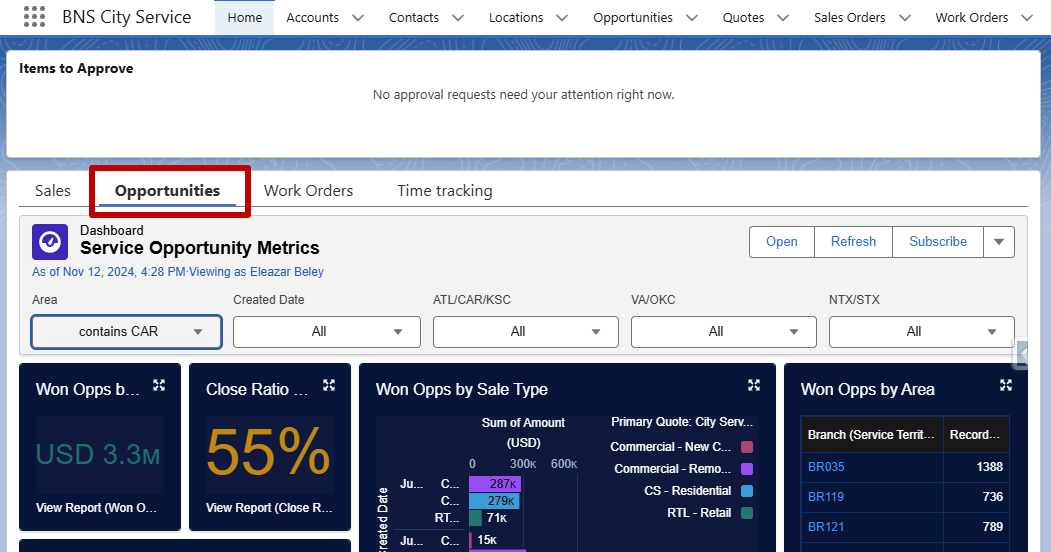
A new dashboard is now available on your home screens, designed to give you greater visibility into the opportunities across your areas and service centers. This tool allows you to easily view what’s in the sales pipeline and identify orders that may need follow-up. To check it out, simply click on the Opportunities tab and use the filters to access your Service Center’s details.

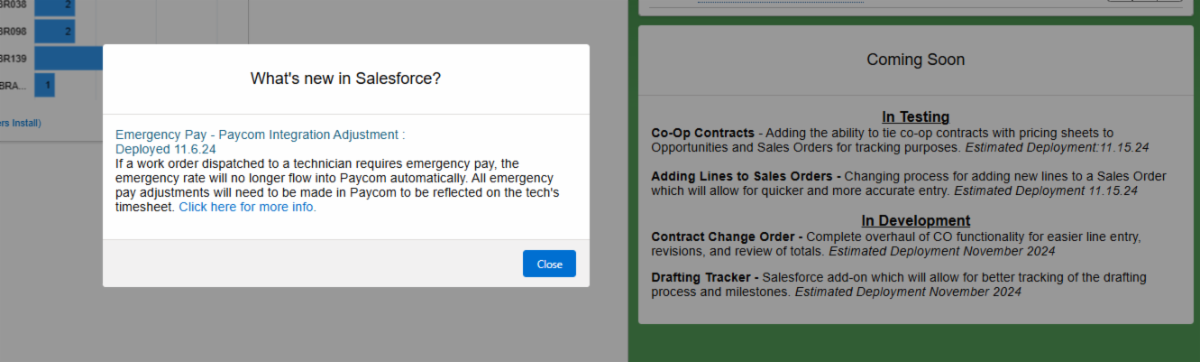
We’ve heard your feedback! Many users have requested an easier way to see updates to the system in Salesforce. Starting this week, you’ll see a pop-up notification upon login highlighting recent changes and improvements. This way, you’ll always know what’s new as soon as it’s implemented.


Additionally, we’re adding a “Coming Soon” section to your Salesforce home screen. This feature will keep you up-to-date on upcoming enhancements, so you can prepare for changes ahead of time. We hope these updates make your Salesforce experience even better!

  • Co-Op Contracts Estimated Deployment Date 11.15.24
  • Change Order Phase I changes Estimated Deployment Date 11.15.24
  • Enhancements for adding parts to a SO after sale Estimated Deployment Date 12.6.24

Field Service on iPad

Our goal is to achieve full adoption of iPads by all technicians at service centers. To support training and help both office and field staff become more familiar with the Field Service application in Salesforce, we’ve created a comprehensive walkthrough video along with supplementary materials. Here are some helpful links for Field Service:

  1. Complete walk-through: https://binswangerglass.screenstepslive.com/a/1888239-video-walk-through-of-field-service-on-the-ipad
  2. View documents attached to orders: https://binswangerglass.screenstepslive.com/a/1888266-viewing-documents-attached-to-orders
  3. Clock-in: https://binswangerglass.screenstepslive.com/a/1811267-how-to-clock-in-daily-punch-in-on-the-mobile-app
  4. All Screensteps for Field Service: https://binswangerglass.screenstepslive.com/m/123241

Dixie, Age 5 1/2

Dixie enjoys the simple things in life like hanging out with her mom, sleeping, and eating. In the summers you can catch her hanging around the back of the boat getting some sun. She loves that you can use the global search bar to search for anything in Salesforce!

To Request Support: Create a ticket at support.binswangerglass.com or send an email to salesforce.support@binswangerglass.com.